AWS offers a huge catalog, and memorizing it is not the same as understanding cloud architecture. A better starting point is to learn a small set of services that cover identity, networking, compute, storage, databases, integration, and operations.
These are the ten I would learn first.
1. AWS Identity and Access Management
IAM controls who can do what. Users, roles, policies, and temporary credentials form the permission layer beneath every workload. Learn least privilege, identity-based policies, resource policies, role assumption, and why applications should use roles instead of long-lived access keys.
2. Amazon VPC
A Virtual Private Cloud provides private address space, subnets, route tables, gateways, network ACLs, and connectivity boundaries. Learn the difference between public and private subnets, how routes create reachability, and how security groups filter traffic at network interfaces.
The public and private subnet diagram is a practical place to trace those decisions.
3. Amazon EC2
EC2 provides virtual machines with a wide range of CPU, memory, storage, network, and accelerator profiles. Learn instance families, AMIs, EBS, security groups, user data, Auto Scaling, purchase options, and the shared responsibility that comes with managing an operating system.
4. Amazon S3
S3 is durable object storage for files, backups, logs, data lakes, static assets, and application objects. Learn buckets and objects, versioning, lifecycle policies, encryption, access points, event notifications, and the distinction between object storage and a mounted filesystem.
5. Amazon RDS and Aurora
RDS manages relational database engines, while Aurora is AWS's cloud-optimized relational engine compatible with MySQL and PostgreSQL. Learn Multi-AZ availability, read replicas, backups, failover, connection management, and why database scaling is different from stateless compute scaling.
6. Amazon DynamoDB
DynamoDB is a managed NoSQL database built for predictable, low-latency access at scale. Start with access patterns, partition keys, sort keys, secondary indexes, on-demand capacity, and hot-partition risks. Good DynamoDB design begins with queries, not with a normalized entity diagram.
7. AWS Lambda
Lambda runs code in response to events without a continuously running server fleet. It fits APIs, automation, stream processing, and asynchronous tasks. Learn timeouts, concurrency, retries, idempotency, cold starts, and when a long-running or consistently busy workload belongs elsewhere.
8. Amazon API Gateway
API Gateway provides managed HTTP, REST, and WebSocket APIs. It handles routing, throttling, validation, authorization integrations, and metrics at the public edge. Pairing API Gateway with Lambda is common, but it can also front other HTTP and AWS service integrations.
9. Elastic Load Balancing
Application Load Balancers route HTTP and HTTPS using Layer 7 information. Network Load Balancers handle high-performance Layer 4 TCP, UDP, and TLS traffic. Load balancers also provide health-aware distribution, which is central to replacing failed targets safely.
10. Amazon CloudWatch
CloudWatch collects metrics, logs, alarms, and dashboards. It is not merely a place to search logs after an incident. Good architecture defines service-level signals, actionable alarms, retention, and a path from symptom to cause.
How these services fit together
A typical request might enter an ALB or API Gateway, reach EC2 or Lambda, read from RDS or DynamoDB, store objects in S3, and emit telemetry to CloudWatch. IAM controls every service-to-service call, while VPC design controls network reachability.
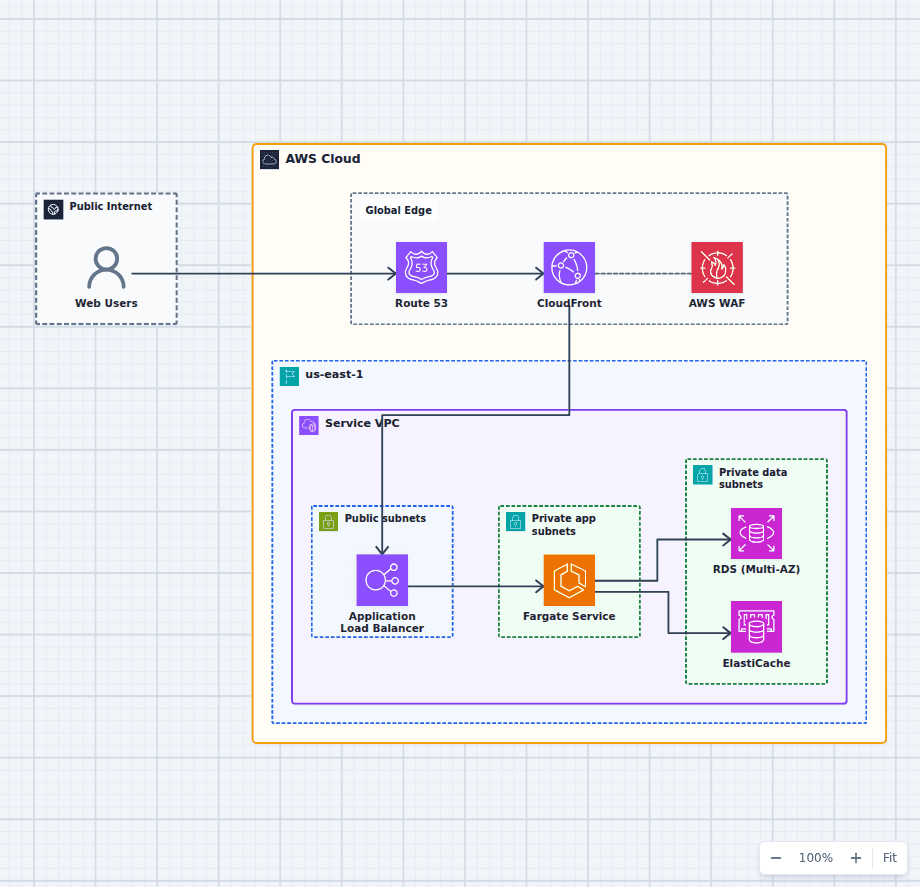
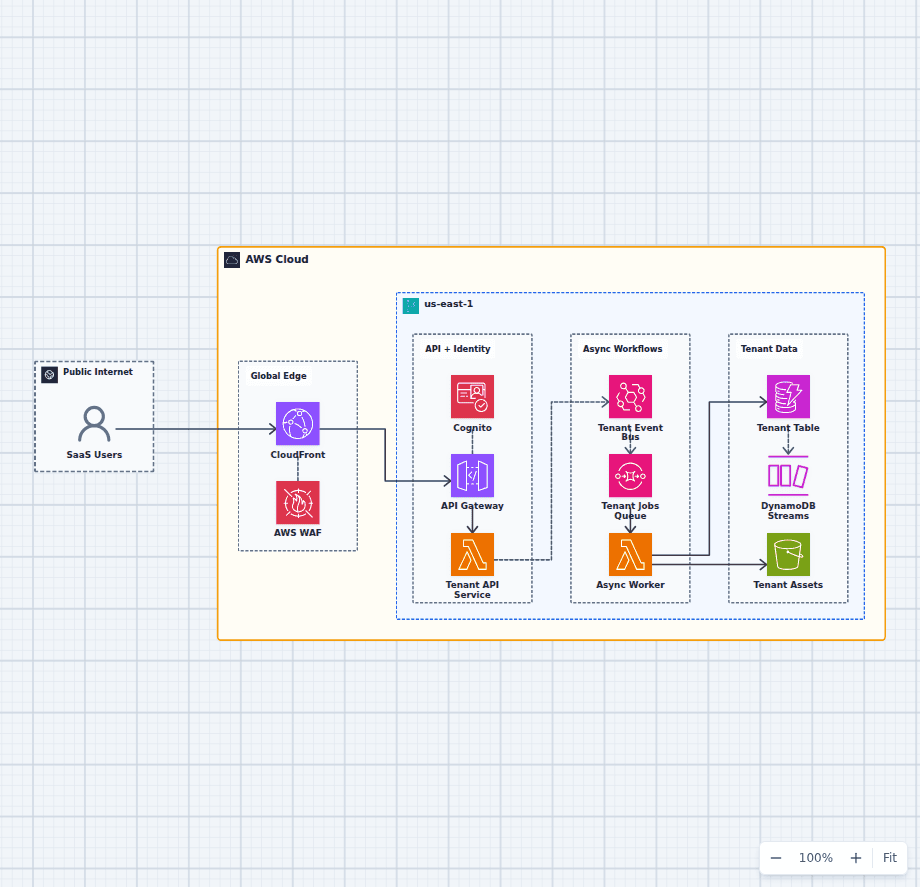
Study complete paths. Open the serverless REST API architecture and explain each hop in plain language. Then compare it with the high-availability web architecture. That exercise teaches more than a stack of service flashcards.
If the workload is a public website, start with Website X-Ray for an outside-in audit, then pair the findings with Website X-Ray's SEO guide for AWS-hosted websites. It connects public crawl, canonical, rendering, and CDN symptoms back to the AWS architecture behind them.