
Public and Private Subnets in an AWS VPC
A simple VPC showing public ingress and egress, private application compute, and an isolated relational database.
Open editable diagramArchitecture diagram
Edit this exact diagram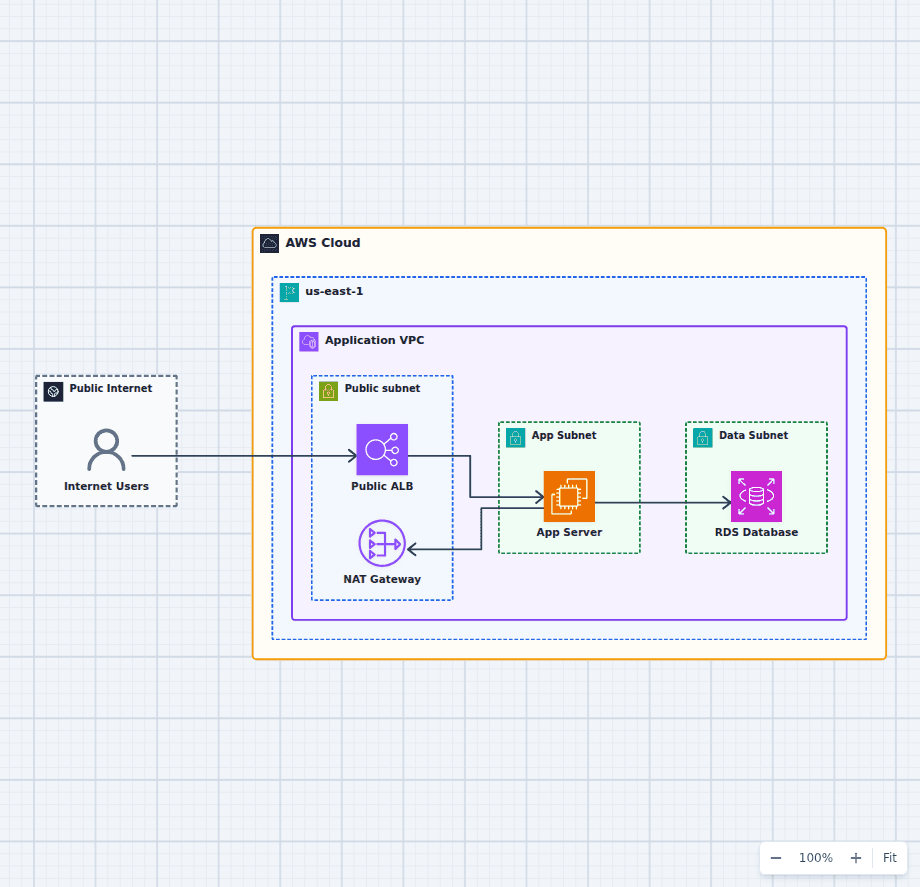 Open on the canvas
AWS public and private subnet architecture diagram with an internet gateway, internet-facing Application Load Balancer in public subnets, NAT Gateway, private application compute, and a private RDS database. The image links to a fully editable BuildPlane starter.
Overview
A VPC is a private IP address range you control inside an AWS Region, and a subnet is a slice of that range pinned to a single Availability Zone. Nothing about a subnet is inherently public or private: the distinction comes entirely from its route table. A subnet whose route table sends 0.0.0.0/0 to an internet gateway is public; a subnet whose default route points at a NAT gateway, or nowhere at all, is private. This diagram shows the standard three-tier arrangement that follows from that one rule. An internet-facing Application Load Balancer sits in public subnets and is the only component with a public path. It forwards requests to application compute in private subnets, which reaches Amazon RDS over a private route that never leaves the VPC. A NAT gateway in the public subnet gives that private compute outbound access for package installs and API calls without ever creating an inbound path back to it.
Components
- Public Load Balancer: Receives internet traffic and forwards only approved application requests into the private tier.
- NAT Gateway: Lets private compute initiate outbound connections without accepting inbound internet sessions.
- Application Server: Runs application code in a private subnet and receives traffic only from the load balancer.
- RDS Database: Keeps relational data in a separate private subnet with no direct public path.
Network Flow
- Internet users connect to the public load balancer.
- The load balancer routes application traffic to the private application server.
- The application server reads and writes data in the private RDS database.
- When outbound access is needed, the application server routes through the NAT gateway.
Customize First
- Add matching subnets in a second Availability Zone for production availability.
- Replace broad security-group rules with the smallest required source-to-destination rules.
- Add VPC endpoints for AWS services that should not require NAT egress.
Related AWS guides
Understand the decisions behind this diagram
Use these practical explanations to compare services, failure boundaries, and operating tradeoffs before adapting the architecture.
AWS Fundamentals
What Happens When You Launch an EC2 Instance?
The Launch button hides a surprising amount of coordination. Here is the control-plane story, the data-plane result, and the checks that matter once the instance is running.
Read the guideNetworking
AWS VPC Explained: Subnets, Routes, Gateways, and Security Groups
A VPC is a network you assemble from eight components. Here is what each one does, which decisions are permanent, and the layout that satisfies most production requirements.
Read the guideAWS Certification
AWS Solutions Architect Associate Study Guide for SAA-C03
SAA-C03 tests architectural judgment. Build a decision matrix, trace real diagrams, and practice explaining why three plausible answers lose to one requirement.
Read the guideDesign rationale
Decisions that shape this architecture
The route table, not the name, makes a subnet public
A subnet is public when its associated route table contains a route for 0.0.0.0/0 pointing at an internet gateway. That is the whole definition. Two subnets with identical names, tags, and CIDR sizes can differ in exposure purely because one is associated with the public route table and the other is not. This is why VPC reviews should start with route table associations rather than with resource names: a subnet labeled "private" that was associated with the public route table during a migration is public, whatever the tag says.
Use the load balancer as the ingress boundary
The application tier stays private and its security group allows traffic only from the load balancer security group, referenced by group ID rather than by CIDR. This removes public addressing from compute entirely, so an instance cannot be reached even if someone later attaches an Elastic IP or opens a port by mistake. It also means the set of internet-reachable resources in the account is small enough to enumerate: the load balancer and the NAT gateway.
Separate outbound access from inbound access
Private compute usually still needs the internet for package repositories, operating system updates, and third-party APIs. A NAT gateway provides that outbound path while remaining one-directional: it translates connections initiated from inside the VPC and has no mechanism for accepting connections initiated from outside. This is the distinction an internet gateway does not make, and it is why replacing the NAT gateway with a second internet gateway route would silently make the application tier reachable.
Give the load balancer at least two subnets in different zones
An Application Load Balancer requires subnets in a minimum of two Availability Zones, so a public tier is always at least a pair. Amazon RDS applies the same constraint through its DB subnet group. Even a single-AZ starter therefore needs the second public and database subnets defined; the diagram shows the concepts in one zone for legibility, but the subnet inventory a real deployment needs is already implied by these two service requirements.
Size CIDR blocks for the growth you cannot undo
A subnet CIDR cannot be resized after creation, and AWS reserves five addresses in every subnet (the network address, the VPC router, DNS, one reserved for future use, and the broadcast address), so a /28 yields eleven usable addresses rather than sixteen. Subnets can range from /28 to /16. Private application subnets are the ones that run out first, because container tasks and Elastic Network Interfaces consume addresses far faster than instances do. Allocating a /20 to each private subnet and a /24 to each public subnet costs nothing and avoids a rebuild.
Keep the database in its own subnet tier
Placing RDS in dedicated database subnets rather than sharing the application subnets means the database route table, network ACL, and address space can be reasoned about separately. It also makes the blast radius of a permissive application-tier change smaller: widening a security group in the application subnets does not automatically widen anything in the data tier.
Before production
Operational checks
Verify route tables independently for each public and private subnet, and confirm no private subnet has a 0.0.0.0/0 route to an internet gateway.
Check that no subnet relies on the VPC main route table by default. Associate every subnet explicitly so a change to the main table cannot alter exposure.
Restrict security-group rules to reference the next required tier by security group ID rather than by CIDR range.
Confirm that automatic public IP assignment is disabled on every private subnet.
Review NAT data-processing cost and add VPC gateway endpoints for Amazon S3 and DynamoDB, which are free and remove that traffic from the NAT path entirely.
Add equivalent subnets in a second Availability Zone, with a NAT gateway per zone, before treating the design as production-ready.
Enable VPC Flow Logs on the VPC so rejected connections are visible during an incident.
Confirm the RDS instance has Publicly Accessible set to false and sits in a DB subnet group containing only private database subnets.
Scope and tradeoffs
What this diagram does not solve
The starter shows one-AZ concepts clearly
A production web application should duplicate the public, application, and database subnets across at least two Availability Zones, with a NAT gateway in each. A single NAT gateway is a zonal resource: if its Availability Zone fails, private compute in every other zone loses outbound internet access even though the zone it sits in is healthy.
Subnet placement is only one security layer
IAM, encryption at rest and in transit, patching, flow logs, network ACLs, and application-level authorization remain necessary even when every resource is private. Network isolation limits reachability; it does not authenticate or authorize the traffic that is allowed through.
NAT gateways are a recurring cost that scales with traffic
A NAT gateway bills for every hour it exists and for every gigabyte it processes, in each Availability Zone. Workloads that pull large container images or write heavily to S3 through NAT often find it is the largest line item in the VPC. Gateway endpoints for S3 and DynamoDB, and interface endpoints for other services, are the usual remedy.
IPv6 uses a different egress mechanism
A NAT gateway handles IPv4 only. Private subnets that need outbound IPv6 require an egress-only internet gateway, which provides the same one-directional behavior for IPv6 traffic.
Common questions
Frequently asked questions
What makes an AWS subnet public?
A subnet is public when its route table has a route for 0.0.0.0/0 pointing at an internet gateway attached to the VPC. Nothing else about the subnet matters. A resource inside it additionally needs a public or Elastic IP address and permissive security group rules before it can actually communicate with the internet.
What is the difference between a public and a private subnet?
Only the default route. A public subnet routes 0.0.0.0/0 to an internet gateway, which is bidirectional, so resources with public addresses can both initiate and receive internet connections. A private subnet either has no default route or routes 0.0.0.0/0 to a NAT gateway, which only translates connections initiated from inside the VPC. The subnets are otherwise identical AWS resources.
Why is the database in a separate private subnet?
The separation removes any direct internet path and lets the database accept connections only from the application tier on the required port. It also gives the data tier its own route table and network ACL, so a permissive change in the application subnets does not widen access to the database.
Can private subnets access AWS services without a NAT gateway?
Yes. Gateway endpoints for Amazon S3 and DynamoDB route that traffic privately at no charge, and interface endpoints powered by AWS PrivateLink do the same for most other services for an hourly and per-gigabyte fee. Many private subnets need no NAT gateway at all once endpoints cover their dependencies.
How many subnets does a VPC need?
A production web application typically uses six: public, application, and database subnets in each of two Availability Zones. Two is the practical floor for the public tier because an Application Load Balancer requires subnets in at least two zones, and Amazon RDS requires a DB subnet group spanning at least two zones.
How large should each subnet CIDR be?
Subnets can be between /28 and /16, and AWS reserves five addresses in each, so a /28 provides eleven usable addresses. A subnet CIDR cannot be changed after creation. Private application subnets exhaust addresses fastest because container tasks and network interfaces consume them quickly, so a /20 per private subnet and a /24 per public subnet is a common allocation that leaves room to grow.
Does a NAT gateway go in the public or the private subnet?
The public subnet. The NAT gateway needs its own route to the internet gateway to reach the internet on behalf of private resources. The private subnets then route 0.0.0.0/0 to the NAT gateway. Placing a NAT gateway in a private subnet leaves it with no path out and the private tier with no egress.
Can I convert a public subnet to a private one?
Yes, by associating it with a route table that has no internet gateway route. Existing resources keep any public IP addresses already assigned, so also disable automatic public IP assignment on the subnet and release or replace the addresses on resources that should no longer be reachable.
Do I still need network ACLs if I use security groups?
Usually not for everyday access control. Security groups are stateful and evaluated per resource, which handles almost all application requirements. Network ACLs are stateless and evaluated per subnet, which makes them a coarse second layer: useful for broad denials such as blocking a range at the subnet edge, and awkward as a primary control because return traffic must be allowed explicitly.
Keep exploring
Related AWS architectures
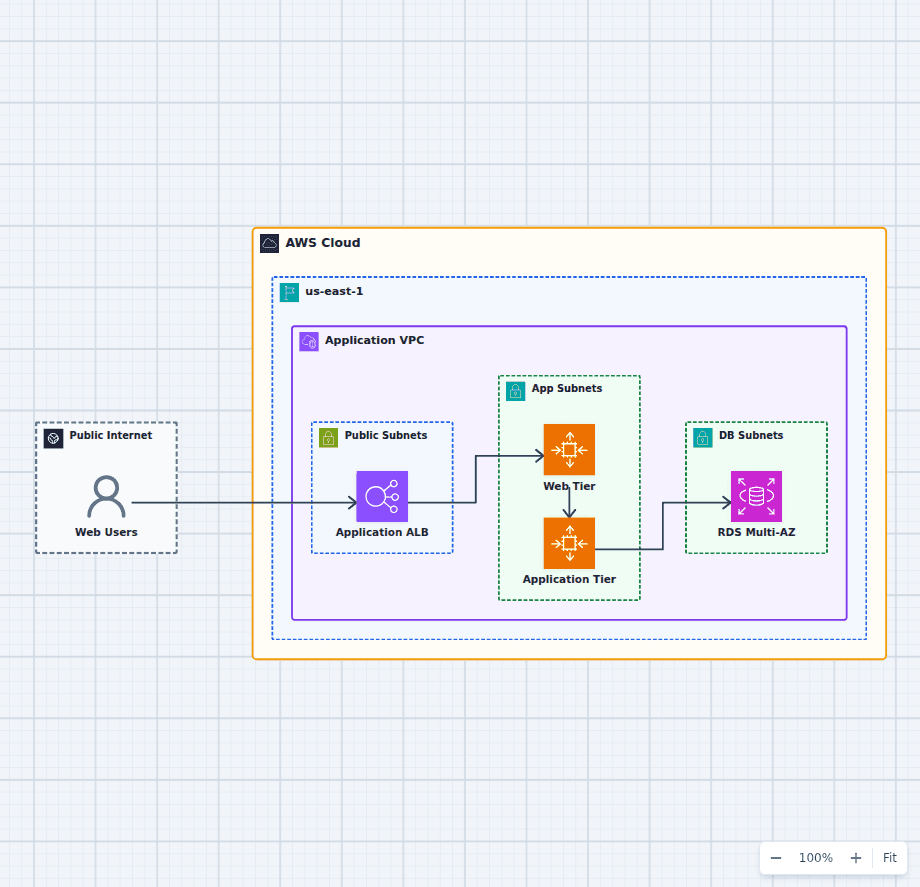
Highly Available Three-Tier Web Application on AWS
This starter architecture separates ingress, presentation, application logic, and relational data so each tier can fail and scale independently. It is a practical baseline for teams moving a conventional web application onto AWS without collapsing every responsibility into one server.
Explore the architecture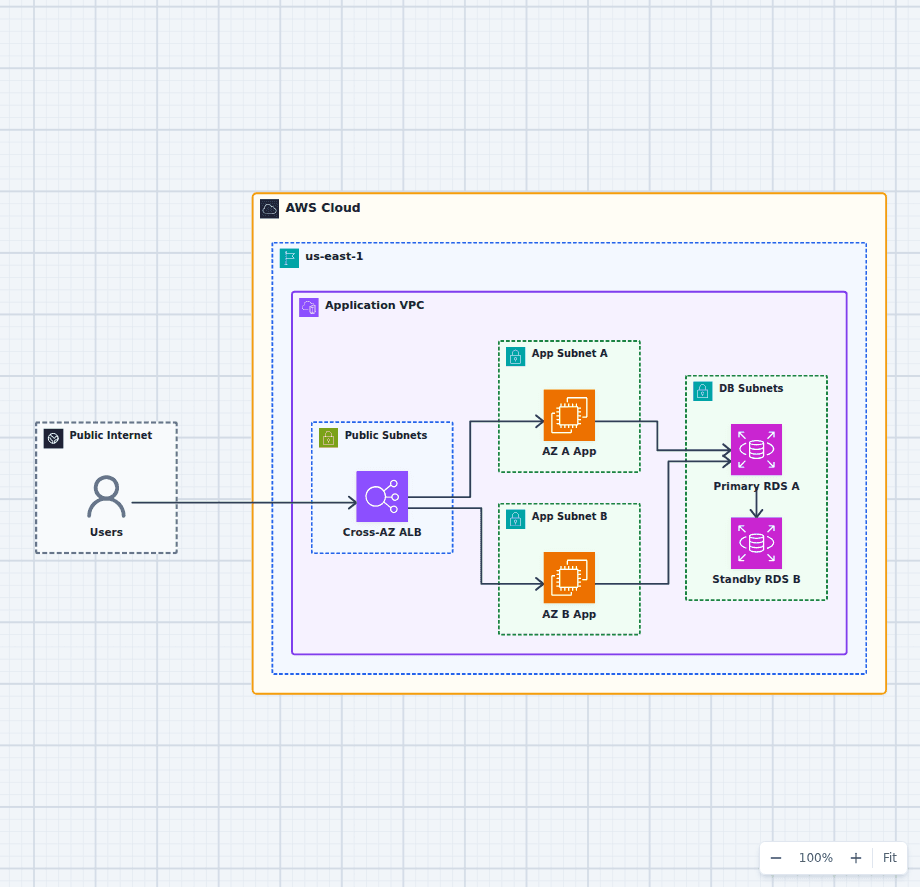
An AWS Application That Survives an Availability Zone Failure
This architecture focuses on one failure question: what happens when an entire Availability Zone becomes unavailable? Healthy application capacity remains in the other zone, the load balancer removes failed targets, and RDS can promote its synchronous standby.
Explore the architecture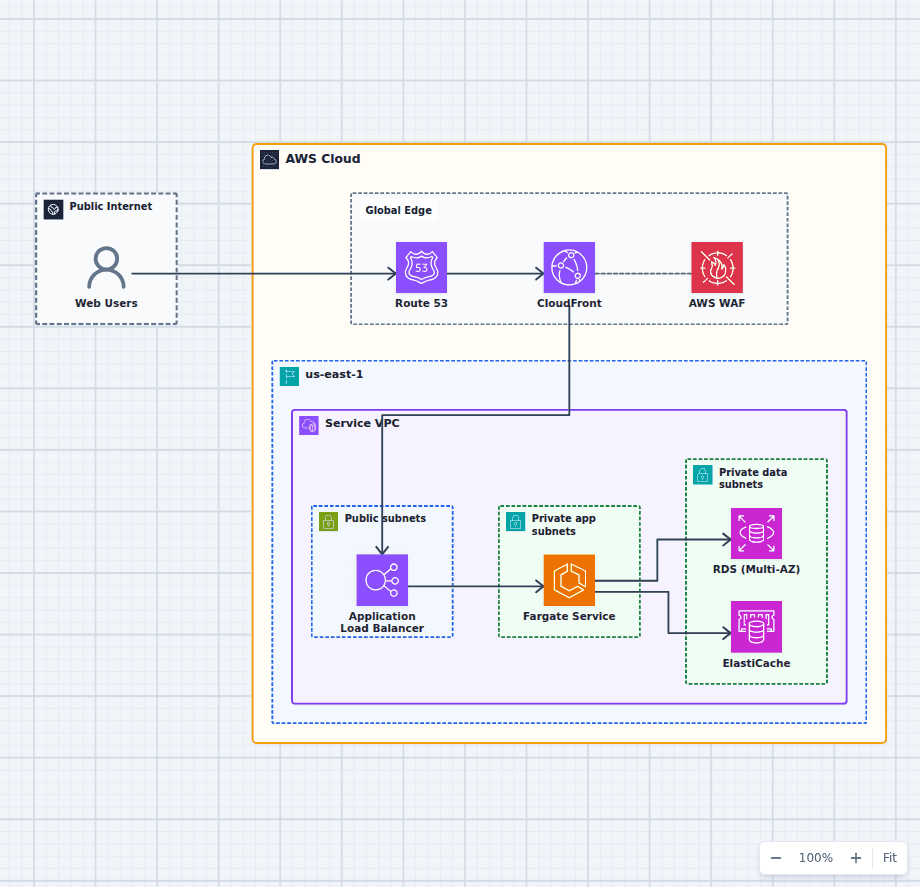
Containerized Web Service with Amazon ECS and Fargate
This architecture runs a production container service without an EC2 host fleet. A protected global edge forwards to a Multi-AZ load balancer, Fargate tasks stay private and reach data services over the VPC network, and managed image, secret, and observability services support the runtime. Every component here is one an ordinary web application needs eventually, which is why this shape is a common destination for teams outgrowing a single server and for teams who found Lambda too constraining.
Explore the architectureFrom reference to working draft
Adapt this architecture with your AWS AI Agent
Start from the exact diagram in this guide. Change requirements, challenge a decision, or ask what fails first, while keeping the architecture editable.