
Serverless REST API Architecture on AWS
A compact request path through API Gateway and Lambda into DynamoDB, with CloudWatch capturing runtime logs.
Open editable diagramArchitecture diagram
Edit this exact diagram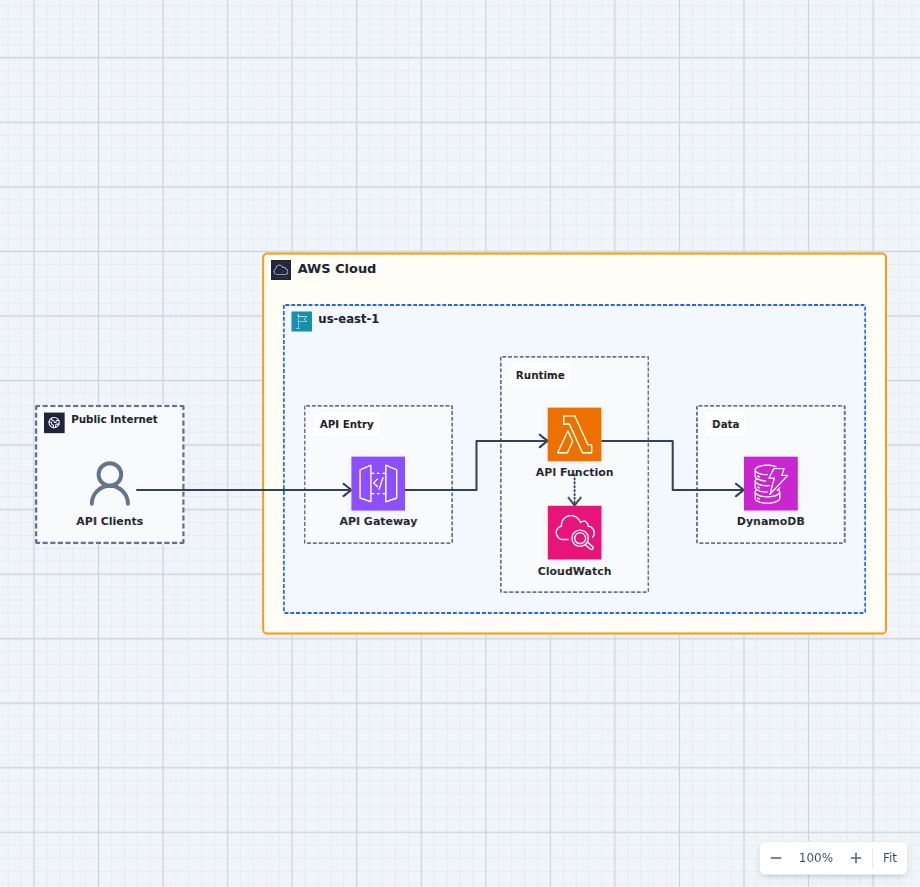 Open on the canvas
Serverless REST API AWS architecture diagram with API Gateway, AWS Lambda, DynamoDB, and CloudWatch. The image links to a fully editable BuildPlane starter.
Overview
Amazon API Gateway exposes the REST endpoint and invokes AWS Lambda for request handling. Lambda reads and writes application records in DynamoDB, while CloudWatch captures execution logs and metrics. There is no server to patch and no capacity to provision, and the compute tier costs nothing while idle, though retained resources such as DynamoDB storage and CloudWatch log retention still bill whether or not anyone calls the API. What replaces those concerns is a different set: concurrency limits rather than instance counts, cold starts rather than warm-up time, per-request cost rather than per-hour cost, and an access-key model built entirely on IAM roles. This diagram is the smallest arrangement in which all four of those decisions are visible.
Components
- API Gateway: Publishes REST routes and provides a managed front door for throttling and request validation.
- AWS Lambda: Executes stateless API logic without a continuously running server fleet.
- DynamoDB: Stores application records with on-demand capacity suitable for an early workload.
- CloudWatch: Collects function logs and provides the first place to add latency and error alarms.
Request Flow
- An API client sends an HTTPS request to API Gateway.
- API Gateway validates and invokes the Lambda function for the selected route.
- Lambda applies application logic and reads or writes a DynamoDB record.
- Lambda emits execution logs and metrics to CloudWatch.
Customize First
- Add Cognito or another authorizer when the API needs user identity.
- Add SQS when slow work should leave the synchronous request path.
- Define alarms for error rate, throttling, and latency before launch.
Related AWS guides
Understand the decisions behind this diagram
Use these practical explanations to compare services, failure boundaries, and operating tradeoffs before adapting the architecture.
Architecture
EC2 vs Lambda vs Fargate: Choosing Compute on AWS
Choose EC2 for control, Lambda for event-driven units of work, and Fargate for managed container capacity. Real systems often use more than one.
Read the guideAWS Certification
AWS Cloud Practitioner Study Guide: A Practical 30-Day Plan
Cloud Practitioner is easier when services form a mental map. This four-week plan combines the official exam domains, small labs, diagrams, and scenario practice.
Read the guideEngineering Career
How to Make the Most of an Engineering Internship
A strong internship is not measured by how much code you type. It is measured by how quickly you learn the system, reduce uncertainty, and become useful to the team.
Read the guideDesign rationale
Decisions that shape this architecture
API Gateway is the security and shaping boundary
The gateway terminates TLS, validates request schemas, applies throttling and usage plans, and authorizes the caller before any function code runs. Rejecting a malformed or unauthorized request at the gateway costs nothing in Lambda invocations, which makes it a cost control as much as a security control. Choose HTTP APIs for lower cost and latency on straightforward JSON services, and REST APIs when you need request validation, API keys and usage plans, AWS WAF integration, or private endpoints.
Lambda functions stay stateless and single-purpose
Each function handles one route or one job and holds nothing between invocations. Any state that must survive lives in DynamoDB. This is what lets the platform run one concurrent execution or ten thousand without coordination, and it is also what makes the functions independently deployable and independently scalable.
DynamoDB matches the access pattern, not the data model
On-demand capacity mode removes provisioning to match a workload that may be idle for hours, and single-digit millisecond reads suit a request path with a strict latency budget. The tradeoff is real: DynamoDB rewards a table designed around the queries the API actually makes, and punishes relational habits. If the API needs joins, ad-hoc queries, or transactions across many entities, Aurora Serverless is the more honest choice.
Give every function its own execution role
A shared role across functions grants each one the union of what all of them need. A per-function role scoped to the specific table and the specific actions keeps a compromised function from reaching data it never handles. This is the serverless equivalent of network segmentation, and it is the main security control available at this layer.
Plan for cold starts rather than hoping they are rare
A cold start is initialisation time added to the first request a new execution environment serves: runtime start, dependency loading, and connection setup. On a busy function where most requests reuse a warm environment it shows up in the tail rather than the median, which is why it is usually discussed as a p99 problem. On a low-traffic or spiky function, where a large share of invocations land on a fresh environment, it moves the median too. Keep the deployment package small, initialise clients outside the handler so they are reused, and use provisioned concurrency on latency-sensitive routes where the cost is justified. Runtimes with heavy startup, notably JVM and .NET, pay this most.
Concurrency, not instance count, is the capacity limit
The account has a Region-wide concurrent execution quota shared by every function. One function under load can exhaust it and throttle the rest, which fails as HTTP 429 responses on unrelated endpoints. Reserved concurrency both guarantees a floor for a critical function and caps a noisy one. This is the single most common serverless production surprise.
Before production
Operational checks
Set reserved concurrency on critical functions so one endpoint cannot exhaust the account quota.
Configure a dead-letter queue or an on-failure destination for every asynchronous invocation.
Set the function timeout below the API Gateway integration timeout so the client receives a real error rather than a gateway timeout.
Enable AWS X-Ray tracing to see where latency sits across gateway, function, and table.
Alarm on Lambda Throttles, Errors, and Duration p99, and on DynamoDB ThrottledRequests.
Set a CloudWatch Logs retention period. The default is never expire, and it becomes a meaningful cost.
Give each function its own execution role scoped to the specific table and actions.
Confirm idempotency for any route that can be retried, because the platform retries asynchronous invocations automatically.
Scope and tradeoffs
What this diagram does not solve
No authentication layer is shown
A production API needs a Cognito user pool authorizer, a Lambda authorizer, or IAM authorization at the gateway. The secure authentication architecture in this library shows that layer attached to the same shape.
Lambda has hard execution limits
A 15 minute maximum duration, 10 GB memory, 10 GB ephemeral storage, and a 6 MB synchronous payload. Work that exceeds any of these belongs in Step Functions, a container task, or a batch job rather than in a longer function.
Cost inverts at sustained high traffic
Per-request pricing is dramatically cheaper than an idle server and more expensive than a saturated one. There is a crossover point, workload-dependent but usually in the region of steady high-volume traffic, past which a container service on Fargate costs less. Model it rather than assuming serverless is always cheaper.
Single Region, no caching layer
This diagram is one Region with no CloudFront in front and no response caching. For a global audience or a read-heavy API, both matter, and the multi-Region serverless API architecture covers the failover case.
Common questions
Frequently asked questions
What is a serverless REST API on AWS?
An API where AWS runs the compute. API Gateway provides the HTTPS endpoint, Lambda runs the handler code per request, and a managed database such as DynamoDB stores the data. You provision no servers, patch no operating system, and pay per request rather than per hour.
Should I use HTTP APIs or REST APIs in API Gateway?
HTTP APIs cost less, add less latency, and cover most straightforward JSON services. Choose REST APIs when you need request and response validation, API keys with usage plans, AWS WAF integration, private endpoints inside a VPC, or request and response transformation.
How do I reduce Lambda cold starts?
Keep the deployment package small, create SDK clients and database connections outside the handler so they are reused across invocations, prefer a runtime with fast startup, and enable provisioned concurrency on the routes where tail latency matters. Measure the effect on your own traffic rather than assuming it is confined to the tail: at high, steady volume it is a p99 concern, while at low or bursty volume enough invocations start cold to move the median as well.
When is serverless more expensive than containers?
At sustained, predictable, high traffic. Lambda bills per invocation and per gigabyte-second, which is very cheap for bursty or idle workloads and eventually more expensive than a Fargate task running near full utilization around the clock. The crossover depends on request duration and memory, so model your own numbers.
Do I need a VPC for a serverless API?
Not for this architecture. Lambda reaches DynamoDB over the AWS network without one. Attach the function to a VPC only when it must reach a private resource such as RDS or an internal service, and be aware that VPC-attached functions need NAT or endpoints for outbound AWS calls.
How does this scale, and what breaks first?
API Gateway and Lambda scale automatically, so the first limit is usually the account concurrent execution quota, which is shared across every function in the Region. After that it is DynamoDB throttling on a hot partition key. Both are visible in CloudWatch before they become outages.
How should I handle background work?
Do not do it inside the request handler. Put the job on SQS or EventBridge and process it with a separate function, so the API response time does not depend on the slow work and retries are handled by the queue rather than by the caller.
Keep exploring
Related AWS architectures
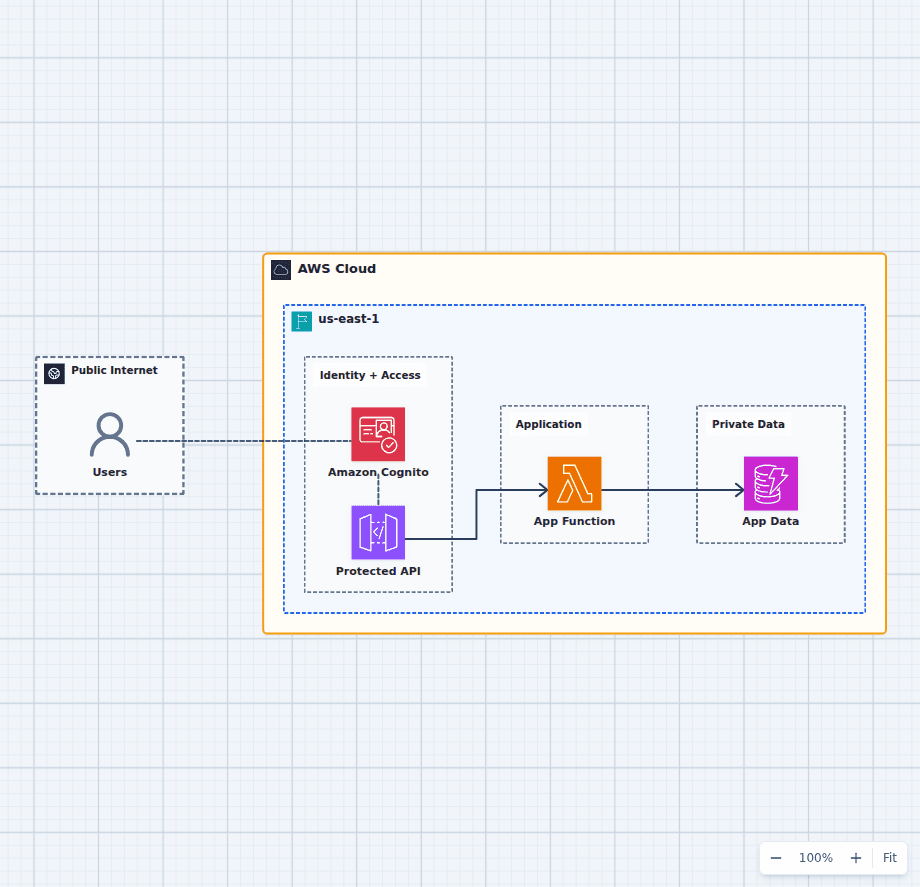
Secure Application Authentication with Amazon Cognito
This architecture separates identity verification from application authorization. Cognito authenticates the user, API Gateway validates the presented token, Lambda enforces business rules, and DynamoDB remains behind the application boundary.
Explore the architecture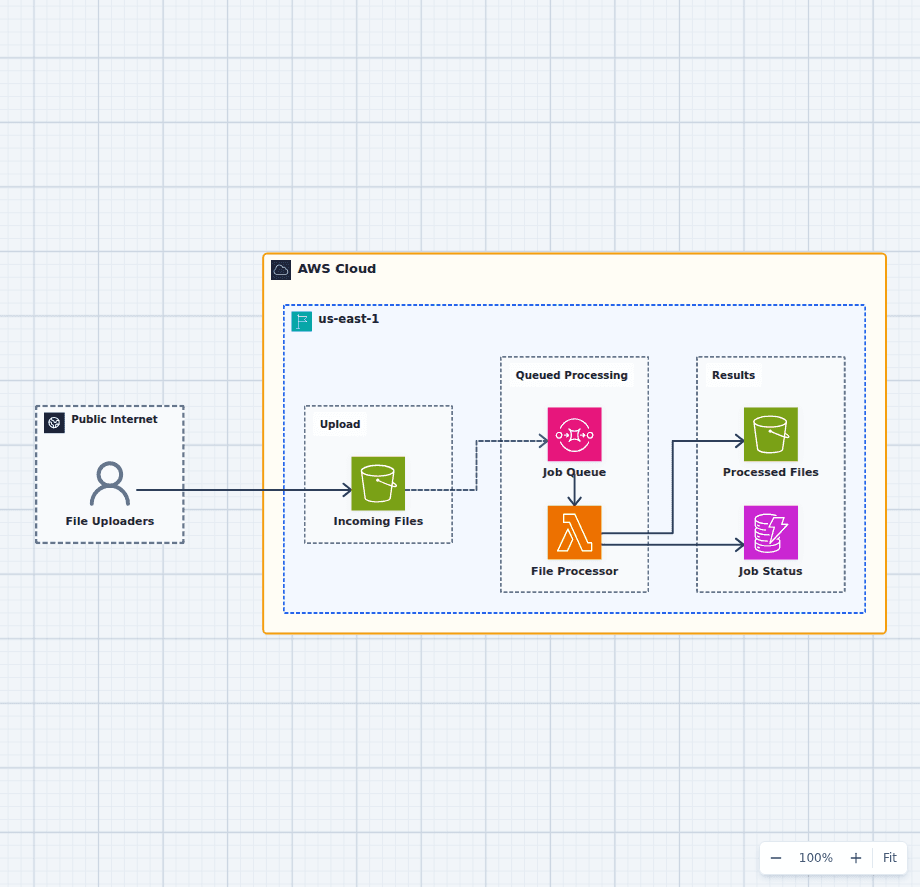
Asynchronous File Processing Pipeline on AWS
This design accepts uploads immediately and lets workers process them at a controlled rate. S3 protects the source file, SQS absorbs bursts and retries, Lambda performs bounded work, and separate result and status stores make completion observable.
Explore the architecture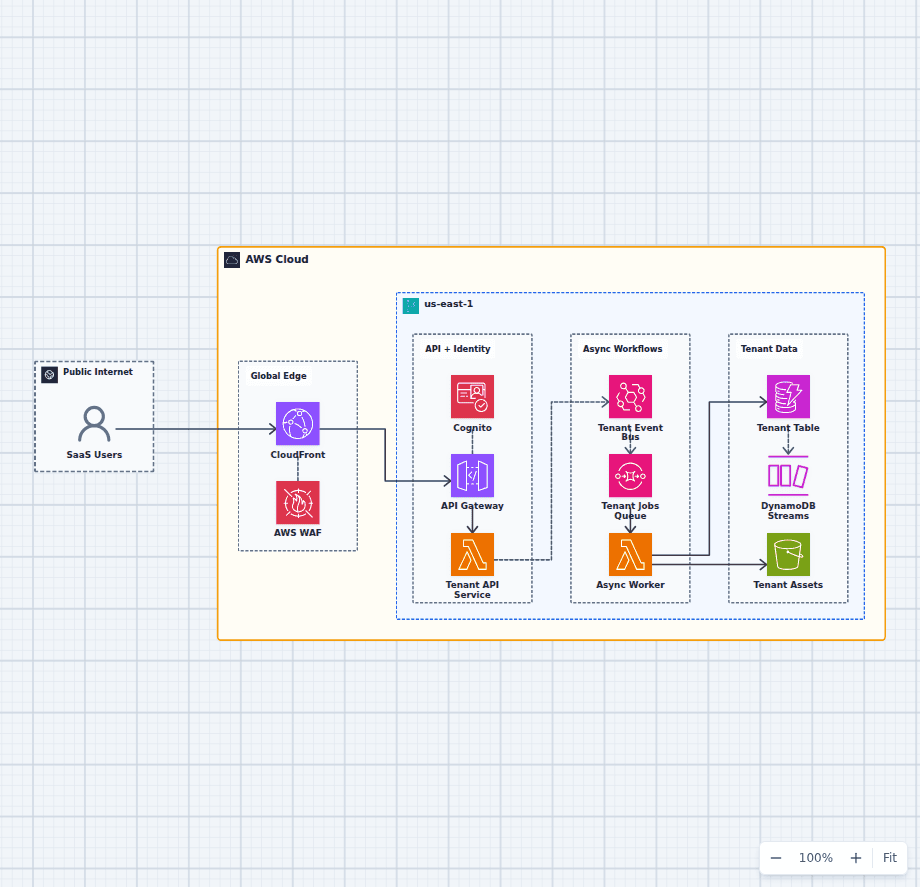
Serverless Multi-Tenant SaaS Architecture on AWS
This architecture combines a protected synchronous API with a durable asynchronous work path. Tenant identity travels from Cognito into application authorization, domain events decouple background work, and DynamoDB plus S3 provide scalable tenant state and assets.
Explore the architectureFrom reference to working draft
Adapt this architecture with your AWS AI Agent
Start from the exact diagram in this guide. Change requirements, challenge a decision, or ask what fails first, while keeping the architecture editable.