
Highly Available Three-Tier Web Application on AWS
A clear three-tier request path with Multi-AZ ingress, independently scaled web and application tiers, and an RDS Multi-AZ database.
Open editable diagramArchitecture diagram
Edit this exact diagram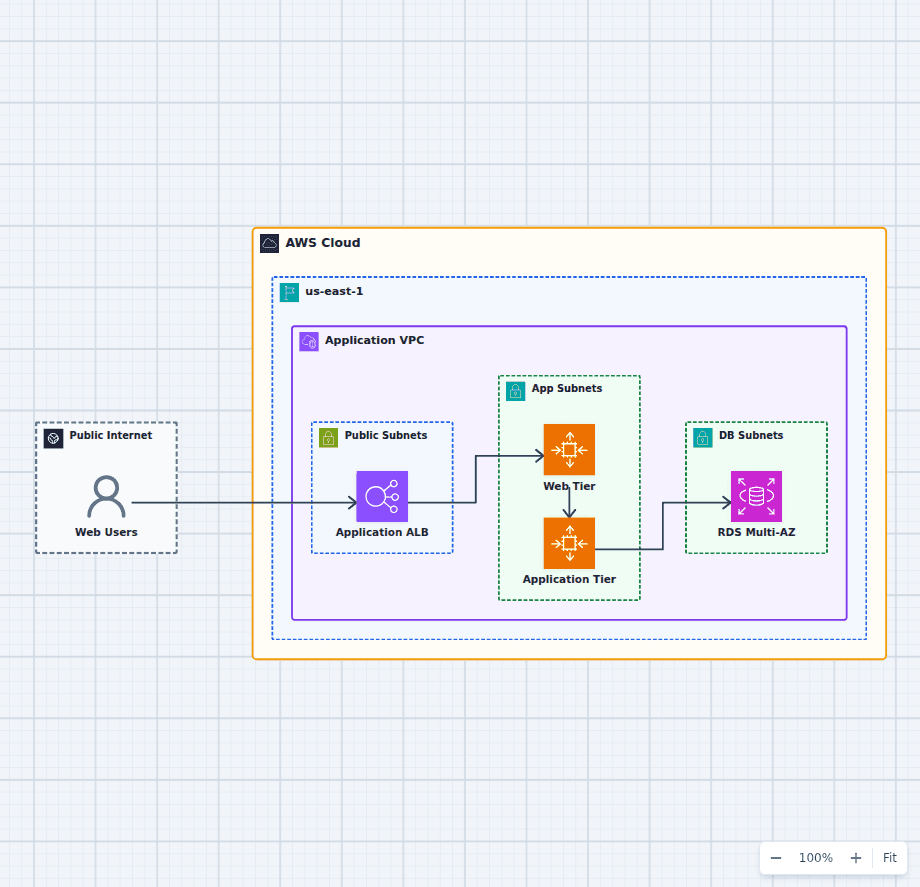 Open on the canvas
Highly available three-tier AWS architecture diagram with an Application Load Balancer, Auto Scaling web and application tiers, and Amazon RDS Multi-AZ. The image links to a fully editable BuildPlane starter.
Overview
Traffic enters through an Application Load Balancer and is distributed across stateless web and application tiers running in two Availability Zones. Each compute tier scales independently, while Amazon RDS Multi-AZ provides relational storage with a synchronous standby for database failover.
Components
- Application Load Balancer: Accepts HTTPS traffic, checks target health, and distributes requests across Availability Zones.
- Web Tier: Serves the web experience from a stateless Auto Scaling fleet in private subnets.
- Application Tier: Runs business logic in a separate Auto Scaling fleet so application capacity can change independently.
- RDS Multi-AZ: Stores relational data and maintains a synchronous standby for automatic database failover.
Request Flow
- Web users send HTTPS requests to the Application Load Balancer.
- The load balancer routes healthy traffic to the web tier across two Availability Zones.
- The web tier calls the application tier for business operations.
- The application tier reads and writes relational data in RDS Multi-AZ.
Customize First
- Choose instance sizes and scaling signals for the web and application tiers.
- Add CloudFront and WAF when the application needs global caching and edge protection.
- Add backups, monitoring, and secrets management before production use.
Related AWS guides
Understand the decisions behind this diagram
Use these practical explanations to compare services, failure boundaries, and operating tradeoffs before adapting the architecture.
AWS Fundamentals
What Happens When You Launch an EC2 Instance?
The Launch button hides a surprising amount of coordination. Here is the control-plane story, the data-plane result, and the checks that matter once the instance is running.
Read the guideData
AWS Database Services Compared: RDS, Aurora, DynamoDB, and More
The right AWS database follows from access patterns, consistency, scale, and operations. Start with the data model instead of choosing the newest service.
Read the guideDesign rationale
Decisions that shape this architecture
Scale the web and application tiers separately
The web tier and application tier use separate Auto Scaling capacity. A traffic spike that increases page delivery does not have to force the same scaling policy on business logic workers.
Keep compute stateless
Requests can move between healthy instances because session state and durable records do not live on one application host. This is what lets the load balancer remove failed targets safely.
Use Multi-AZ for database availability
RDS Multi-AZ maintains a synchronous standby for failover. It improves availability, but it is not a read-scaling strategy and it does not replace backups.
Before production
Operational checks
Test target health checks against real application readiness, not only process uptime.
Set minimum Auto Scaling capacity in each Availability Zone.
Exercise database reconnection behavior during an RDS failover.
Add alarms for unhealthy targets, scaling saturation, error rate, and database pressure.
Scope and tradeoffs
What this diagram does not solve
One Region remains a shared failure domain
The design handles instance and Availability Zone failures inside one Region. Regional continuity requires a second deployment, data replication, and an explicit traffic failover policy.
Security and operations need workload-specific detail
Security groups, secrets rotation, patching, backups, WAF rules, and deployment controls should be added around the actual application requirements.
Common questions
Frequently asked questions
Why separate the web tier from the application tier?
The separation gives each tier its own scaling, deployment, and failure boundary. It is useful when frontend delivery and application processing have different capacity profiles.
Does RDS Multi-AZ improve read performance?
No. Multi-AZ primarily provides a standby for availability. Add read replicas or another read-scaling design when query volume requires it.
Can I edit this AWS architecture diagram?
Yes. Open the starter in BuildPlane to move services, change boundaries, add controls, and ask the AI Agent to adapt the design to your workload.
Keep exploring
Related AWS architectures
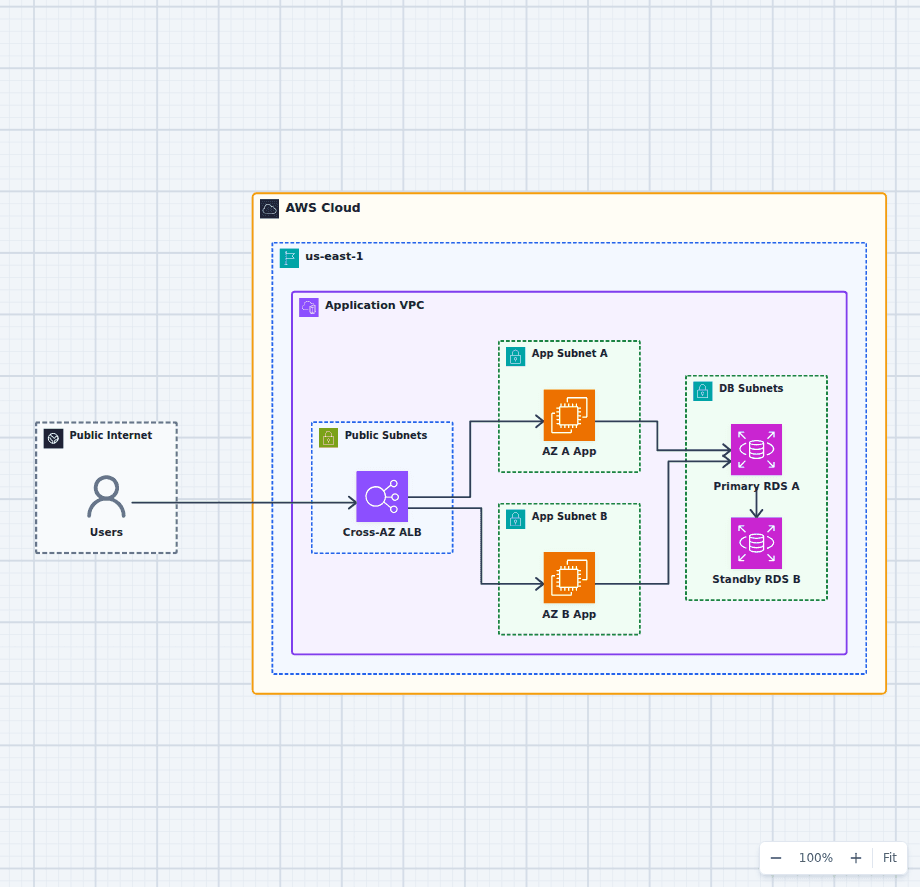
An AWS Application That Survives an Availability Zone Failure
This architecture focuses on one failure question: what happens when an entire Availability Zone becomes unavailable? Healthy application capacity remains in the other zone, the load balancer removes failed targets, and RDS can promote its synchronous standby.
Explore the architecture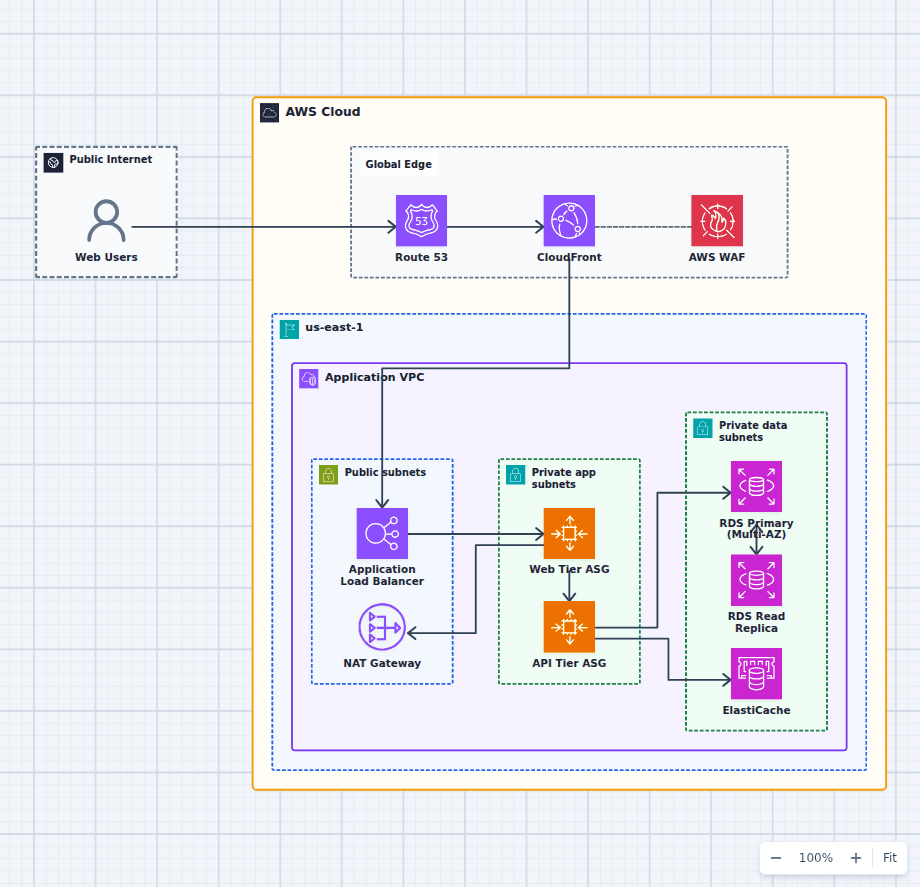
Production-Grade Highly Available Web Platform on AWS
This reference expands the three-tier baseline with a global edge, separate scaling domains, caching, read scaling, private egress, secrets, backups, and operations. It is intended for teams evaluating a conventional production web platform rather than a minimal learning diagram.
Explore the architecture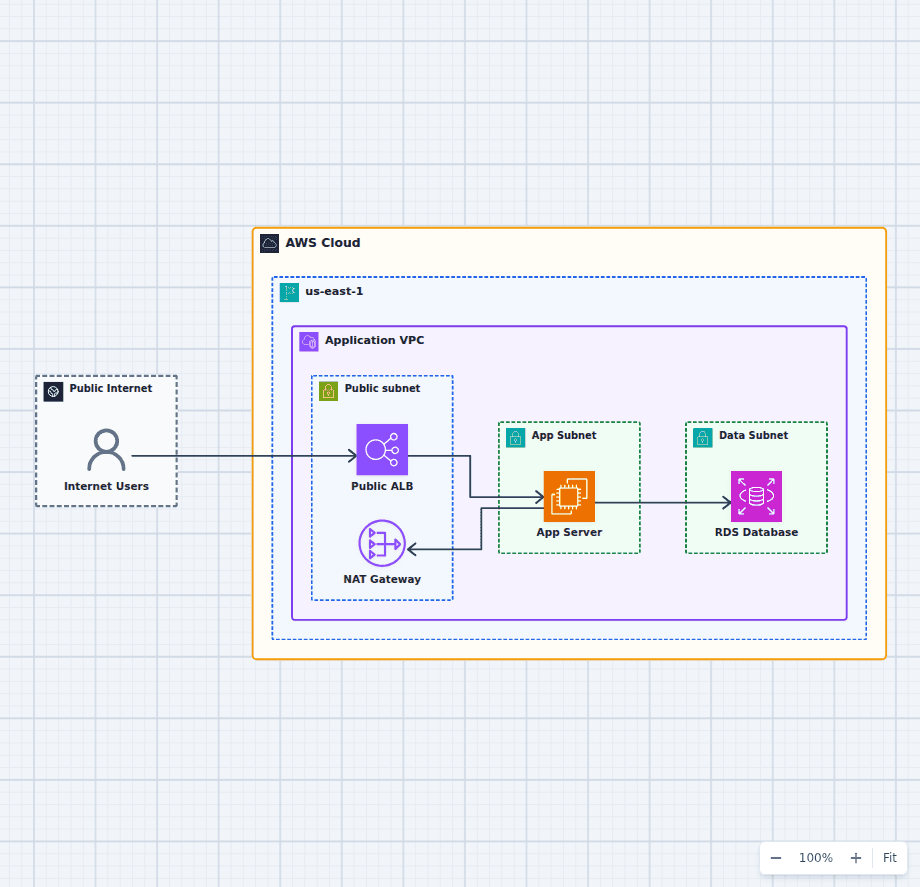
Public and Private Subnets in an AWS VPC
This VPC pattern makes exposure decisions explicit and auditable. The load balancer and NAT gateway are the only resources in the public path; application compute accepts traffic solely from the load balancer security group; the database accepts connections solely from the application security group and has no route to or from the internet. Because every layer is enforced by a route table and a security group reference rather than by convention, you can answer "what is reachable from the internet?" by reading the diagram. Everything else in a production build, such as a second Availability Zone, VPC endpoints, and flow logs, attaches to this skeleton without changing it.
Explore the architectureFrom reference to working draft
Adapt this architecture with your AWS AI Agent
Start from the exact diagram in this guide. Change requirements, challenge a decision, or ask what fails first, while keeping the architecture editable.