Latency measures delay, but one number cannot explain the complete web experience. Time to First Byte and Time to Last Byte describe different parts of a response.
What is Time to First Byte?
Time to First Byte, or TTFB, measures how long it takes from starting a request until the client receives the first response byte. Depending on the tool and connection state, it can include DNS lookup, TCP connection, TLS negotiation, network travel, server queueing, application processing, database calls, and the first response write.
TTFB matters because it affects perceived responsiveness. A user cannot begin receiving server-rendered HTML or API data before the response starts.
What is Time to Last Byte?
Time to Last Byte, or TTLB, measures until the final response byte arrives. It includes the first-byte delay plus the transfer time for the complete payload.
TTLB is affected by response size, compression, server streaming rate, connection throughput, packet loss, client network conditions, and competition for bandwidth. Large downloads, APIs with oversized payloads, and media segments make this metric especially important.
A fast TTFB can hide a slow experience
A server can flush one byte quickly and then generate the rest slowly. That produces an attractive TTFB without a useful page. A browser may also receive HTML quickly but wait on blocking scripts, fonts, images, or client-side API requests.
Measure real user outcomes such as Largest Contentful Paint and interaction readiness alongside network timing.
Improve first-byte latency
- Cache responses at CloudFront or inside the application when identity and freshness allow it.
- Reduce server processing and database query time.
- Reuse connections and prefer modern protocols where the client path supports them.
- Place workloads and data to avoid unnecessary long-distance calls.
- Scale before saturation creates queueing.
- Keep dependency timeouts and retries within the user request budget.
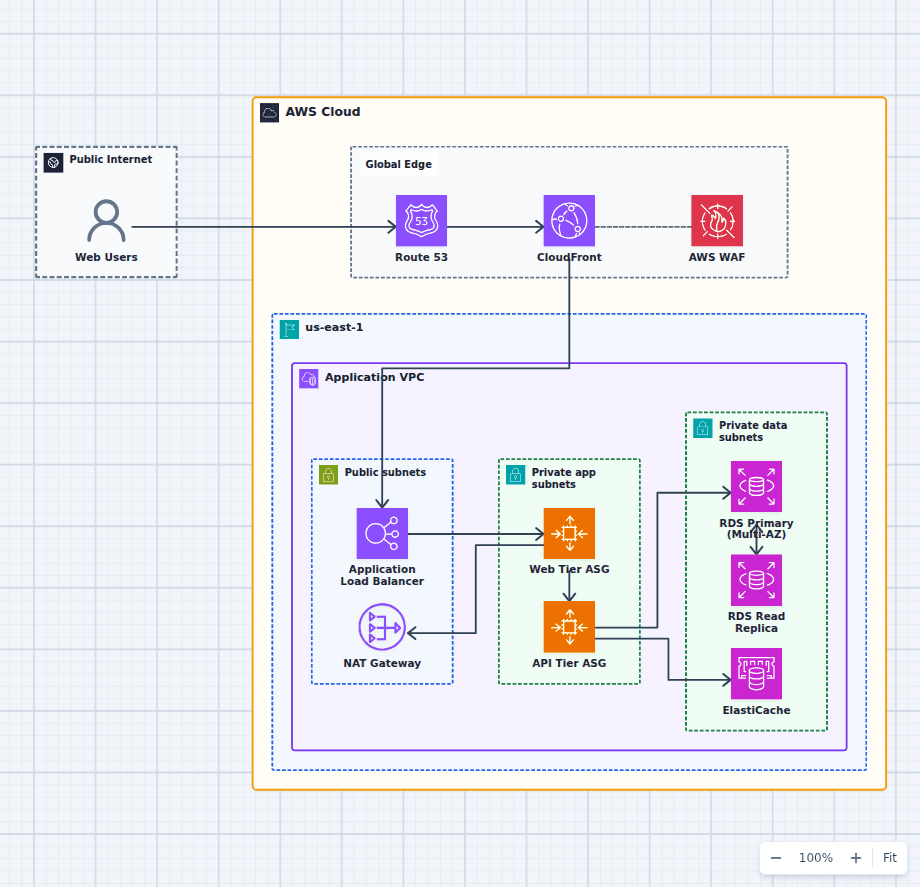
The production high-availability web architecture shows DNS, edge, load balancer, application, and database hops that can affect TTFB.
Improve last-byte latency
- Compress text responses.
- Resize and encode images appropriately.
- Paginate or stream large API responses.
- Use CloudFront for cacheable static and media content.
- Remove unused payload fields and duplicate client downloads.
- Investigate bandwidth, packet loss, and server output rate.
Measure from more than one location
Synthetic tests provide repeatability. Real-user monitoring captures the networks and devices customers actually use. Server traces explain backend time. Use all three perspectives when a result matters.
Use Website X-Ray's TTFB vs LCP diagnostic guide for an outside-in view, then map the visible timing back to the AWS web architecture behind the site.
TTFB is the cost of getting the response started. TTLB is the cost of completing the transfer. Measure both, but optimize for the moment the user can actually accomplish the task.