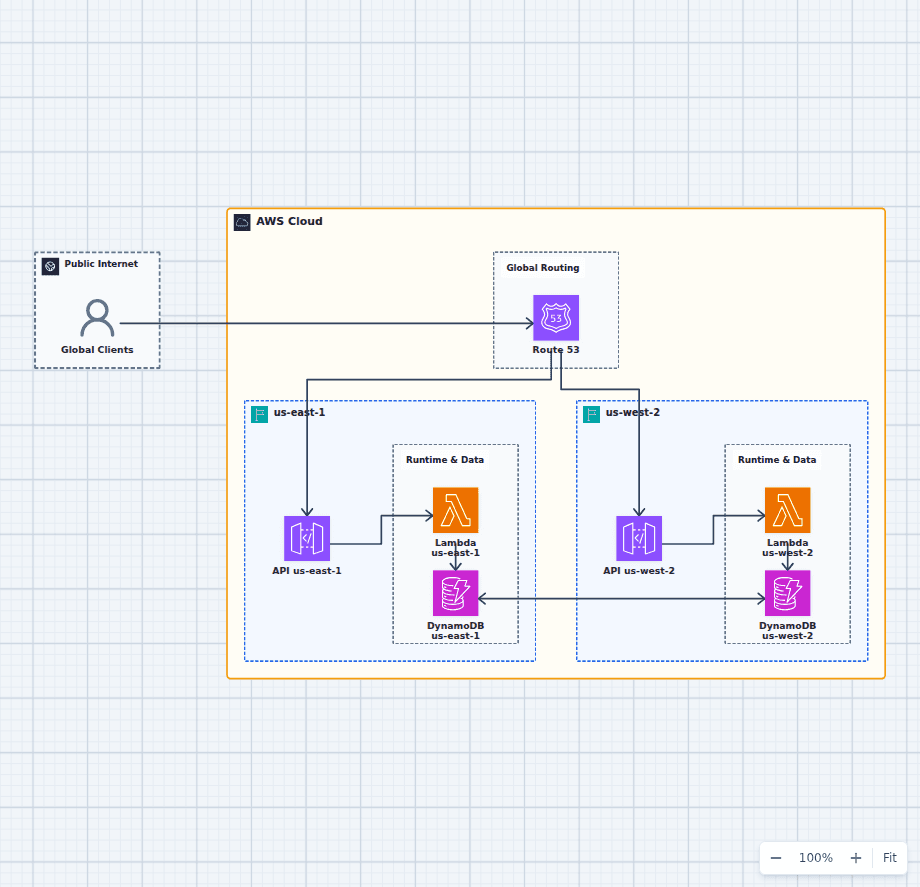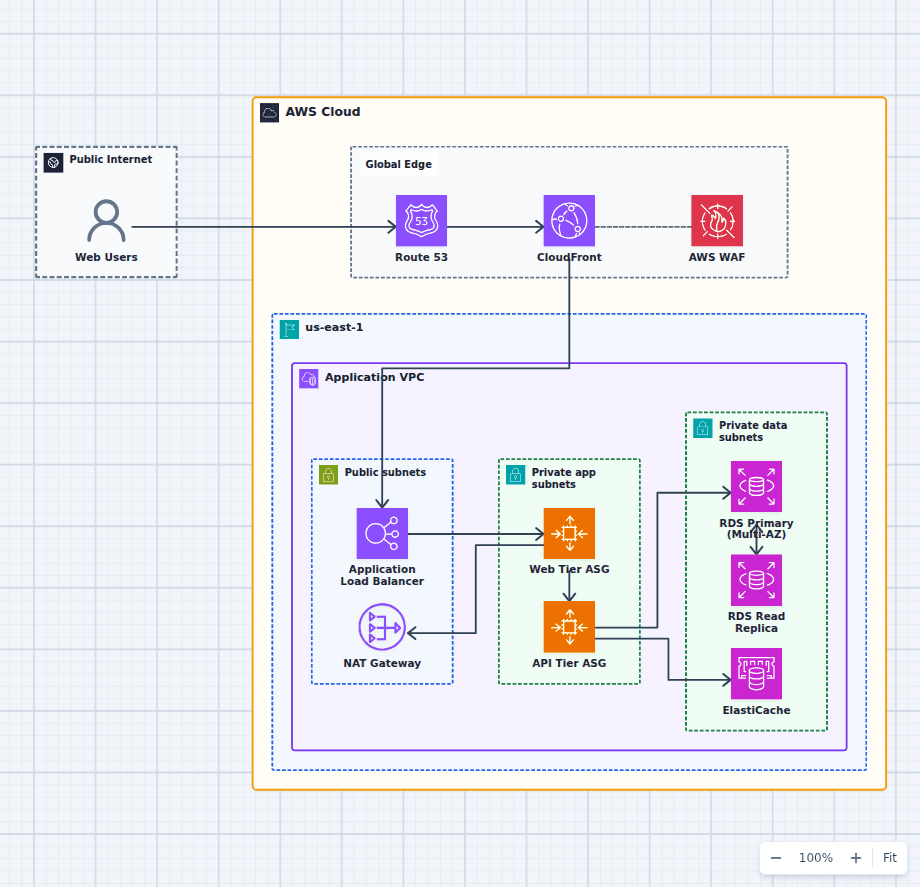
A highly available web application keeps providing an acceptable service when individual components fail. On AWS, that usually means surviving an instance failure and an Availability Zone failure without a manual rebuild.
Start with an explicit availability target
"Highly available" is too vague to design against. Define the customer-facing objective, the measurement window, and which operations are critical. A read-only status page and a payment submission do not need identical recovery behavior.
The target drives cost. Extra zones, standby databases, replicated caches, deployment safeguards, and regional recovery all buy down different risks.
Build across Availability Zones
Create public and private subnets in at least two Availability Zones. Place an internet-facing Application Load Balancer in the public subnets and application compute in private subnets. Run enough healthy compute in each zone to absorb a failure or define how fast Auto Scaling must replace lost capacity.
Security groups should allow the ALB to reach application targets without exposing those targets directly to the internet. The public and private subnet guide explains this boundary.
Keep the compute tier stateless
Any healthy target should be able to handle the next request. Do not keep durable uploads, session state, or unique configuration on one instance. Put objects in S3, use a shared session store when needed, and deliver secrets through a managed service.
Statelessness makes rolling deployments, health-based replacement, and horizontal scaling much safer.
Choose the database availability model carefully
RDS Multi-AZ provides a standby and managed failover for relational databases. Aurora distributes storage across multiple Availability Zones and supports reader instances. DynamoDB provides regional managed availability with a different data model.
Availability does not eliminate recovery planning. Define backups, point-in-time recovery, restore testing, data retention, and application reconnection behavior. A healthy standby is not proof that the application handles a failover cleanly.
Protect and accelerate the edge
CloudFront can cache content closer to users and reduce repeated origin work. AWS WAF can filter common malicious request patterns when associated with CloudFront or ALB. Route 53 health and routing policies can support endpoint-level failover.
For a public site, use Website X-Ray's AWS website performance architecture guide to compare the visible edge-to-browser behavior with the architecture you intended to deploy.
Observe the service, not only the servers
Track request rate, error rate, and latency at the load balancer and application. Add database saturation, queue depth, dependency failures, and deployment markers. An alarm should tell an operator what customer symptom is at risk and where to start.
Test the failure
Stop an instance. Drain a target. Fail the database over. Block one dependency. Simulate the loss of a zone in a controlled environment. Watch health checks, scaling, retries, timeouts, and dashboards.
The Availability Zone failure practice architecture is designed for this exact discussion. The production high-availability web platform adds edge security and operational controls.
High availability is real only when the system has demonstrated that it can lose something important and continue serving.