
Architecture Review Practice: A Single-AZ AWS Web App
A cleanly drawn but intentionally incomplete single-AZ web application for practicing reliability, security, and cost review.
Open editable diagramArchitecture diagram
Edit this exact diagram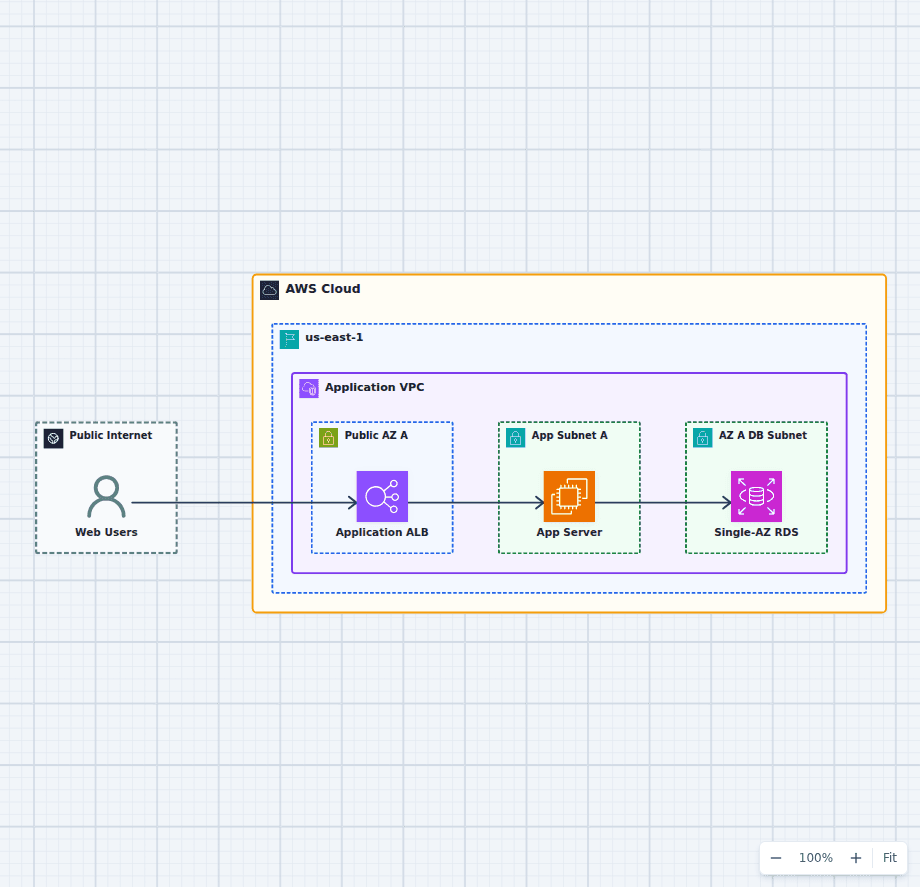 Open on the canvas
AWS architecture review diagram showing an Application Load Balancer, one application server, and a Single-AZ RDS database. The image links to a fully editable BuildPlane starter.
Overview
An internet-facing Application Load Balancer forwards all traffic to a single application server, which reads and writes a Single-AZ Amazon RDS database. Public ingress, application compute, and data are separated inside a VPC, but the compute and database layers remain single points of failure. This baseline makes resilience, security, and observability gaps easy to identify.
Components
- Application Load Balancer: Provides a stable public endpoint but currently has only one application target.
- Single Application Server: Runs the whole application in one Availability Zone with no Auto Scaling replacement shown.
- Single-AZ RDS: Stores relational data without the standby failover provided by Multi-AZ deployment.
- Review Boundary: The VPC separates public ingress, private compute, and private data even though resilience controls are incomplete.
Review Flow
- Web users connect to the public Application Load Balancer.
- The load balancer forwards every request to one application server.
- The application server reads and writes the Single-AZ RDS database.
- The reviewer identifies what would fail, what is unobserved, and which controls should be added first.
Customize First
- Add a second Availability Zone and Auto Scaling capacity to remove the compute single point of failure.
- Convert the database to Multi-AZ and define backup and recovery objectives.
- Add authentication, secrets management, and monitoring based on the application’s requirements.
Related AWS guides
Understand the decisions behind this diagram
Use these practical explanations to compare services, failure boundaries, and operating tradeoffs before adapting the architecture.
AWS Certification
AWS Cloud Practitioner Practice Questions with Architecture Scenarios
These questions focus on the small words that change the answer: managed, durable, private, lowest effort, audit, estimate, and alert.
Read the guideAWS Certification
SAA-C03 Architecture Scenarios: The Decision Patterns to Know
Most SAA questions are variations of a small set of architecture decisions. Learn the requirement that selects each pattern and the distractor that almost fits.
Read the guideEngineering Career
How to Make the Most of an Engineering Internship
A strong internship is not measured by how much code you type. It is measured by how quickly you learn the system, reduce uncertainty, and become useful to the team.
Read the guideDesign rationale
Decisions that shape this architecture
Review the failure path before adding services
The first question is not which AWS product is missing. Ask what user-visible behavior occurs when the application instance or database becomes unavailable.
Separate availability from scalability
A larger instance may handle more traffic but remains one failure point. Auto Scaling across zones addresses replacement and distribution, not only capacity.
Prioritize controls by impact
Multi-AZ compute and data usually come before optional optimizations. Authentication, secrets, monitoring, backups, and cost controls should follow the workload threat and recovery model.
Before production
Operational checks
Document the effect of losing the application instance.
Document database backup, restore, and failover objectives.
Identify where credentials live and how they rotate.
Define the first alarms an operator needs during an incident.
Scope and tradeoffs
What this diagram does not solve
This is intentionally not a production reference
The weaknesses are teaching material. Do not interpret the polished visual as evidence that the architecture is resilient or secure.
A complete review needs workload context
Traffic, data sensitivity, recovery objectives, deployment process, team size, and budget determine which improvements should come first.
Common questions
Frequently asked questions
What is the biggest risk in this Single-AZ design?
Both compute and database availability depend on single resources or one zone. Either failure can interrupt the application.
Should every AWS application be multi-Region?
No. Multi-Region complexity should be justified by recovery objectives and business impact. Multi-AZ is often the first availability step.
How can I use this diagram for practice?
List failure modes and missing controls first, then open the editable diagram and add improvements in priority order while explaining each tradeoff.
Keep exploring
Related AWS architectures
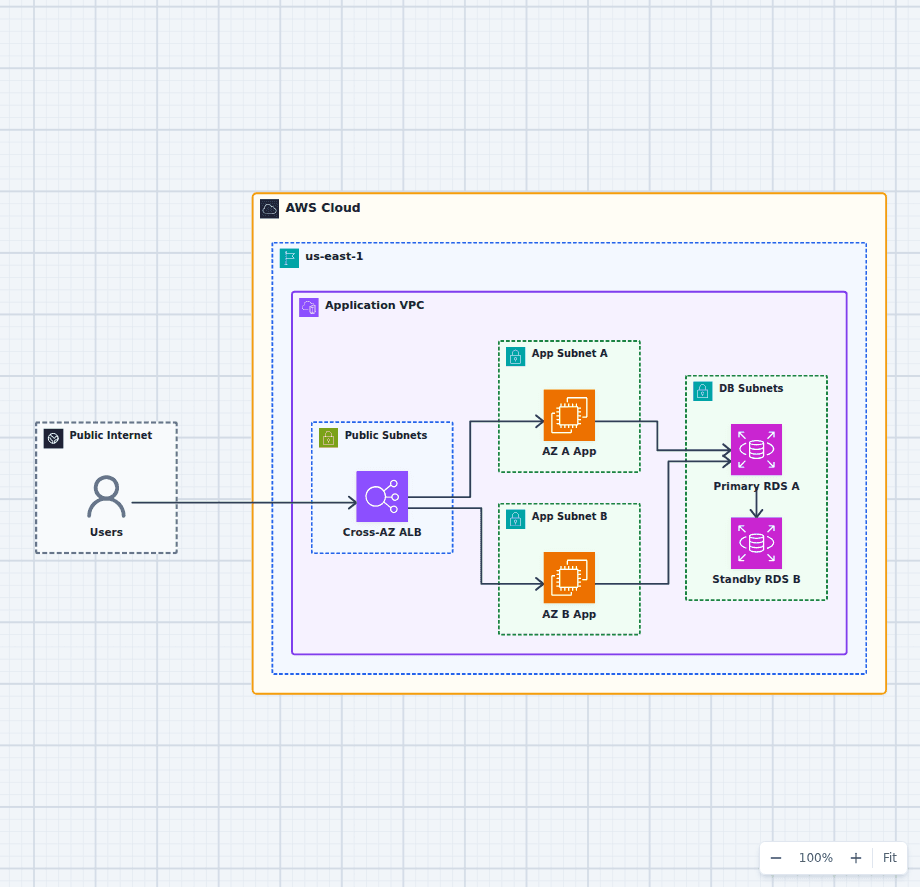
An AWS Application That Survives an Availability Zone Failure
This architecture focuses on one failure question: what happens when an entire Availability Zone becomes unavailable? Healthy application capacity remains in the other zone, the load balancer removes failed targets, and RDS can promote its synchronous standby.
Explore the architecture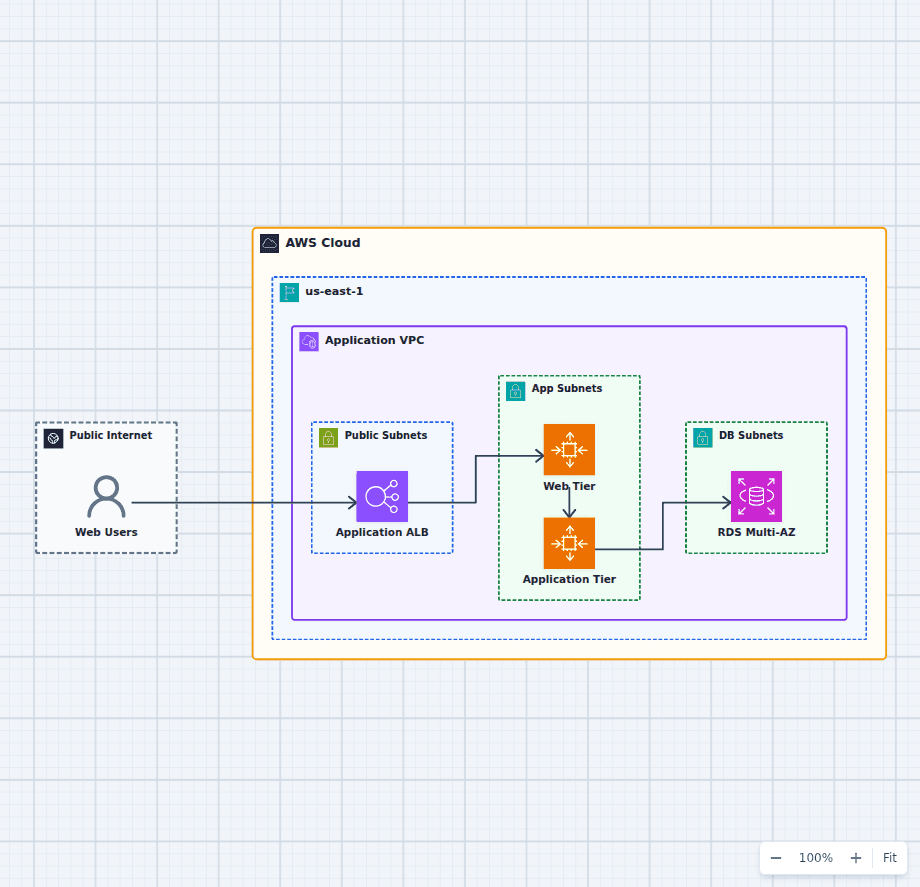
Highly Available Three-Tier Web Application on AWS
This starter architecture separates ingress, presentation, application logic, and relational data so each tier can fail and scale independently. It is a practical baseline for teams moving a conventional web application onto AWS without collapsing every responsibility into one server.
Explore the architecture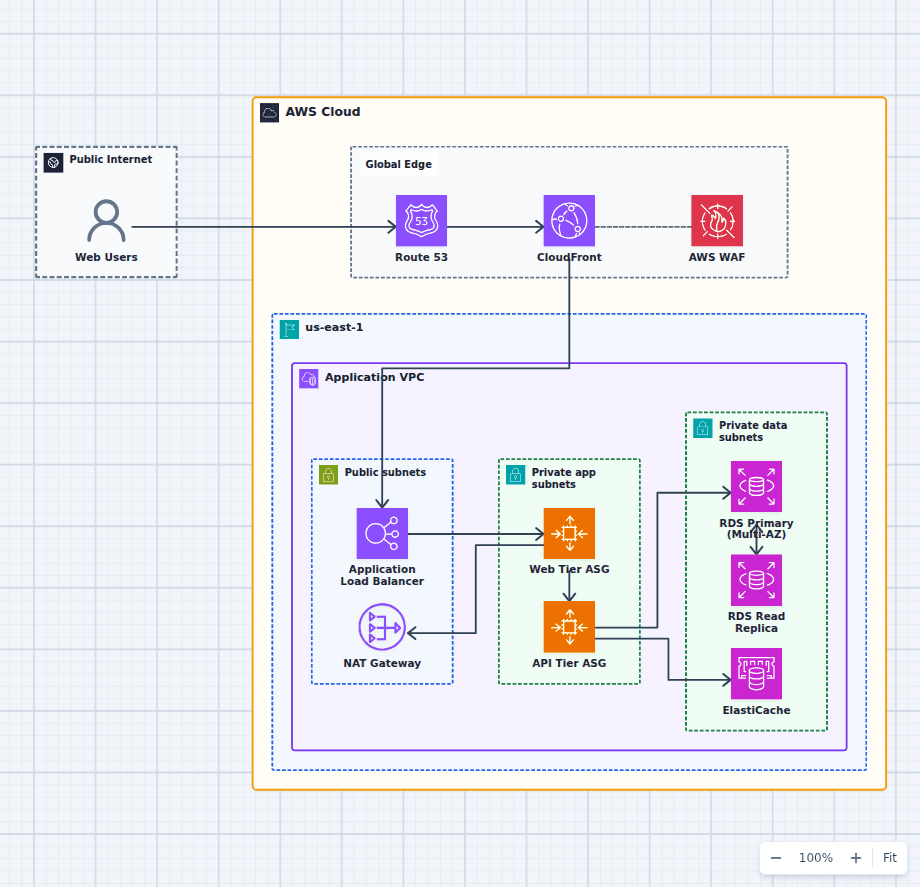
Production-Grade Highly Available Web Platform on AWS
This reference expands the three-tier baseline with a global edge, separate scaling domains, caching, read scaling, private egress, secrets, backups, and operations. It is intended for teams evaluating a conventional production web platform rather than a minimal learning diagram.
Explore the architectureFrom reference to working draft
Adapt this architecture with your AWS AI Agent
Start from the exact diagram in this guide. Change requirements, challenge a decision, or ask what fails first, while keeping the architecture editable.