
Containerized Web Service with Amazon ECS and Fargate
Global edge with WAF, an ALB into a private Fargate service, Multi-AZ RDS and ElastiCache data stores, ECR images, and Secrets Manager.
Open editable diagramArchitecture diagram
Edit this exact diagram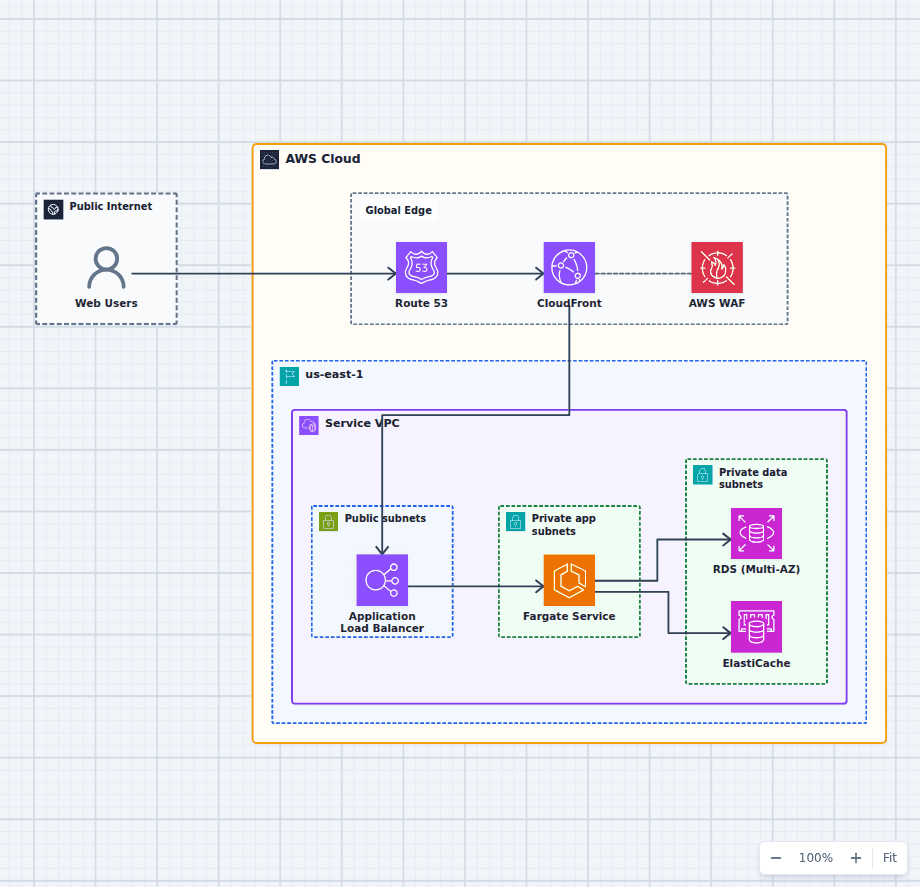 Open on the canvas
Amazon ECS Fargate web architecture diagram with CloudFront, WAF, ALB, private Fargate tasks, RDS, ElastiCache, ECR, and Secrets Manager. The image links to a fully editable BuildPlane starter.
Overview
Amazon Route 53, CloudFront, and AWS WAF form the public edge before traffic reaches a cross-zone Application Load Balancer. The load balancer routes requests to an Amazon ECS service running Fargate tasks in private subnets. Amazon RDS and ElastiCache provide application state, while Amazon ECR and Secrets Manager supply container images and runtime credentials. Fargate is what makes this different from a classic ECS deployment: there is no EC2 instance fleet to size, patch, or scale, because each task is billed for the vCPU and memory it requests and is placed on infrastructure AWS manages.
Components
- Global Edge: Route 53, CloudFront, and WAF handle DNS, caching, and protection.
- VPC Networking: Public subnets host the ALB; private subnets isolate the tasks and data.
- Containers: A Fargate service scales by target tracking across Availability Zones with no host fleet to manage.
- Data Layer: A Multi-AZ RDS instance and ElastiCache separate durable writes from hot reads.
- Images + Config: ECR supplies scanned images and Secrets Manager injects credentials over the private subnets.
Traffic Flow
- Users resolve the domain via Route 53 and reach CloudFront, which forwards dynamic traffic after WAF.
- CloudFront routes to the ALB, which balances requests across the Fargate service.
- The service reads from ElastiCache and writes to the Multi-AZ RDS instance.
- Tasks pull images from ECR and read secrets from Secrets Manager over the private subnets.
- Auto scaling adjusts task count as load changes.
Customize First
- Set task sizes, service auto-scaling targets, and desired counts for your traffic profile.
- Split into web and worker services, or add service discovery / App Mesh, as your app grows.
- Introduce blue/green deployments and image-scan gates in your delivery pipeline.
Related AWS guides
Understand the decisions behind this diagram
Use these practical explanations to compare services, failure boundaries, and operating tradeoffs before adapting the architecture.
Cost Optimization
How to Reduce EC2 Costs Without Making Production Fragile
The biggest EC2 savings rarely come from one discount. They come from removing idle capacity, matching commitments to a stable baseline, and scaling the rest safely.
Read the guideNetworking
ALB vs NLB: How to Choose the Right AWS Load Balancer
ALB understands web requests. NLB moves network connections with very low overhead. The right choice follows from the protocol and routing behavior your application needs.
Read the guideArchitecture
EC2 vs Lambda vs Fargate: Choosing Compute on AWS
Choose EC2 for control, Lambda for event-driven units of work, and Fargate for managed container capacity. Real systems often use more than one.
Read the guideDesign rationale
Decisions that shape this architecture
Fargate removes the host fleet, not the sizing decision
With Fargate there is no EC2 instance to patch, scale, or bin-pack, and no shared kernel between tasks. What remains is choosing the vCPU and memory per task, and those come from a fixed matrix rather than a free choice: memory options are tied to the CPU size selected. Over-requesting is the most common waste in a Fargate bill, because you pay for what the task requests, not what it uses. Right-size from actual Container Insights metrics rather than from the first value that ran without crashing.
The load balancer is the only public entry
Tasks run in private subnets with no public IP and accept traffic only from the load balancer security group. The ALB spans at least two Availability Zones, which is both a requirement of the service and the mechanism that lets a zone fail without taking the service down. Target group health checks decide which tasks receive traffic, and the deregistration delay decides how gracefully in-flight requests finish during a deployment.
CloudFront and WAF belong at the edge, not in front of everything
CloudFront terminates TLS close to the user, caches static responses, and absorbs a large share of traffic before it reaches the origin. AWS WAF attaches there to filter common exploits and apply rate limits. This pairing is worthwhile because there is a public HTTP entry point taking untrusted traffic. AWS WAF can also be attached to an internal Application Load Balancer, and that is worth doing when the callers are genuinely untrusted, but on an internal service reached only by your own components it adds per-request cost and latency for a threat model the network already handles.
Secrets are fetched at task start, never baked into the image
The task definition references Secrets Manager or Parameter Store, and the ECS agent injects the value as an environment variable at launch using the task execution role. The image stays free of credentials, so pushing it to ECR does not distribute secrets, and rotating a secret does not require a rebuild. Keep the execution role, which pulls the image and the secret, separate from the task role, which is what the application code uses at runtime.
Scale on a signal that reflects queueing, not just CPU
Service auto scaling on CPU is the default and is often the wrong signal for a web service, because a request-bound application can be slow while its CPU is idle. ALB request count per target scales on actual demand, and target tracking on that metric responds more faithfully. Fargate task startup takes tens of seconds including image pull and health check passes, so set the scaling cooldown and the health check grace period with that in mind.
ElastiCache absorbs read pressure that would otherwise hit RDS
The cache sits between the application and the database for session state, computed results, and hot reads. It is also the component most likely to hide a problem: an application that only performs acceptably with a warm cache will fail on a cold start or a cache node replacement. Measure the database under a cold cache at least once so you know whether the cache is an optimization or a dependency.
Before production
Operational checks
Right-size task vCPU and memory from Container Insights data rather than from the first value that ran.
Scale on ALB request count per target, or a queue depth, rather than CPU alone.
Set the health check grace period longer than real task startup so ECS does not kill tasks that are still booting.
Enable ECR image scanning and pin image tags by digest so a deployment is reproducible.
Separate the task execution role from the task role, and scope each to what it actually needs.
Configure ALB deregistration delay and container stop timeout so in-flight requests finish during deployments.
Run RDS Multi-AZ and confirm the failover path is exercised, not just configured.
Send container logs to CloudWatch with a retention period set, since the default never expires.
Use VPC endpoints for ECR, Secrets Manager, and CloudWatch so task startup traffic does not traverse the NAT gateway.
Scope and tradeoffs
What this diagram does not solve
Fargate costs more per unit of compute than EC2
You pay a premium for not managing hosts. For steady, predictable, high-utilization workloads, an EC2 capacity provider or Compute Savings Plans close much of the gap. For variable or modest workloads, the operational saving usually outweighs the difference.
Startup time is tens of seconds, not milliseconds
Provisioning, image pull, container start, and health checks all take time. Fargate does not suit workloads that need to scale from zero within a request, which is the case Lambda handles well.
NAT gateway data charges are easy to miss
Private tasks pulling images and calling AWS APIs through a NAT gateway pay a per-gigabyte processing charge on every pull. VPC endpoints for ECR, S3, Secrets Manager, and CloudWatch remove most of that traffic and often pay for themselves quickly.
Single Region, and no CI/CD pipeline shown
This diagram is one Region with no cross-Region failover, and it stops at the running service. The CI/CD pipeline for ECS Fargate architecture in this library covers how images get built and deployed into it.
Common questions
Frequently asked questions
What is AWS Fargate?
A serverless compute engine for containers. You define how much vCPU and memory a task needs, and AWS provisions and manages the underlying infrastructure. There is no EC2 instance to patch, scale, or bin-pack, and each task runs isolated rather than sharing a kernel with its neighbours.
Fargate or Lambda for a web service?
Lambda suits short, bursty, event-driven work and scales from zero, at the cost of a 15 minute execution limit, a cold-start tail, and packaging constraints. Fargate suits long-running processes, large dependencies, existing container images, and frameworks that expect a persistent process, at the cost of paying for a running task even when idle. If the application is already a container and serves sustained HTTP traffic, Fargate is usually the simpler fit.
Fargate or EC2 launch type for ECS?
Fargate when you would rather not operate hosts and your utilization is variable. EC2 when you need GPUs, specific instance families, very high sustained utilization where the per-unit price matters, or control over the host itself. The same ECS service definitions work with either through capacity providers, so this is not a one-way door.
Do Fargate tasks need public subnets?
No, and they should not use them. Tasks run in private subnets and receive traffic through the load balancer. They need outbound access to pull images and reach AWS APIs, which comes from a NAT gateway or, more cheaply, from VPC endpoints for ECR, S3, Secrets Manager, and CloudWatch.
How does an ECS service scale?
Application Auto Scaling adjusts the desired task count against a target metric. Target tracking on ALB request count per target usually tracks real demand better than CPU utilization, because a request-bound application can be slow while its CPU is idle. Allow for task startup time when setting cooldowns.
How are secrets provided to a container?
Through the task definition, which references Secrets Manager or SSM Parameter Store by ARN. The ECS agent resolves the value at task start using the task execution role and injects it as an environment variable, so credentials never enter the image or the repository.
Should I use Fargate or EKS?
ECS with Fargate is simpler and has no control-plane concepts to learn. Choose EKS when you need the Kubernetes ecosystem, portability across clouds, or team expertise that is already Kubernetes-shaped. For a single web service, ECS is usually less machinery for the same result.
Keep exploring
Related AWS architectures
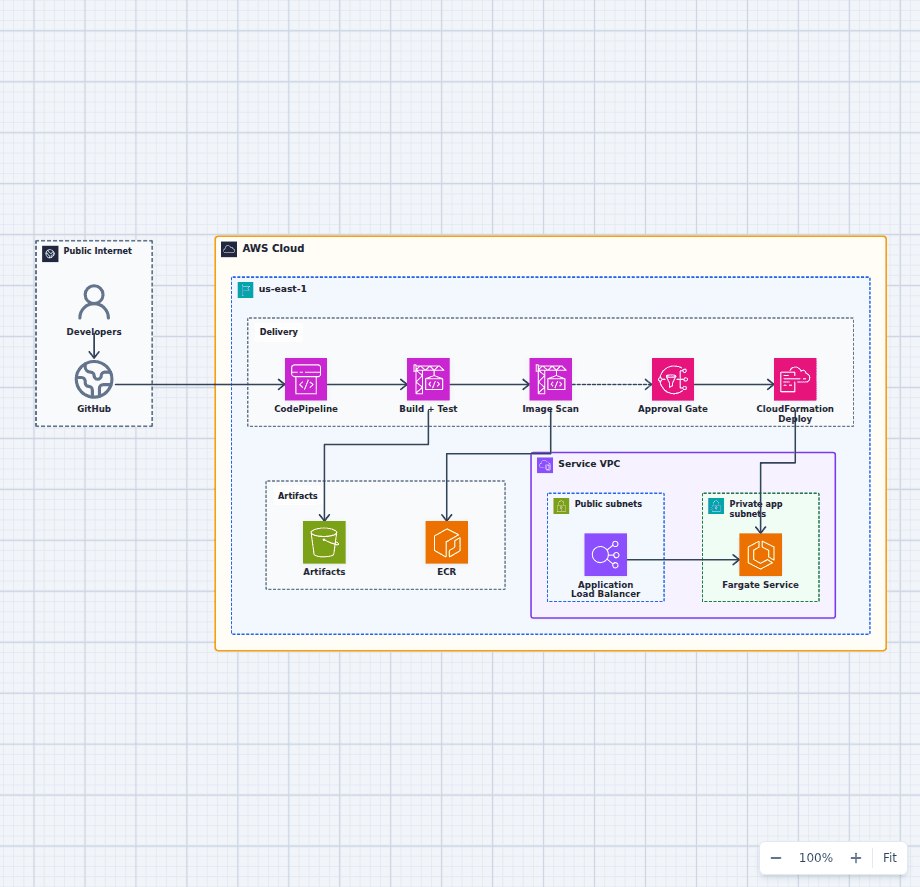
CI/CD Pipeline to Amazon ECS Fargate
This delivery architecture turns a source change into a tested, scanned, approved, and deployed Fargate release. It keeps build artifacts and container images distinct, makes the production approval visible, and delegates infrastructure updates to CloudFormation.
Explore the architecture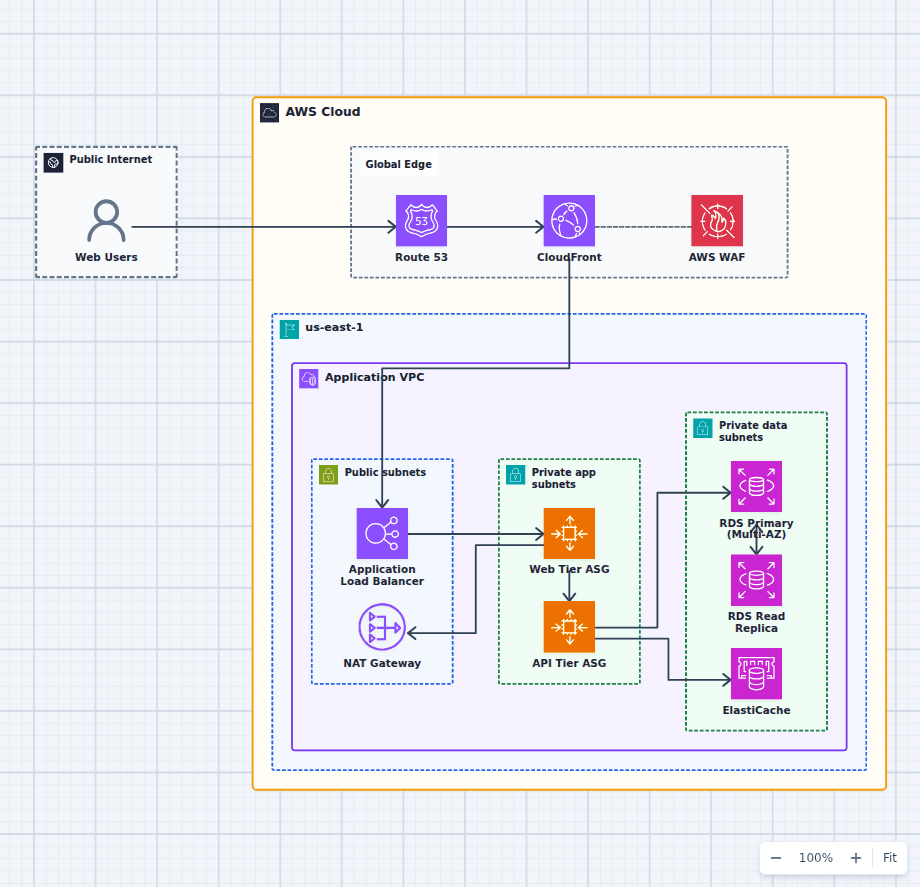
Production-Grade Highly Available Web Platform on AWS
This reference expands the three-tier baseline with a global edge, separate scaling domains, caching, read scaling, private egress, secrets, backups, and operations. It is intended for teams evaluating a conventional production web platform rather than a minimal learning diagram.
Explore the architecture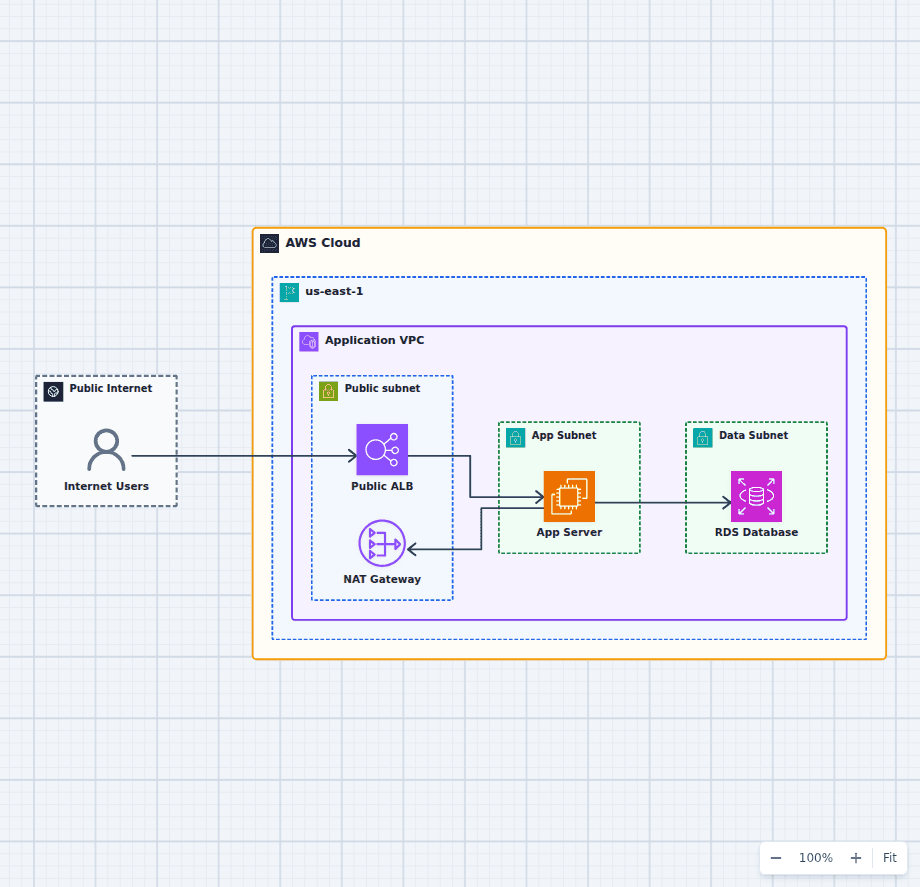
Public and Private Subnets in an AWS VPC
This VPC pattern makes exposure decisions explicit and auditable. The load balancer and NAT gateway are the only resources in the public path; application compute accepts traffic solely from the load balancer security group; the database accepts connections solely from the application security group and has no route to or from the internet. Because every layer is enforced by a route table and a security group reference rather than by convention, you can answer "what is reachable from the internet?" by reading the diagram. Everything else in a production build, such as a second Availability Zone, VPC endpoints, and flow logs, attaches to this skeleton without changing it.
Explore the architectureFrom reference to working draft
Adapt this architecture with your AWS AI Agent
Start from the exact diagram in this guide. Change requirements, challenge a decision, or ask what fails first, while keeping the architecture editable.