
CI/CD Pipeline to Amazon ECS Fargate
Source-triggered CodePipeline with CodeBuild build and image-scan stages, S3 artifacts, ECR, a manual approval gate, and CloudFormation deployment to a private Fargate service behind an ALB.
Open editable diagramArchitecture diagram
Edit this exact diagram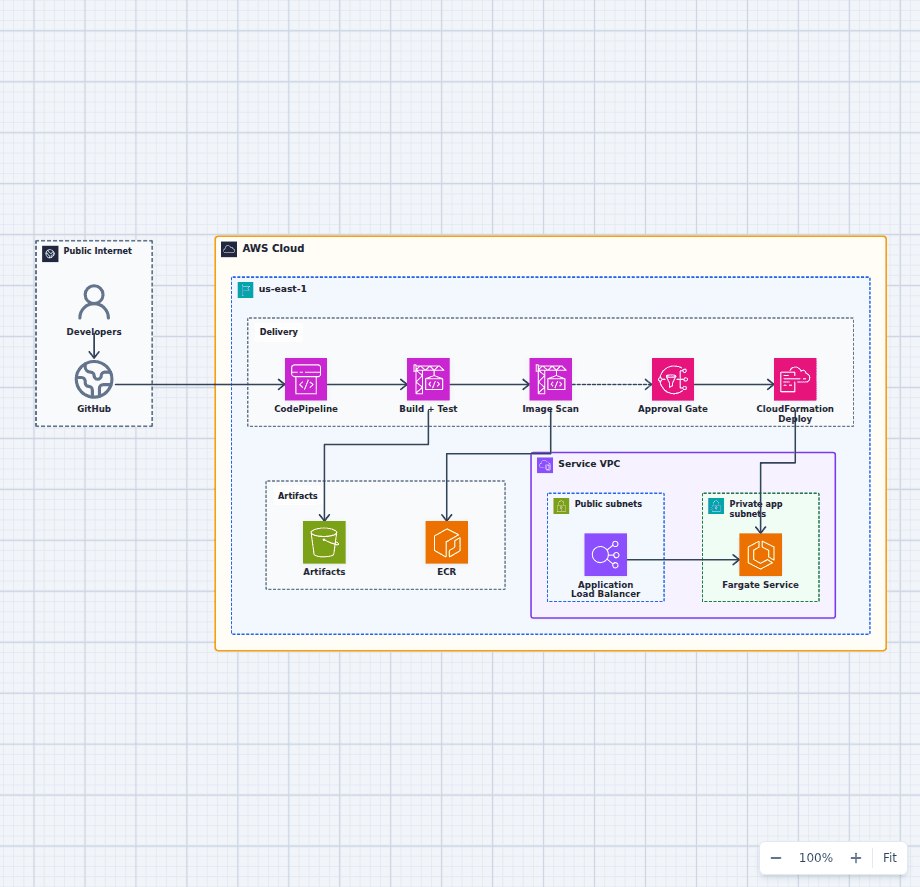 Open on the canvas
AWS CI/CD pipeline architecture diagram from GitHub through CodePipeline, CodeBuild, image scanning, ECR, manual approval, CloudFormation, and ECS Fargate. The image links to a fully editable BuildPlane starter.
Overview
A GitHub push starts AWS CodePipeline, which uses CodeBuild to build and test the application before storing a scanned container image in Amazon ECR and deployment artifacts in Amazon S3. A manual approval gate controls promotion. AWS CloudFormation then deploys the release to an ECS Fargate service behind an Application Load Balancer.
Components
- Source: A GitHub push starts the pipeline; developers also act as release approvers.
- Delivery: CodePipeline sequences build, image scan, approval, and deploy stages.
- Artifacts: S3 holds build artifacts and pipeline state; ECR holds scanned, tagged images.
- Runtime: CloudFormation updates the Fargate service, which serves traffic behind an ALB.
- Approval: An SNS-backed manual gate pauses the pipeline before the production deploy.
Delivery Flow
- A developer pushes to GitHub, triggering CodePipeline.
- CodeBuild compiles and tests, then the scan stage promotes the image to ECR and artifacts to S3.
- The pipeline notifies approvers and waits at the manual approval gate.
- On approval, CloudFormation deploys the new task definition to the Fargate service.
- The ALB routes traffic to the updated service.
Customize First
- Add blue/green or canary deployment with CodeDeploy and automated rollback alarms.
- Insert integration/e2e test stages and enforce image-scan severity gates.
- Parameterize per-environment (staging/prod) pipelines and cross-account deploy roles.
Related AWS guides
Understand the decisions behind this diagram
Use these practical explanations to compare services, failure boundaries, and operating tradeoffs before adapting the architecture.
Design rationale
Decisions that shape this architecture
Promote an immutable image
Build and scan the image once, store it in ECR, and deploy the approved digest. Rebuilding between environments can produce a different artifact than the one that passed tests.
Keep deployment configuration in code
CloudFormation applies the task definition and service changes through a reviewable, repeatable contract instead of console edits.
Place approval after evidence exists
Approvers should see test, scan, and staging evidence before promoting the release. Approval without useful evidence becomes ceremony rather than risk control.
Before production
Operational checks
Fail the pipeline on agreed vulnerability severity and policy violations.
Run integration tests against the same image digest intended for production.
Configure deployment rollback from health and application alarms.
Use separate roles and accounts for build, artifact, and production deployment access.
Scope and tradeoffs
What this diagram does not solve
The starter uses a manual production gate
High-confidence teams may prefer automated canary analysis. Regulated or high-impact environments may require additional approval and evidence controls.
A rolling deployment is not always enough
Add CodeDeploy blue/green or canary behavior when rollback speed, connection draining, and pre-traffic validation are important.
Common questions
Frequently asked questions
Why store images in ECR and artifacts in S3?
ECR is the container image registry. S3 stores pipeline artifacts such as packaged templates, manifests, reports, and intermediate build outputs.
Should the pipeline deploy the latest image tag?
No. Deploy a versioned tag or digest so the released artifact is immutable, auditable, and identical to the artifact that passed validation.
How can this pipeline support multiple environments?
Promote one immutable artifact through environment-specific stages and roles, with separate configuration, tests, approvals, and deployment targets.
Keep exploring
Related AWS architectures
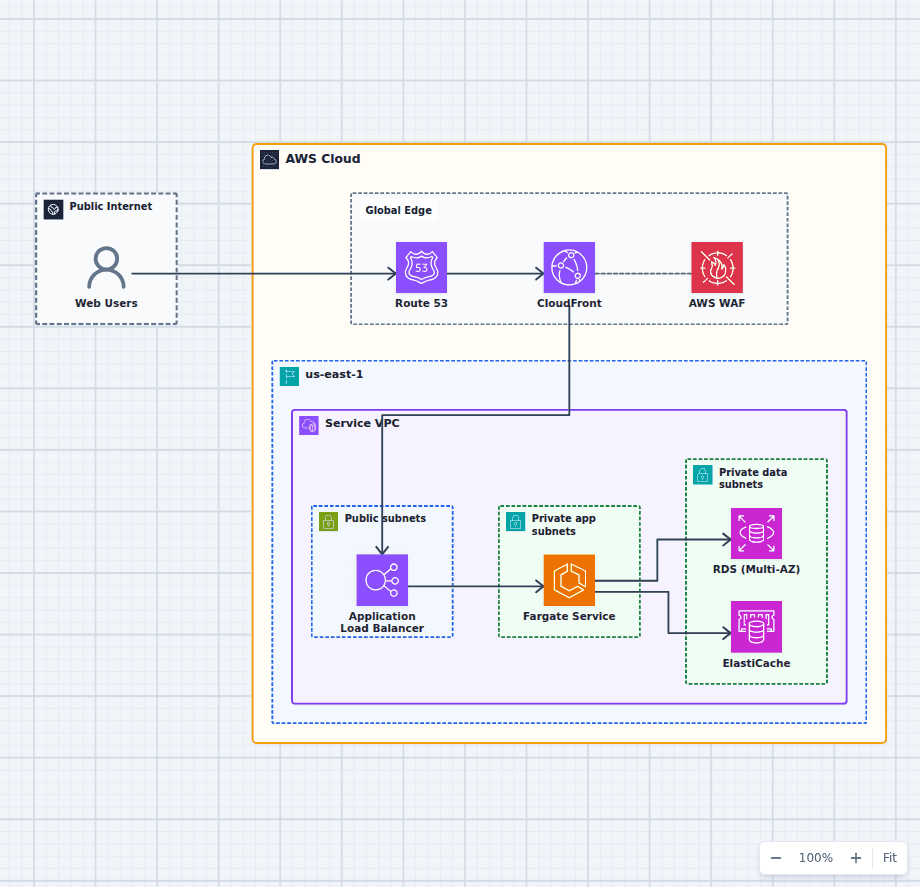
Containerized Web Service with Amazon ECS and Fargate
This architecture runs a production container service without an EC2 host fleet. A protected global edge forwards to a Multi-AZ load balancer, Fargate tasks stay private and reach data services over the VPC network, and managed image, secret, and observability services support the runtime. Every component here is one an ordinary web application needs eventually, which is why this shape is a common destination for teams outgrowing a single server and for teams who found Lambda too constraining.
Explore the architecture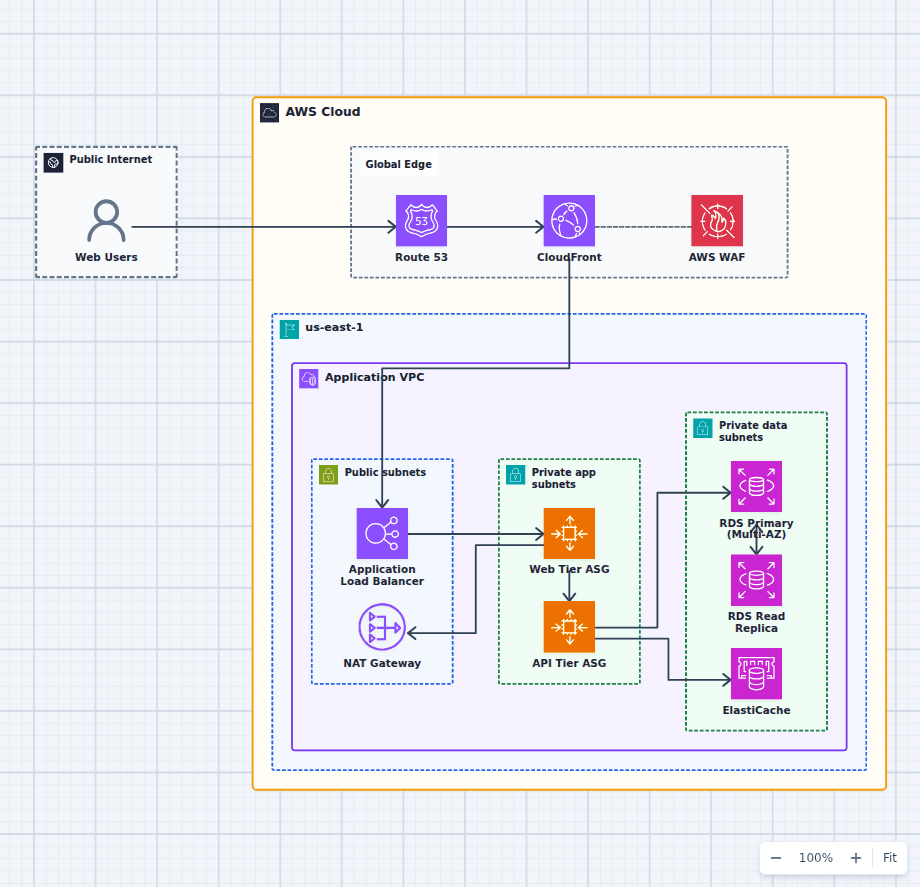
Production-Grade Highly Available Web Platform on AWS
This reference expands the three-tier baseline with a global edge, separate scaling domains, caching, read scaling, private egress, secrets, backups, and operations. It is intended for teams evaluating a conventional production web platform rather than a minimal learning diagram.
Explore the architecture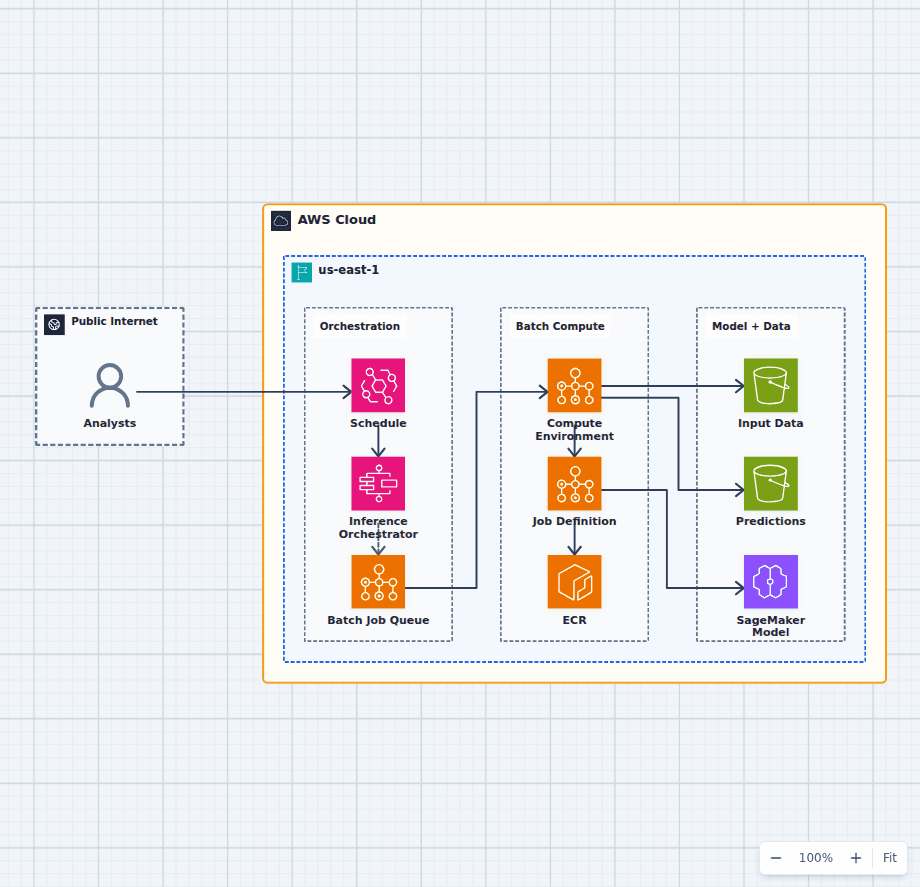
Machine Learning Batch Inference Platform on AWS
This architecture runs scheduled or on-demand scoring as a durable workflow. Step Functions coordinates jobs, AWS Batch supplies container compute, ECR pins the runtime, an approved SageMaker model supplies the artifact, and S3 preserves inputs and predictions.
Explore the architectureFrom reference to working draft
Adapt this architecture with your AWS AI Agent
Start from the exact diagram in this guide. Change requirements, challenge a decision, or ask what fails first, while keeping the architecture editable.