
Amazon EBS vs Amazon EFS
Compare low-latency block volumes attached to compute with a regional shared file system mounted by many instances and tasks.
Open editable diagramArchitecture diagram
Edit this exact diagram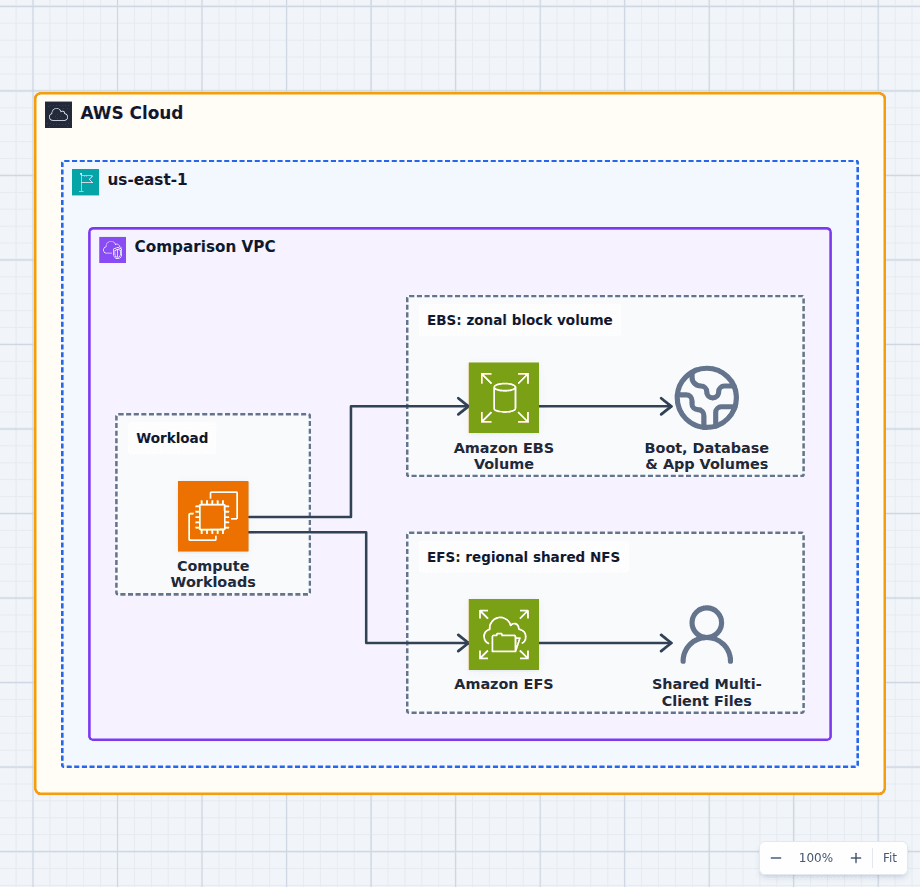 Open on the canvas
Amazon EBS vs EFS architecture diagram comparing attached block volumes for compute with a shared regional NFS filesystem for many clients. The image links to a fully editable BuildPlane starter.
Overview
Amazon EBS provides block volumes attached to compute in one Availability Zone. Amazon EFS provides a regional NFS file system that many clients can mount concurrently. EBS behaves like a disk and suits boot volumes, databases, and latency-sensitive single-host filesystems. EFS behaves like shared network storage and suits common directories across a fleet.
Components
- Shared decision context: Instances and containers deciding between attached block storage and a shared file system.
- Amazon EBS Volume: Low-latency block storage attached to compute in one Availability Zone. Filesystems and databases that need block-device performance and one primary attachment model.
- Amazon EFS: Elastic shared file storage mounted concurrently through regional VPC mount targets. Common directories and content accessed by many instances, tasks, or functions.
Comparison Flow
- Compute Workloads can enter the Amazon EBS Volume path and continue to Boot, Database & App Volumes.
- Compute Workloads can instead enter the Amazon EFS path and continue to Shared Multi-Client Files.
- Choose the path whose operating model and constraints match the workload, then delete the unused branch in the editable diagram.
Customize First
- Choose EBS volume type and provisioned performance from measured I/O.
- Choose EFS performance and throughput modes from concurrency and metadata load.
- Test failover behavior instead of assuming regional storage makes the application regional.
Side-by-side decision
Amazon EBS vs Amazon EFS
Use EBS for disk-like block storage attached to compute in one Availability Zone. Use EFS when multiple clients across zones need one shared POSIX filesystem.
| Decision factor | Amazon EBS | Amazon EFS |
|---|---|---|
| Storage type | Block device | Managed NFS file system |
| Scope | Volume in one Availability Zone | Regional filesystem with zonal mount targets |
| Clients | Normally one primary instance; Multi-Attach is specialized | Many concurrent Linux clients |
| Performance | Volume-type IOPS and throughput controls | Filesystem performance and throughput modes |
| Recovery | Snapshots and application replication | Regional data plus backup and application recovery |
| Typical use | Boot, database, transactional app volume | Shared content, home dirs, CMS, common assets |
Related AWS guides
Understand the decisions behind this diagram
Use these practical explanations to compare services, failure boundaries, and operating tradeoffs before adapting the architecture.
Design rationale
Decisions that shape this architecture
Attachment topology decides the baseline
EBS lives in one Availability Zone with its attached compute, so cross-zone recovery uses snapshots, replicas, or application failover. EFS exposes mount targets across zones so many clients can see one namespace. That does not automatically make the application highly available.
Block performance is explicit
EBS volume types expose IOPS and throughput characteristics that can be tuned for databases and latency-sensitive filesystems. EFS performance depends on file-system mode, throughput mode, workload concurrency, and metadata patterns.
Shared writable state changes deployment behavior
EFS can simplify applications that expect shared files, but it can also become a contention and failure dependency for every replica. Prefer object storage or independent local state when the application does not truly need a mutable shared namespace.
Before production
Operational checks
Benchmark IOPS, throughput, latency, metadata operations, and burst behavior.
Test instance or Availability Zone recovery without assuming storage moves automatically.
Configure snapshots or AWS Backup and perform restore drills.
Review encryption, mount permissions, security groups, and filesystem access points.
Scope and tradeoffs
What this diagram does not solve
Multi-Attach is not a generic shared filesystem
Supported EBS Multi-Attach configurations require compatible volume types, instances, Availability Zone placement, and cluster-aware software. It does not turn a normal filesystem into safe multi-writer storage.
Regional EFS still needs resilient clients
A regional file system can remain available while an application tier fails. Compute must run across zones, use local mount targets, and reconnect correctly for that durability to become application availability.
Common questions
Frequently asked questions
Can EBS be attached across Availability Zones?
No. An EBS volume belongs to one Availability Zone. Create a snapshot or application-level replica and restore or fail over into another zone.
Can multiple EC2 instances mount EFS?
Yes. EFS is built for many NFS clients to mount the same filesystem concurrently, subject to networking, permissions, and workload performance.
Which is faster, EBS or EFS?
EBS usually provides lower and more controllable block latency for an attached workload. EFS provides shared file access and scales differently. Benchmark the actual I/O and metadata pattern.
Keep exploring
Related AWS architectures
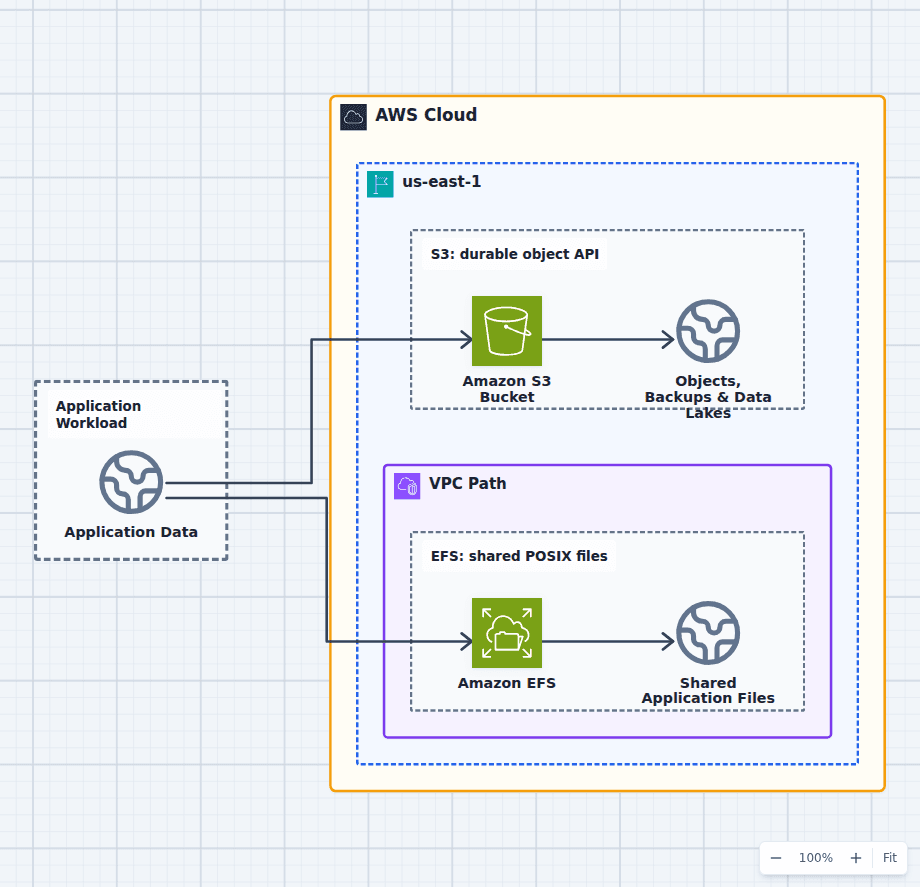
Amazon S3 vs Amazon EFS
Choose S3 for static assets, backups, logs, archives, artifacts, media, data lakes, and applications designed around object APIs. Choose EFS for shared Linux directories, content management, home directories, lift-and-shift file dependencies, and workloads that need many clients to mount one file system. Do not mount an object store abstraction merely to avoid changing code without testing semantics and performance.
Explore the architecture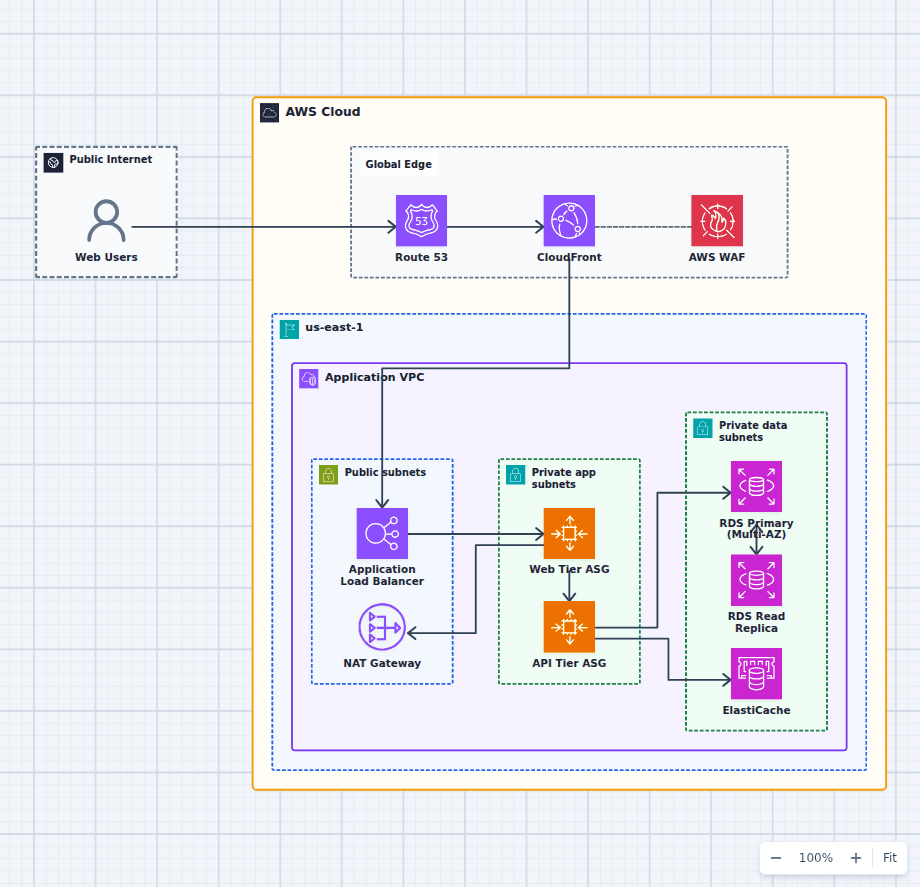
Production-Grade Highly Available Web Platform on AWS
This reference expands the three-tier baseline with a global edge, separate scaling domains, caching, read scaling, private egress, secrets, backups, and operations. It is intended for teams evaluating a conventional production web platform rather than a minimal learning diagram.
Explore the architecture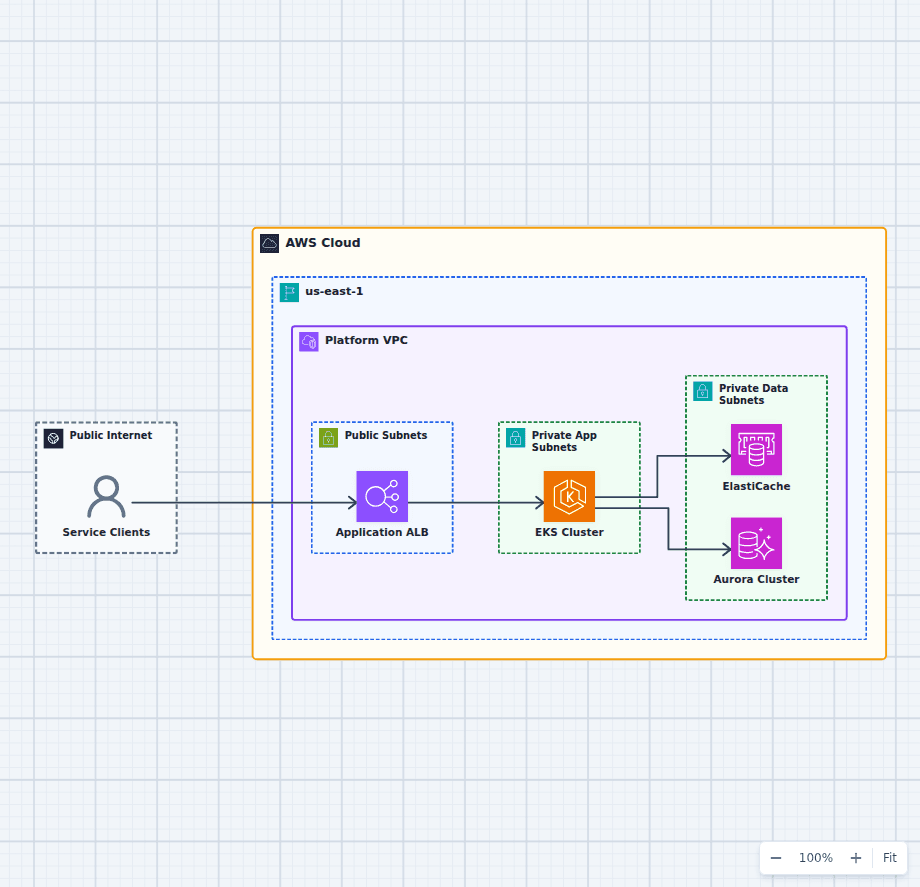
Amazon EKS Microservices Platform
This Kubernetes architecture makes the primary operating boundaries visible without drawing every cluster object. Public ingress, private compute, cache, and relational state are separated so platform teams can reason about scaling, availability, deployment, and data ownership independently.
Explore the architectureFrom reference to working draft
Adapt this architecture with your AWS AI Agent
Start from the exact diagram in this guide. Change requirements, challenge a decision, or ask what fails first, while keeping the architecture editable.