
Amazon EKS Microservices Platform
An internet-facing ALB routes into an EKS microservices cluster backed by ElastiCache and Aurora in private data subnets.
Open editable diagramArchitecture diagram
Edit this exact diagram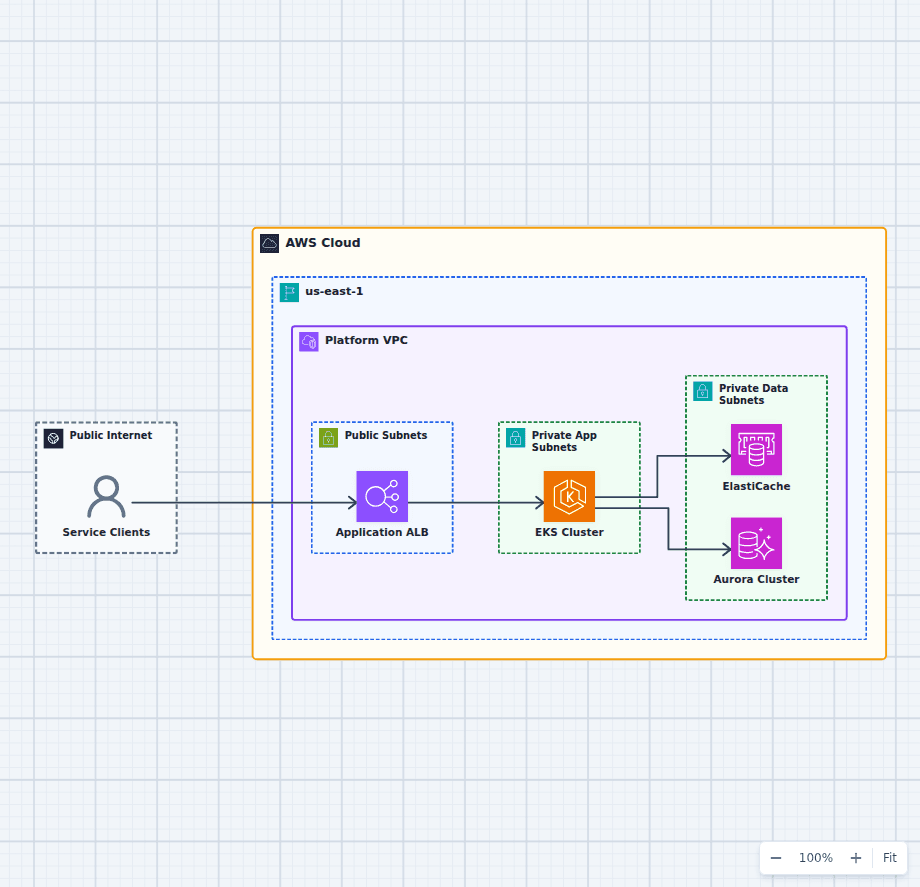 Open on the canvas
Amazon EKS microservices architecture diagram with an Application Load Balancer, Kubernetes cluster, ElastiCache, and Aurora. The image links to a fully editable BuildPlane starter.
Overview
An internet-facing Application Load Balancer accepts client traffic and routes it to microservices running on Amazon EKS in private application subnets. Services use ElastiCache for low-latency hot data and Amazon Aurora for authoritative relational records.
Components
- Application Load Balancer: The ALB terminates public traffic and routes only to healthy Kubernetes ingress targets.
- Amazon EKS: The cluster runs independently deployable services in private application subnets.
- ElastiCache and Aurora: The cache accelerates hot reads while Aurora retains authoritative relational data.
Service Request Flow
- Clients enter through the public Application Load Balancer.
- The ALB routes requests to services running on Amazon EKS in private subnets.
- Services consult ElastiCache for hot data and fall through to Aurora for durable records.
Customize First
- Choose managed node groups, Karpenter, or Fargate from workload scheduling needs.
- Add the AWS Load Balancer Controller, pod autoscaling, and disruption budgets.
- Define database connection pooling and cache invalidation before scaling service replicas.
Related AWS guides
Understand the decisions behind this diagram
Use these practical explanations to compare services, failure boundaries, and operating tradeoffs before adapting the architecture.
Design rationale
Decisions that shape this architecture
Expose one controlled ingress path
The ALB terminates public traffic and forwards only to healthy cluster targets, leaving worker capacity and stateful services without direct public exposure.
Keep service compute private
EKS workloads run behind the load balancer in private subnets, reducing the public attack surface and making outbound access an explicit network decision.
Treat the cache as disposable
ElastiCache accelerates hot reads, but Aurora remains authoritative. Applications must tolerate cache misses and define invalidation from domain behavior.
Before production
Operational checks
Distribute worker capacity and ingress targets across at least two Availability Zones.
Set pod requests, limits, disruption budgets, and autoscaling signals from measured workloads.
Monitor ingress errors, pod restarts, scheduling pressure, cache health, and database saturation.
Test cluster upgrades, node replacement, and database failover before production windows.
Scope and tradeoffs
What this diagram does not solve
The cluster adds an operating platform
EKS reduces control-plane work but still requires ownership for workloads, networking, policy, upgrades, capacity, observability, and incident response.
One cluster is still a shared blast radius
Namespaces and policies provide isolation, but teams with stronger regulatory or availability boundaries may need separate clusters or accounts.
Common questions
Frequently asked questions
Why use an ALB in front of EKS?
An ALB provides managed Layer 7 ingress, TLS termination, health checks, and routing that the AWS Load Balancer Controller can connect to Kubernetes ingress resources.
Should EKS use managed node groups or Fargate?
Choose from workload density, isolation, daemon requirements, startup behavior, cost, and the amount of node lifecycle management the platform team wants to own.
Can the cache be removed?
Yes. Remove ElastiCache when measured latency and database load do not justify the extra consistency and operational complexity.
Keep exploring
Related AWS architectures
Containerized Web Service with Amazon ECS and Fargate
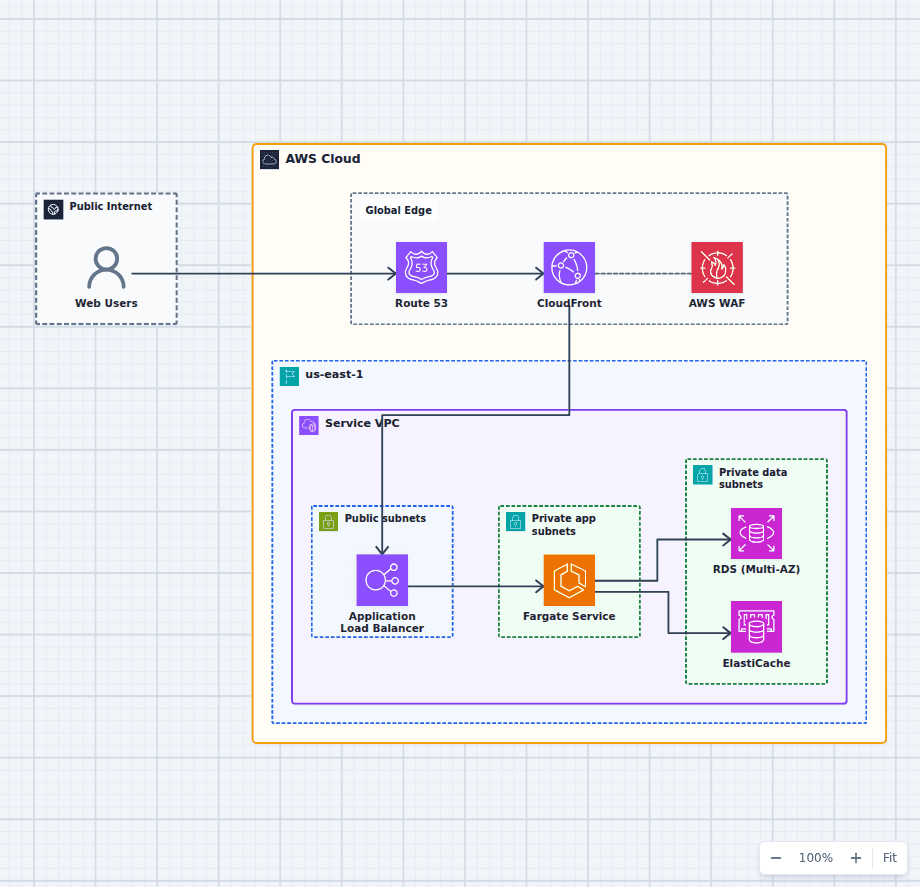
This architecture runs a production container service without an EC2 host fleet. A protected global edge forwards to a Multi-AZ load balancer, Fargate tasks stay private and reach data services over the VPC network, and managed image, secret, and observability services support the runtime. Every component here is one an ordinary web application needs eventually, which is why this shape is a common destination for teams outgrowing a single server and for teams who found Lambda too constraining.
Explore the architecture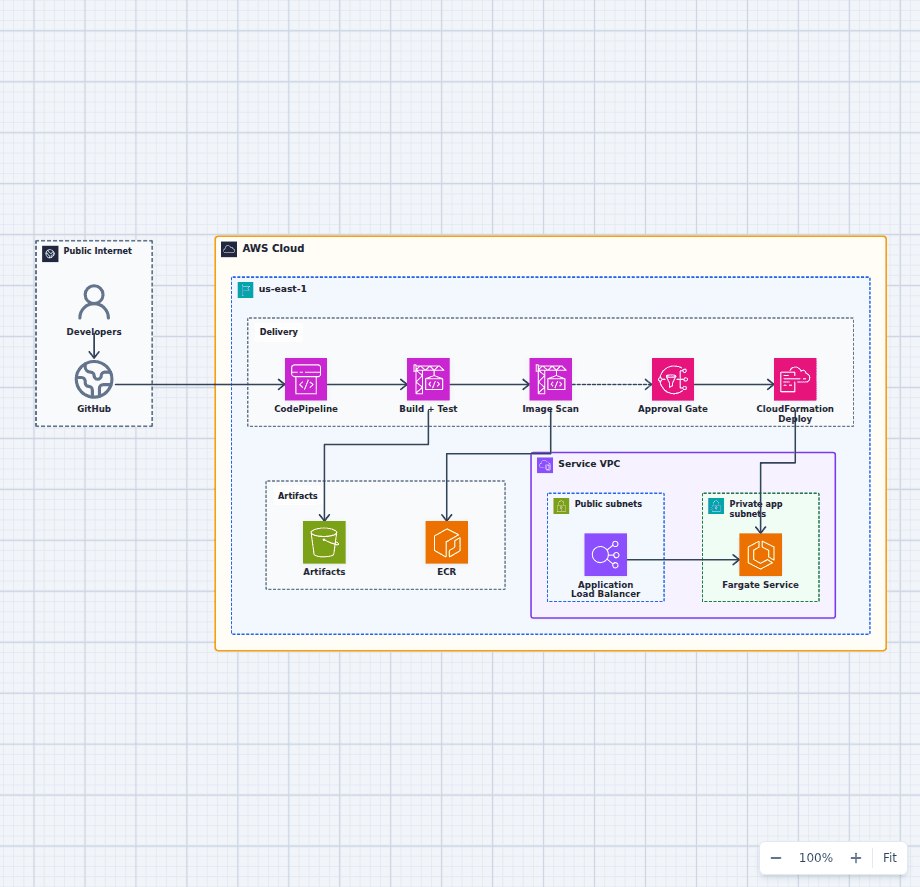
CI/CD Pipeline to Amazon ECS Fargate
This delivery architecture turns a source change into a tested, scanned, approved, and deployed Fargate release. It keeps build artifacts and container images distinct, makes the production approval visible, and delegates infrastructure updates to CloudFormation.
Explore the architecture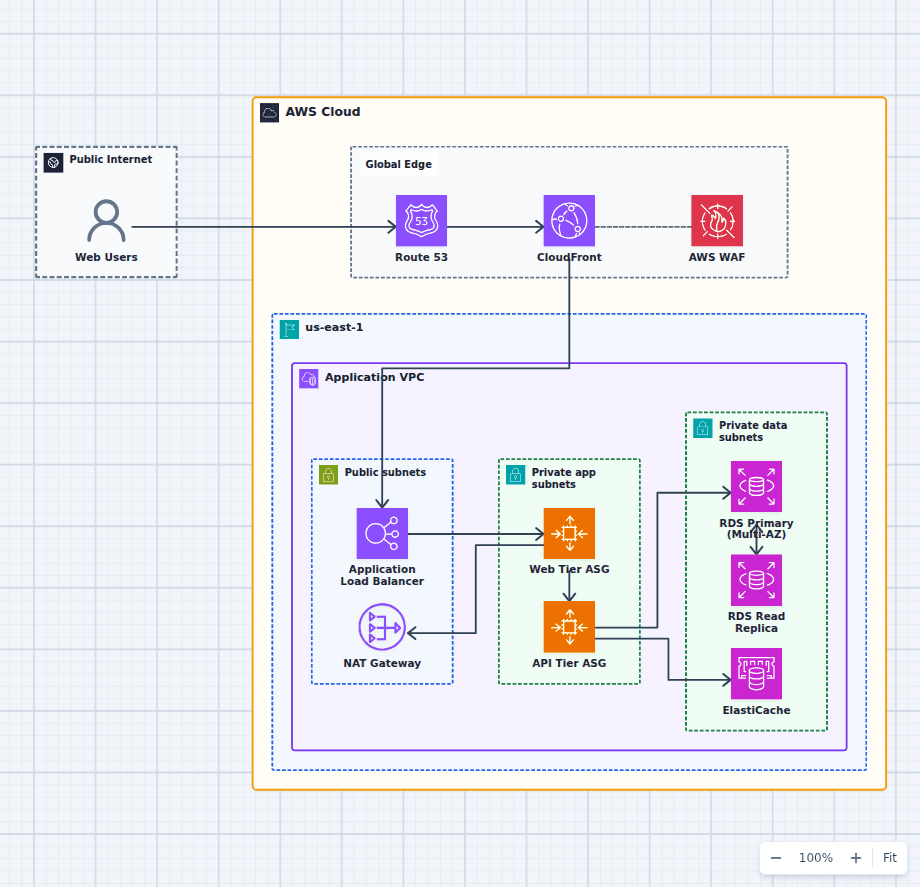
Production-Grade Highly Available Web Platform on AWS
This reference expands the three-tier baseline with a global edge, separate scaling domains, caching, read scaling, private egress, secrets, backups, and operations. It is intended for teams evaluating a conventional production web platform rather than a minimal learning diagram.
Explore the architectureFrom reference to working draft
Adapt this architecture with your AWS AI Agent
Start from the exact diagram in this guide. Change requirements, challenge a decision, or ask what fails first, while keeping the architecture editable.