A VPC is a logically isolated network you control inside an AWS Region. Everything else in this article is a component you place inside it, and almost every AWS networking problem is really a question about one of eight of them: CIDR blocks, subnets, route tables, gateways, security groups, network ACLs, endpoints, and DNS.
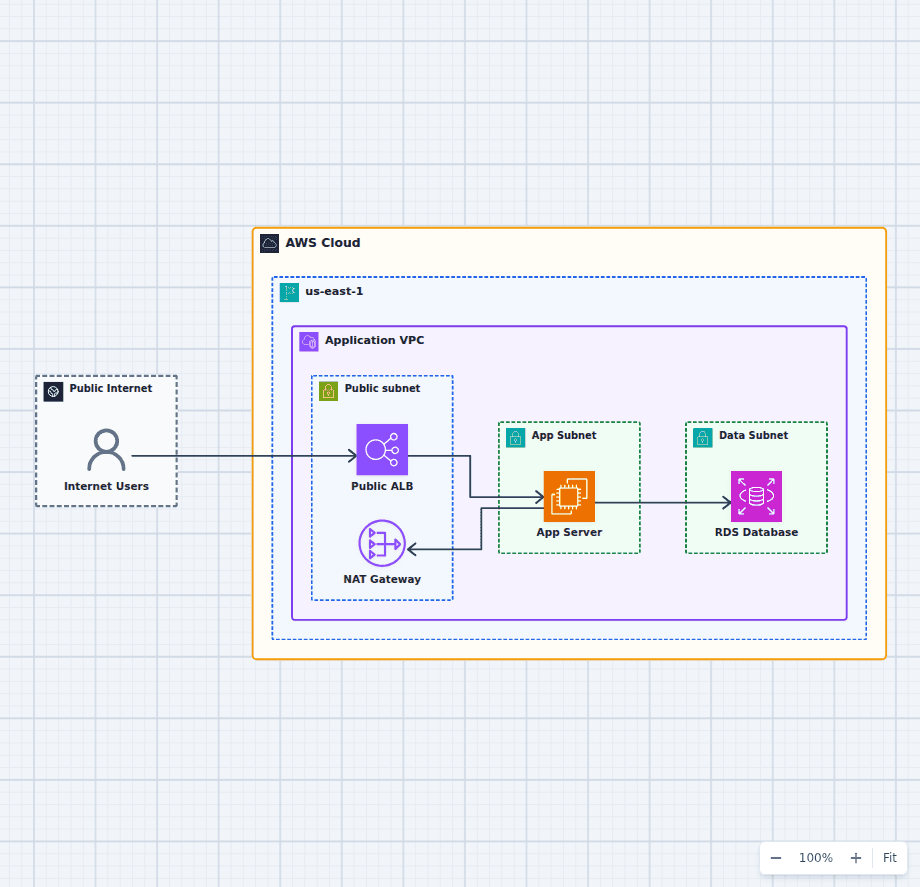
This is a reference for all of them and how they fit together. For the specific question of how public and private subnets differ and why, the public and private subnet architecture covers that in depth with an editable diagram.
Start with the CIDR block, because you cannot undo it
A VPC is defined by an IPv4 CIDR block between /16 and /28. You can add secondary blocks later, but you cannot resize or remove the primary one, and you cannot change it without rebuilding the VPC.
Three rules that prevent the most expensive mistakes:
- Use private address space from RFC 1918: 10.0.0.0/8, 172.16.0.0/12, or 192.168.0.0/16.
- Do not overlap with anything you might ever connect to. Peering, Transit Gateway, VPN, and Direct Connect all refuse to route between overlapping ranges. The default 172.31.0.0/16 of the default VPC collides with a surprising number of corporate networks and other accounts.
- Allocate generously. A /16 gives you 65,536 addresses and costs nothing extra. Teams that carefully allocate a /24 to "keep things tidy" run out when a container platform arrives and consumes an address per task.
AWS reserves five addresses in every subnet: the network address, the VPC router, DNS, one held for future use, and the broadcast address. A /28 therefore yields eleven usable addresses, not sixteen.
Subnets pin address ranges to Availability Zones
A subnet is a slice of the VPC CIDR that exists in exactly one Availability Zone. That single-zone property is what makes subnets the unit of fault isolation: a zone failure takes out the subnets in it and nothing else.
Subnets are not inherently public or private. That distinction comes entirely from the route table, covered next. What a subnet does decide is the zone, the address range, and whether instances launched into it get a public IP automatically, which should be off for anything private.
A production web application typically uses six subnets: public, application, and database in each of two Availability Zones. Two zones is the practical floor, because an Application Load Balancer requires subnets in at least two zones and Amazon RDS requires a DB subnet group that spans at least two.
Route tables decide everything about reachability
Every subnet is associated with exactly one route table, and that association is the single most important fact about the subnet.
A route table contains the local route for the VPC CIDR, which cannot be removed and is what lets subnets talk to each other, plus whatever you add. The destination for 0.0.0.0/0 is what defines the subnet:
- Points at an internet gateway: the subnet is public.
- Points at a NAT gateway: the subnet is private with outbound access.
- Absent entirely: the subnet is fully isolated and reaches only the VPC and any endpoints you attach.
Routes are matched most-specific-first, so a route for 10.0.5.0/24 wins over 0.0.0.0/0 regardless of order. Every VPC also has a main route table that any unassociated subnet inherits by default, which is a common source of accidental exposure. Associate every subnet explicitly so a change to the main table cannot silently alter what a subnet can reach.
The gateways, and what each one actually does
Internet gateway. A horizontally scaled, highly available component attached to the VPC itself. It is bidirectional: with a route to it and a public IP, a resource can both initiate and receive internet connections. There is no charge for the gateway.
NAT gateway. Lives in a public subnet and gives private resources outbound access by translating connections initiated from inside the VPC. It is one-directional by construction, which is exactly the property an internet gateway lacks. It is also a zonal resource, so a single NAT gateway is a single-zone dependency for every private subnet routed to it; production designs place one per Availability Zone. It bills per hour and per gigabyte processed, and it is frequently the largest line item in a VPC.
Egress-only internet gateway. The IPv6 equivalent of a NAT gateway. A NAT gateway handles IPv4 only, so IPv6 workloads that need outbound-only access use this instead.
Virtual private gateway and Transit Gateway. The VPN and hybrid connectivity attachment points. A virtual private gateway terminates a Site-to-Site VPN or Direct Connect on one VPC. A Transit Gateway acts as a regional hub that many VPCs, VPNs, and Direct Connect gateways attach to, which replaces the mesh of peering connections that otherwise grows quadratically. The hybrid network with Transit Gateway diagram shows that topology.
Security groups and network ACLs are not alternatives
Both filter traffic and they behave differently enough that using the wrong one produces confusing results.
| Security group | Network ACL | |
|---|---|---|
| Applies to | An elastic network interface | An entire subnet |
| State | Stateful: return traffic is automatic | Stateless: you must allow both directions |
| Rules | Allow only | Allow and deny |
| Evaluation | All rules evaluated together | Numbered, first match wins |
| Default | Denies all inbound, allows all outbound | Default ACL allows everything |
Security groups do almost all real work, and their most useful feature is that a rule can reference another security group instead of a CIDR range. "Allow port 5432 from the application security group" stays correct as instances come and go, which a CIDR-based rule does not.
Network ACLs are a coarse second layer at the subnet edge. They are genuinely useful for broad denials, such as blocking a specific range, and awkward as a primary control because stateless evaluation means you must remember to allow ephemeral return ports. If you are debugging traffic that a security group appears to permit, check the ACL for exactly that reason.
VPC endpoints keep AWS traffic off the internet
By default, an instance in a private subnet calling Amazon S3 sends that traffic out through the NAT gateway and across the public AWS network. Endpoints change that.
Gateway endpoints exist for Amazon S3 and DynamoDB. They work by adding a prefix-list route to your route table, they carry no hourly or data charge, and they remove that traffic from the NAT path entirely. There is no reason not to create them in a VPC that uses either service.
Interface endpoints, powered by AWS PrivateLink, place an elastic network interface with a private IP in your subnets for most other AWS services. They bill per hour per availability zone and per gigabyte, so the calculation against NAT charges is worth doing, and they are frequently cheaper as well as more private.
DNS behavior is a setting, not a default
Two VPC attributes control name resolution, and both must be enabled for private DNS names to work, which is what most people actually want:
- enableDnsSupport turns on the Amazon-provided DNS resolver at the VPC base address plus two.
- enableDnsHostnames makes instances receive public DNS hostnames.
Interface endpoints and RDS private endpoints depend on these, which is why endpoint resolution failures in a hand-built VPC usually trace back to a disabled attribute rather than to routing.
Route 53 private hosted zones let you resolve your own domain names inside the VPC, and Route 53 Resolver endpoints forward queries between the VPC and an on-premises DNS server in either direction.
Connecting VPCs
Peering is a one-to-one connection between two VPCs, in any account or Region. It is simple and carries no hourly charge, but it is not transitive: if A peers with B and B peers with C, A cannot reach C. Each side must also add routes and open security groups. Peering is right for a small number of VPCs and becomes unmanageable past a handful.
Transit Gateway is the answer past that point. Every VPC attaches once, routing is centralized in route tables on the gateway, and adding the tenth VPC is the same amount of work as adding the second. It bills per attachment-hour and per gigabyte.
PrivateLink solves a different problem: exposing a single service from one VPC to consumers in others without joining the networks at all. Nothing is routed between the VPCs; the consumer gets an interface endpoint that reaches only that service. This is the right choice for a shared internal API, and it avoids the CIDR-overlap constraint entirely.
Observability and limits
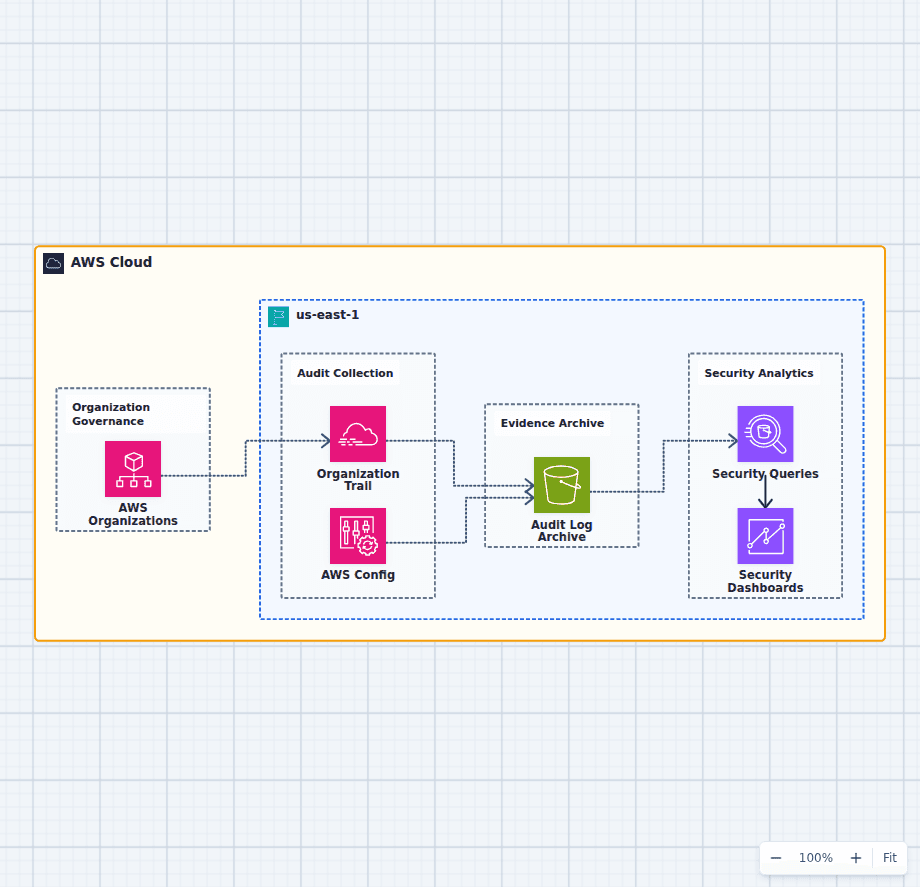
Enable VPC Flow Logs at the VPC level and send them to CloudWatch Logs or S3. They record accepted and rejected connections, and the rejected entries are the fastest way to find a security group or ACL that is blocking traffic during an incident. Flow logs do not capture packet contents; Traffic Mirroring does that for the cases that need it. The centralized security logging diagram shows where these land.
Quotas worth knowing before they surprise you: 5 VPCs per Region by default, 200 subnets per VPC, 200 route tables, 50 routes per route table, and 5 Elastic IPs per Region. All are adjustable, but the request takes time you may not have during a migration.
Putting it together
The shape that satisfies most production requirements: one VPC with a /16, six subnets across two Availability Zones, a public route table with an internet gateway route, one private route table per zone pointing at that zone's NAT gateway, an isolated route table for the database tier, gateway endpoints for S3 and DynamoDB, security groups that reference each other rather than CIDRs, and flow logs enabled.
For the reasoning behind the subnet tiers specifically, see public and private subnets in an AWS VPC. For how this network carries a real application, the production high-availability web platform puts compute, load balancing, and data on top of exactly this layout.