
Amazon SQS vs Amazon Kinesis Data Streams
Compare work queues with ordered replayable event streams for retention, consumer models, throughput, and processing state.
Open editable diagramArchitecture diagram
Edit this exact diagram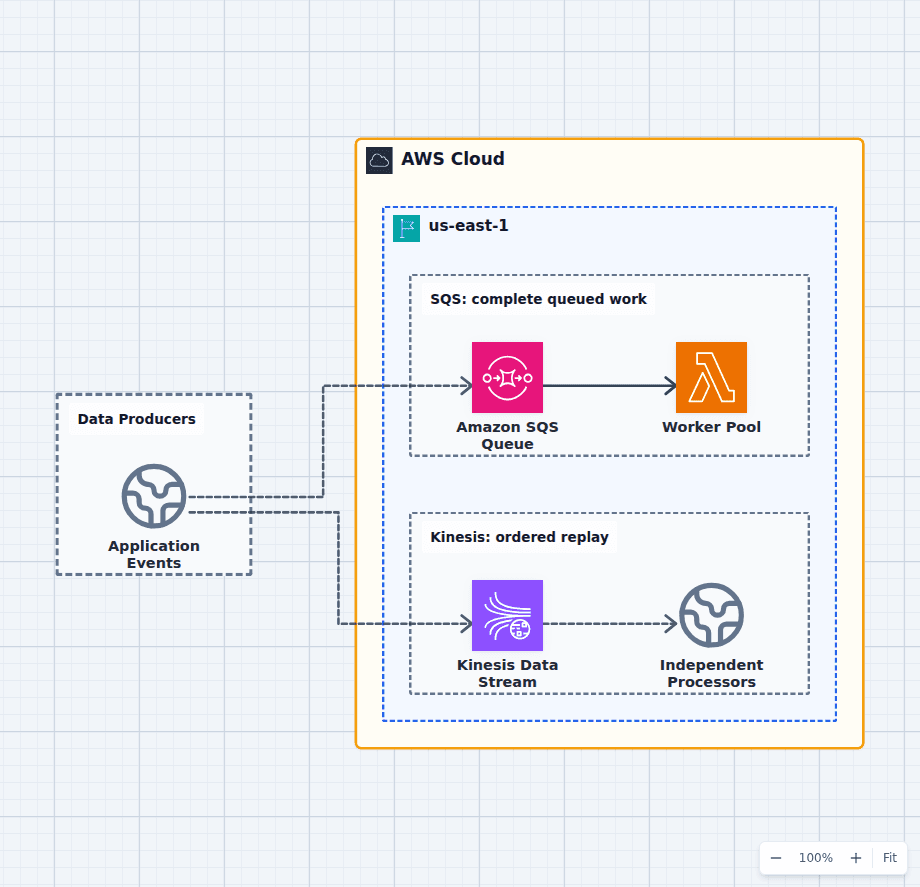 Open on the canvas
Amazon SQS vs Kinesis architecture diagram comparing a work queue with competing workers to an ordered retained data stream with independent processors. The image links to a fully editable BuildPlane starter.
Overview
Amazon SQS stores work waiting to be completed. Amazon Kinesis Data Streams stores an ordered sequence of records for a retention period. SQS distributes messages across competing consumers and removes them after successful processing. Kinesis keeps records available so independent consumer applications can track their own position and replay an earlier section of the stream.
Components
- Shared decision context: Work items and ordered event records emitted by applications and devices.
- Amazon SQS Queue: Distributes independent messages across competing consumers and absorbs backpressure. Consumers process and delete work items from the shared backlog.
- Kinesis Data Stream: Retains ordered records by shard so independent applications can replay them. Analytics, monitoring, and storage consumers track their own position in the stream.
Comparison Flow
- Application Events can enter the Amazon SQS Queue path and continue to Worker Pool.
- Application Events can instead enter the Kinesis Data Stream path and continue to Independent Processors.
- Choose the path whose operating model and constraints match the workload, then delete the unused branch in the editable diagram.
Customize First
- Estimate per-key throughput and skew before choosing Kinesis partition keys.
- Add SQS FIFO only when queue-level ordering is truly required.
- Use EventBridge Pipes when filtering or enriching between a queue or stream and a target.
Side-by-side decision
Amazon SQS vs Kinesis Data Streams
Use SQS when the record is work to complete once by a competing consumer pool. Use Kinesis when the record is part of an ordered retained history read independently by multiple applications.
| Decision factor | Amazon SQS | Kinesis Data Streams |
|---|---|---|
| Data model | Message backlog | Ordered append-only stream |
| Consumption | Competing consumers | Independent consumer applications |
| After success | Message is deleted | Record remains until retention expires |
| Ordering | Best effort, or FIFO queue and message groups | Ordered within each shard partition key |
| Replay | Redrive or copy-based workflows | Read again from an earlier sequence or timestamp |
| Typical use | Jobs and commands | Telemetry, logs, CDC, clickstreams |
Related AWS guides
Understand the decisions behind this diagram
Use these practical explanations to compare services, failure boundaries, and operating tradeoffs before adapting the architecture.
Design rationale
Decisions that shape this architecture
Ask whether consumers share or own position
SQS workers share one backlog and whichever worker receives a message owns that attempt. Each Kinesis consumer application tracks its own position, so analytics, archival, and alerting can all read the same records without copying them into separate queues first.
Ordering creates a partition design
Kinesis order exists within a shard, based on partition keys. A hot key can concentrate throughput. SQS Standard relaxes ordering for scale; SQS FIFO uses message groups when ordered work is required without a retained stream.
Replay is an operational product feature
Kinesis retention makes reprocessing a time range natural. That power requires deterministic consumers, checkpoints, and a plan for duplicate side effects. If replay will never be used, a simpler queue may carry less operating complexity.
Before production
Operational checks
Test partition-key skew and enhanced fan-out requirements.
Monitor iterator age for Kinesis and oldest message age for SQS.
Make consumers idempotent and define checkpoint or delete behavior.
Load-test shard or queue throughput with production record sizes and batching.
Scope and tradeoffs
What this diagram does not solve
Neither service is a database
Retention and queues support transport and processing, not arbitrary long-term querying. Land events in S3, a database, or an analytics store when they must become a durable queryable record.
Managed scaling still needs capacity thinking
On-demand modes reduce provisioning, but partition keys, consumer concurrency, batching, quotas, and downstream limits still determine whether the pipeline keeps up.
Common questions
Frequently asked questions
Can SQS replay messages?
SQS can redrive messages from a dead-letter queue and applications can copy messages for replay, but it is not an ordered retained log with independent consumer positions like Kinesis.
Does Kinesis guarantee global ordering?
No. Kinesis preserves order within a shard, which follows the partition key. Global ordering would collapse scale into one shard and is rarely the correct requirement.
Can Lambda consume both?
Yes. Lambda event source mappings poll SQS queues and Kinesis streams, batch records, and scale consumers, but retry and ordering behavior differ substantially between the two sources.
Keep exploring
Related AWS architectures
Amazon SQS vs Amazon SNS
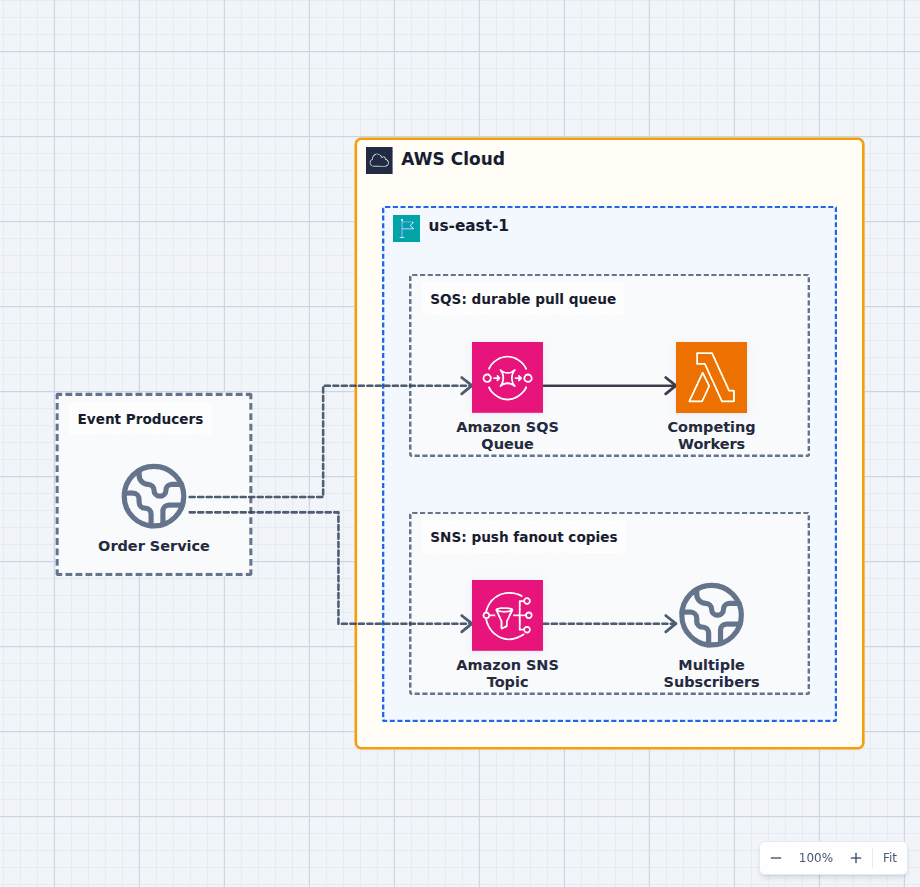
SQS answers who should process this unit of work next; SNS answers which subscribers should receive a copy of this notification. They are commonly used together: a publisher sends one event to SNS, and each durable consumer owns an SQS subscription queue with separate retries, scaling, and a dead-letter queue. The editable comparison diagram shows the pure patterns before you combine them.
Explore the architecture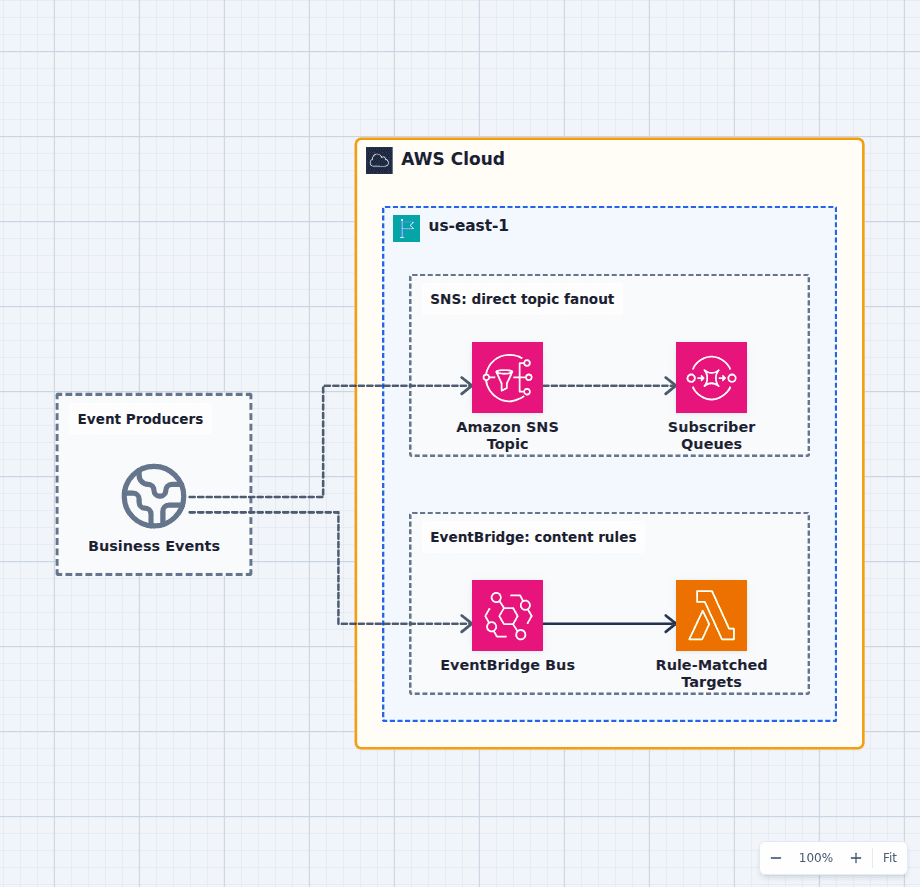
Amazon SNS vs Amazon EventBridge
Choose SNS when a producer needs straightforward, high-throughput fanout to queues, functions, HTTP endpoints, mobile push, SMS, or email. Choose EventBridge when events need richer content matching, routing across accounts and buses, SaaS sources, schema discovery, API destinations, or controlled replay. Use both only when their responsibilities are explicit, not because two buses feel safer than one.
Explore the architecture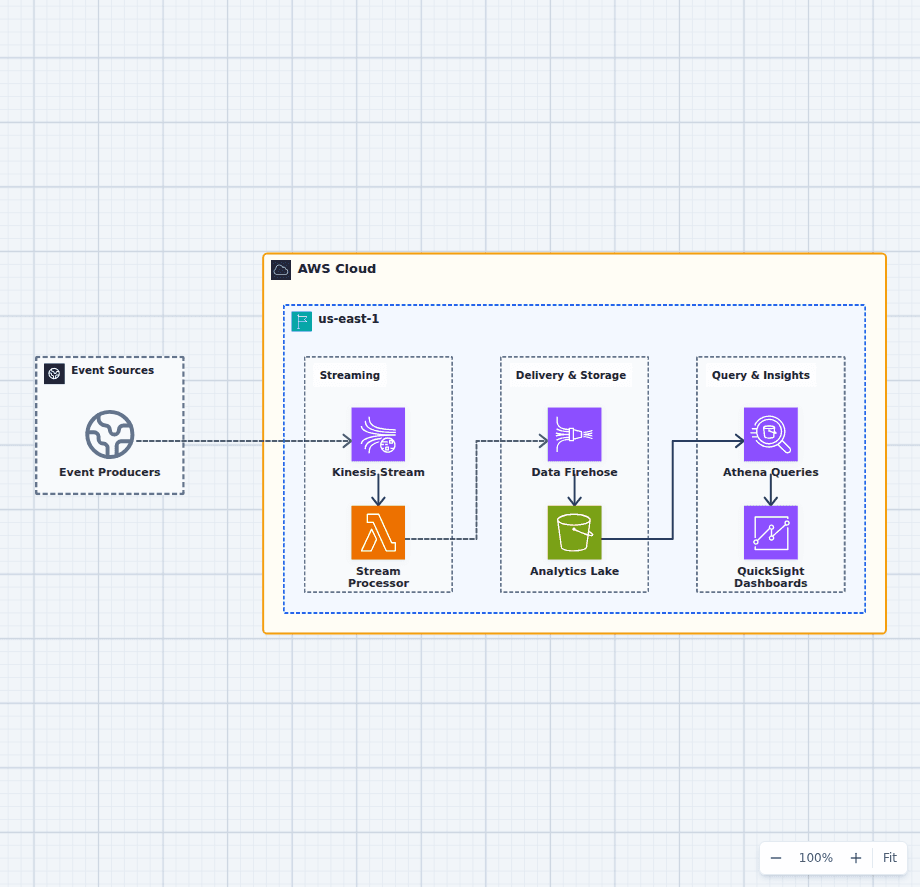
Real-Time Streaming Analytics on AWS
This streaming analytics architecture decouples burst absorption, event transformation, durable delivery, query, and visualization. Each responsibility scales independently, while S3 preserves the complete history needed for replay, deeper analysis, and later changes to dashboard logic.
Explore the architectureFrom reference to working draft
Adapt this architecture with your AWS AI Agent
Start from the exact diagram in this guide. Change requirements, challenge a decision, or ask what fails first, while keeping the architecture editable.