
Application Load Balancer vs Network Load Balancer
Compare an ALB Layer 7 HTTP path with an NLB Layer 4 TCP, UDP, and TLS path, including content routing and static-IP use cases.
Open editable diagramArchitecture diagram
Edit this exact diagram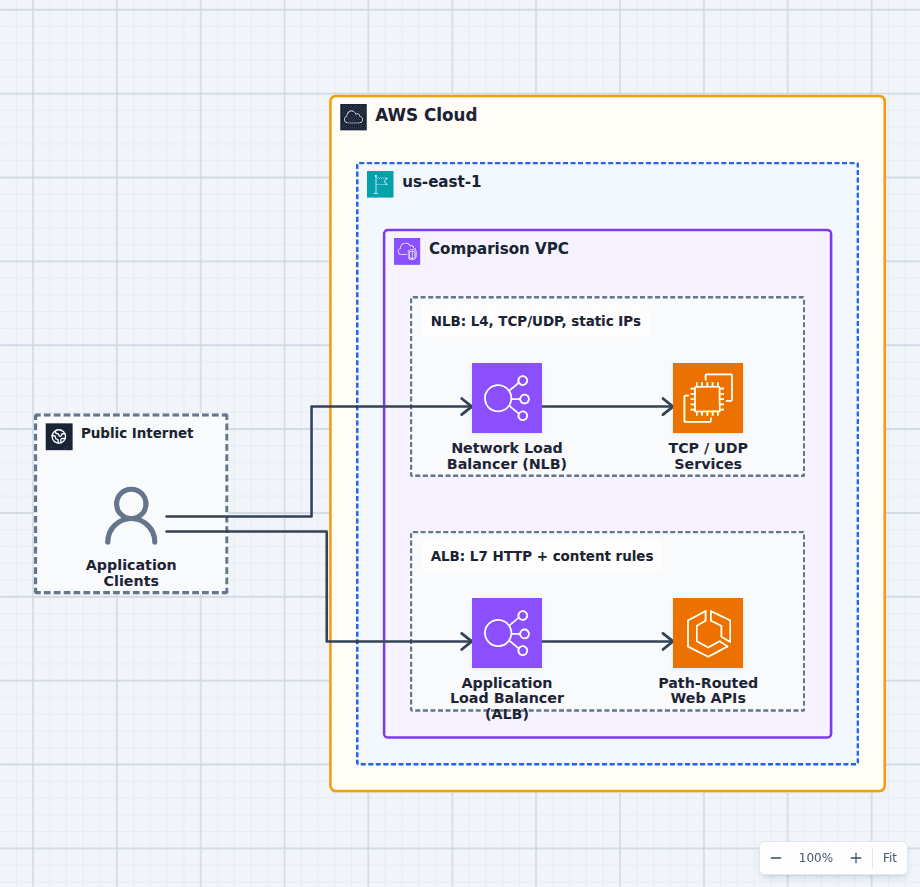 Open on the canvas
AWS ALB vs NLB architecture diagram comparing a Layer 4 Network Load Balancer path to TCP and UDP services with a Layer 7 Application Load Balancer path to web APIs. The image links to a fully editable BuildPlane starter.
Overview
An Application Load Balancer and Network Load Balancer can both distribute traffic across healthy targets, but they make routing decisions from different information. NLB operates at Layer 4 and forwards TCP, UDP, and TLS connections using a flow hash. ALB operates at Layer 7 and can inspect HTTP or HTTPS requests before routing by host, path, header, method, query string, or source IP. That difference drives nearly every other tradeoff in the design.
Components
- Shared decision context: HTTP clients and transport-protocol clients entering the application.
- Network Load Balancer (NLB): Routes transport-layer connections with very high throughput and static addresses per Availability Zone. Targets that need source-IP preservation, non-HTTP protocols, or pass-through connections.
- Application Load Balancer (ALB): Understands HTTP requests and routes by host, path, header, method, or query string. Multiple HTTP services reached through listener rules and target groups.
Comparison Flow
- Application Clients can enter the Network Load Balancer (NLB) path and continue to TCP / UDP Services.
- Application Clients can instead enter the Application Load Balancer (ALB) path and continue to Path-Routed Web APIs.
- Choose the path whose operating model and constraints match the workload, then delete the unused branch in the editable diagram.
Customize First
- Choose listeners and health checks from the real application protocols.
- Add AWS WAF to the ALB path when the application needs Layer 7 filtering.
- Add AWS PrivateLink or fixed allow-list addresses to the NLB path when those requirements drive the choice.
Side-by-side decision
Network Load Balancer vs Application Load Balancer
Use NLB when the requirement is TCP, UDP, TLS pass-through, static IPs, source-IP preservation, or PrivateLink. Use ALB when the workload is HTTP or HTTPS and benefits from content routing, authentication, Lambda targets, or WAF.
| Decision factor | Network Load Balancer | Application Load Balancer |
|---|---|---|
| Network layer | Layer 4 transport connections | Layer 7 HTTP requests |
| Protocols | TCP, UDP, TLS | HTTP, HTTPS, WebSocket, gRPC |
| Routing | Listener and flow-hash routing | Host, path, header, method, query, source IP |
| Addresses | Static IP per Availability Zone; Elastic IP option | DNS name with changing addresses |
| Client address | Can preserve source IP at the target | Adds X-Forwarded-For for HTTP targets |
| Application features | Transport TLS and pass-through behavior | Redirects, fixed responses, OIDC/Cognito, WAF |
| Targets | Instances, IPs, and an ALB | Instances, IPs, and Lambda functions |
Related AWS guides
Understand the decisions behind this diagram
Use these practical explanations to compare services, failure boundaries, and operating tradeoffs before adapting the architecture.
Design rationale
Decisions that shape this architecture
Start with the protocol, not a performance slogan
If the application speaks HTTP, ALB can make useful decisions from each request. If it speaks raw TCP or UDP, an ALB cannot front it and NLB is the natural choice. NLB is designed for very high connection rates and low transport latency, but that does not make it automatically better for an ordinary web API whose routing, authentication, and protection live at Layer 7.
Static addresses and source IP can be architecture requirements
An NLB exposes a stable IP address in each enabled Availability Zone and can use Elastic IP addresses for an internet-facing deployment. That matters when partners allow-list addresses or a client cannot rely on DNS. NLB can also preserve the client source address to compatible targets. An ALB is reached through DNS and supplies client identity to HTTP targets through forwarded headers.
ALB consolidates HTTP services behind one endpoint
Listener rules let one ALB send api.example.com to one target group, /images to another, and gRPC traffic to a third. It can redirect HTTP to HTTPS, return fixed responses, authenticate through OIDC or Cognito, and attach AWS WAF. Rebuilding those controls in every target service is usually more operational work than the load balancer saves.
TLS behavior is not the same as HTTP awareness
Both load balancers can terminate TLS with certificates from ACM. NLB can also pass encrypted TCP through to targets when end-to-end control is required. ALB terminates the connection so it can inspect and route the HTTP request, then can establish HTTPS again to the target. Choose the trust boundary deliberately rather than treating TLS termination as a checkbox.
Before production
Operational checks
Confirm every listener protocol, target protocol, health check, and TLS termination point.
Test source-IP behavior with the selected target type and proxy configuration.
Model LCU or NLCU usage from connections, bytes, rule evaluations, and active flows.
Enable multiple Availability Zones and verify zonal target health and failover behavior.
Attach AWS WAF only to the ALB path, or place an ALB behind NLB when both feature sets are required.
Scope and tradeoffs
What this diagram does not solve
The services can be composed
NLB can target an ALB when a design needs static IP addresses or PrivateLink in front of ALB content routing. That adds another hop, another bill, and another failure surface, so use the composition only when both requirements are real.
Neither load balancer is a complete edge strategy
CloudFront or Global Accelerator may sit in front for global delivery, AWS WAF covers HTTP filtering, Shield addresses DDoS protection, and Route 53 handles DNS and health-aware routing. The diagram isolates the load-balancer decision rather than pretending it solves the whole edge.
Common questions
Frequently asked questions
Is NLB faster than ALB?
NLB has less protocol work to do and is designed for extreme connection throughput and low transport latency. For most web applications, backend processing and network distance dominate the difference, while ALB routing and security features remove work from the application. Benchmark the complete request path rather than choosing from a generic latency claim.
Can an NLB route by URL path or hostname?
No. NLB does not inspect HTTP hostnames or paths. Use an ALB for content-based HTTP routing, or place an ALB behind NLB when static IP or PrivateLink requirements justify both layers.
Which AWS load balancer has static IP addresses?
NLB exposes a static IP address for each enabled Availability Zone and can use an Elastic IP address per zone for an internet-facing load balancer. ALB is consumed through its DNS name and its underlying addresses can change.
Do ALB and NLB both support WebSockets?
ALB supports WebSockets as an HTTP upgrade and understands the initial HTTP request. NLB transparently forwards the underlying TCP connection without understanding the application protocol. The choice still depends on whether HTTP-aware features are useful.
Keep exploring
Related AWS architectures
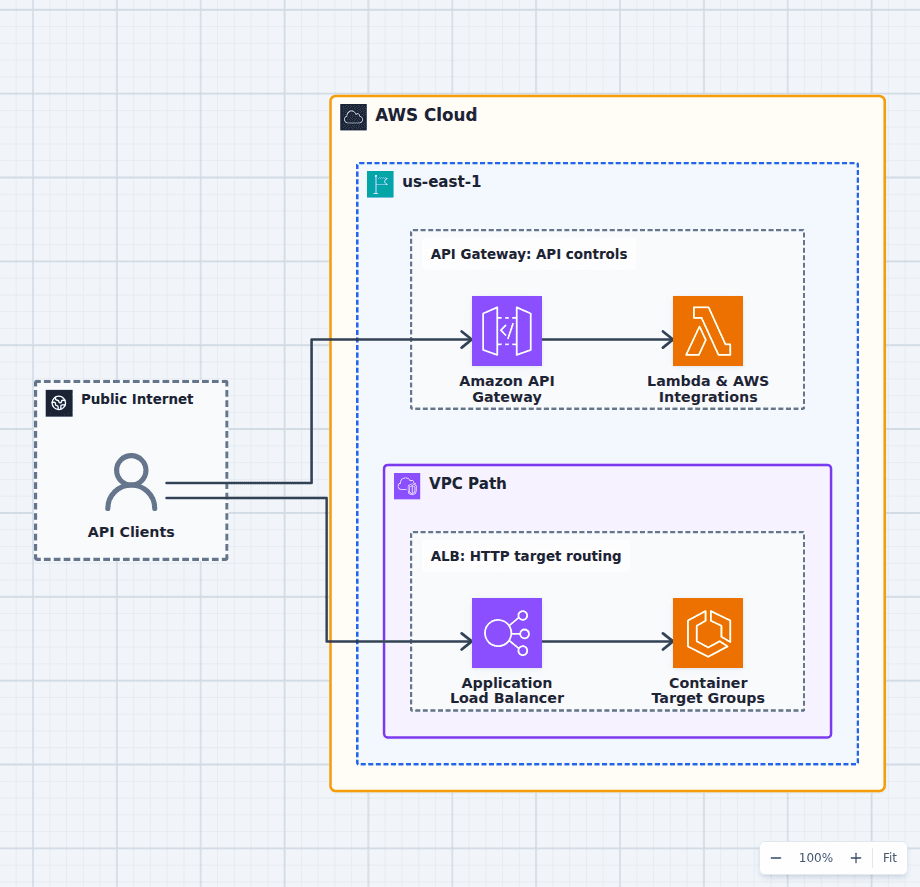
Amazon API Gateway vs Application Load Balancer
Choose API Gateway for public or partner APIs that need API keys, usage plans, authorizers, per-client throttling, stages, transformations, WebSockets, or direct service integrations. Choose ALB for high-volume HTTP routing to ECS, EKS, EC2, IP, or Lambda targets when load balancing is the main requirement. Request economics can favor ALB at sustained volume and API Gateway at small or variable scale, but features often decide first.
Explore the architecture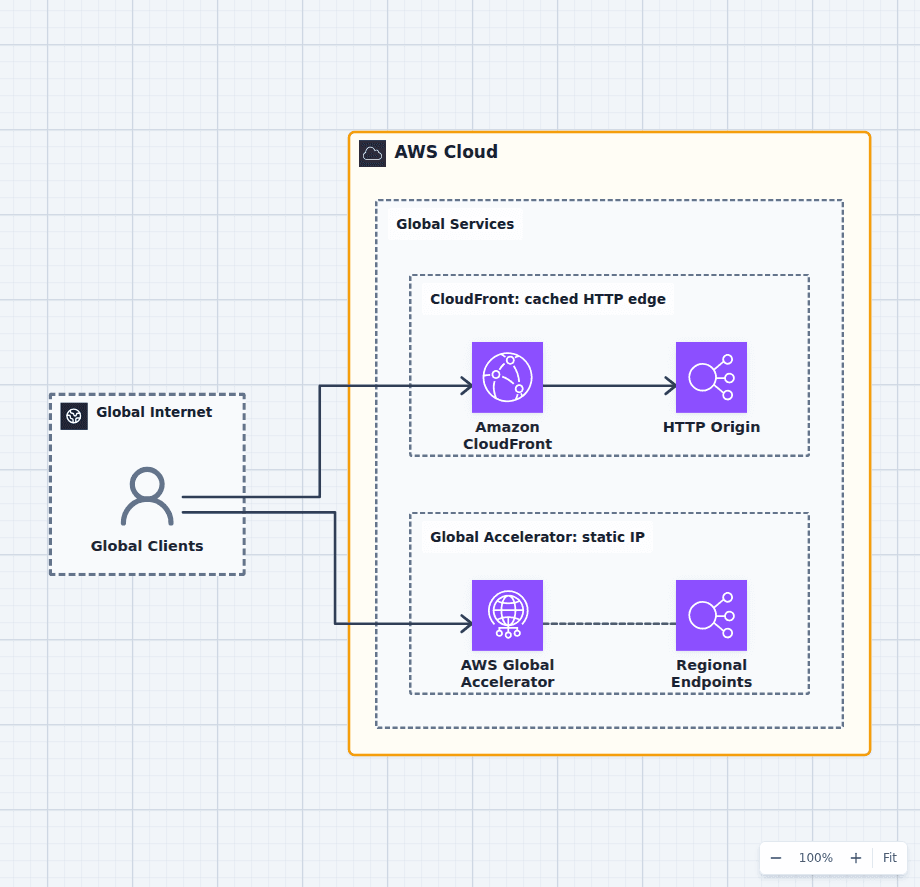
Amazon CloudFront vs AWS Global Accelerator
Choose CloudFront for websites, APIs, downloads, media, or other HTTP workloads that benefit from caching, edge logic, origin shielding, signed access, and AWS WAF. Choose Global Accelerator for static global IP addresses, non-HTTP protocols, source-IP-aware applications, rapid regional endpoint failover, or dynamic traffic that should remain on the AWS backbone. They can be complementary in a broader edge strategy but should not be stacked without a requirement.
Explore the architecture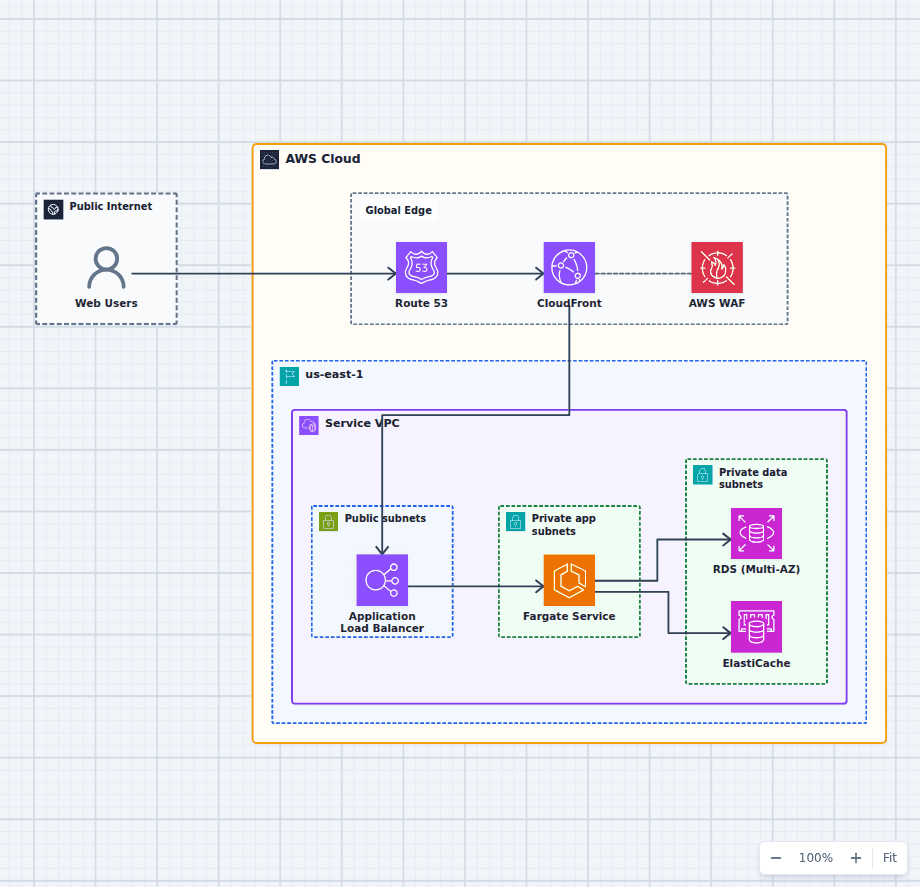
Containerized Web Service with Amazon ECS and Fargate
This architecture runs a production container service without an EC2 host fleet. A protected global edge forwards to a Multi-AZ load balancer, Fargate tasks stay private and reach data services over the VPC network, and managed image, secret, and observability services support the runtime. Every component here is one an ordinary web application needs eventually, which is why this shape is a common destination for teams outgrowing a single server and for teams who found Lambda too constraining.
Explore the architectureFrom reference to working draft
Adapt this architecture with your AWS AI Agent
Start from the exact diagram in this guide. Change requirements, challenge a decision, or ask what fails first, while keeping the architecture editable.