
Amazon API Gateway vs Application Load Balancer
Compare a managed API front door with an HTTP load balancer for authorization, throttling, routing, integrations, latency, and cost.
Open editable diagramArchitecture diagram
Edit this exact diagram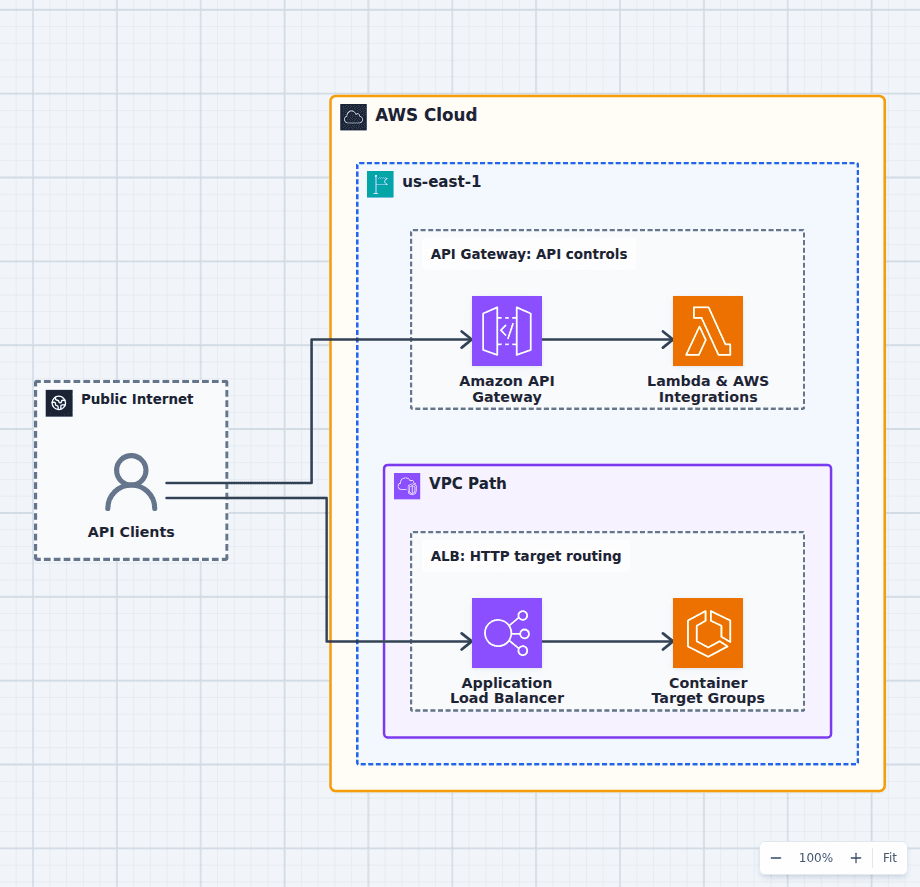 Open on the canvas
Amazon API Gateway vs ALB architecture diagram comparing a managed API front door invoking Lambda with an Application Load Balancer routing to ECS targets. The image links to a fully editable BuildPlane starter.
Overview
Amazon API Gateway is a managed API front door with authorizers, throttling, quotas, stages, transformations, validation options, caching features, WebSocket APIs, and direct AWS integrations. Application Load Balancer is a Layer 7 load balancer that routes HTTP requests to healthy target groups by content rules. The right choice follows the API control plane and backend model.
Components
- Shared decision context: Web, mobile, partner, and service clients making HTTP requests.
- Amazon API Gateway: Managed API endpoint with authorizers, throttling, stages, transformations, and service integrations. Functions and AWS services invoked without operating an always-on HTTP target fleet.
- Application Load Balancer: Layer 7 load balancing by host, path, header, method, and query string. Long-running HTTP services registered behind health-checked target groups.
Comparison Flow
- API Clients can enter the Amazon API Gateway path and continue to Lambda & AWS Integrations.
- API Clients can instead enter the Application Load Balancer path and continue to Container Target Groups.
- Choose the path whose operating model and constraints match the workload, then delete the unused branch in the editable diagram.
Customize First
- List required authorizers, quotas, transformations, stages, and service integrations.
- Compare per-request pricing against ALB capacity-unit behavior at expected traffic.
- Use private integrations or internal load balancers when backends must stay private.
Side-by-side decision
Amazon API Gateway vs Application Load Balancer
Use API Gateway when API management features are part of the product boundary. Use ALB when the need is efficient HTTP routing to healthy target groups and the application owns the rest.
| Decision factor | Amazon API Gateway | Application Load Balancer |
|---|---|---|
| Primary role | API management and service integration | Layer 7 load balancing |
| Controls | Authorizers, quotas, API keys, stages, transformations | Listener rules, redirects, fixed responses, OIDC/Cognito auth |
| Backends | Lambda, HTTP, and direct AWS integrations | Instances, IPs, ECS/EKS targets, Lambda |
| Protocols | HTTP APIs, REST APIs, WebSocket APIs | HTTP, HTTPS, WebSocket, gRPC |
| Scaling unit | Managed request service and quotas | Load balancer capacity units and target fleet |
| Typical use | Product APIs and serverless integrations | Container and instance web services |
Related AWS guides
Understand the decisions behind this diagram
Use these practical explanations to compare services, failure boundaries, and operating tradeoffs before adapting the architecture.
Design rationale
Decisions that shape this architecture
API policy can be infrastructure
If consumer identity, quotas, usage plans, request validation, stage promotion, or transformation must be enforced before backend code runs, API Gateway creates a clear policy boundary. Rebuilding those functions inside every service is rarely free.
ALB is a natural container front door
ECS and EKS workloads already expose health-checked target groups. ALB efficiently routes by hostname and path, integrates with deployments, and keeps the request path conventional for long-running services.
Compare the right API Gateway type
HTTP APIs are simpler and generally lower-cost than REST APIs, while REST APIs include a broader legacy feature set. A comparison that assumes every API needs the most expensive gateway mode exaggerates the difference.
Before production
Operational checks
List required authorizers, quotas, keys, transformations, caching, stages, and protocol features.
Test timeout, payload, header, and integration limits with real requests.
Model request pricing or load-balancer capacity with the target-fleet cost included.
Protect public entry points with logging, abuse controls, and WAF where supported.
Scope and tradeoffs
What this diagram does not solve
The services can work together
API Gateway can privately integrate through VPC Link to load-balanced services. That combination makes sense when the public API policy and internal service fleet are distinct responsibilities.
Ingress does not solve backend scaling
Both services can accept more traffic than a database, downstream API, or worker can handle. Rate limits, target autoscaling, connection pools, and load shedding must follow the full path.
Common questions
Frequently asked questions
Is API Gateway a load balancer?
It distributes managed API requests to integrations, but it is primarily an API management service. ALB is purpose-built to load-balance HTTP traffic across target groups.
Can an ALB invoke Lambda?
Yes. Lambda functions can be ALB targets for HTTP requests. API Gateway still offers a broader API-management and direct-integration feature set.
Which is cheaper at high request volume?
ALB can be economical for sustained high-volume traffic, while API Gateway pricing follows requests and features. Compare current regional pricing with real request size, rules, integrations, and baseline load-balancer cost.
Keep exploring
Related AWS architectures
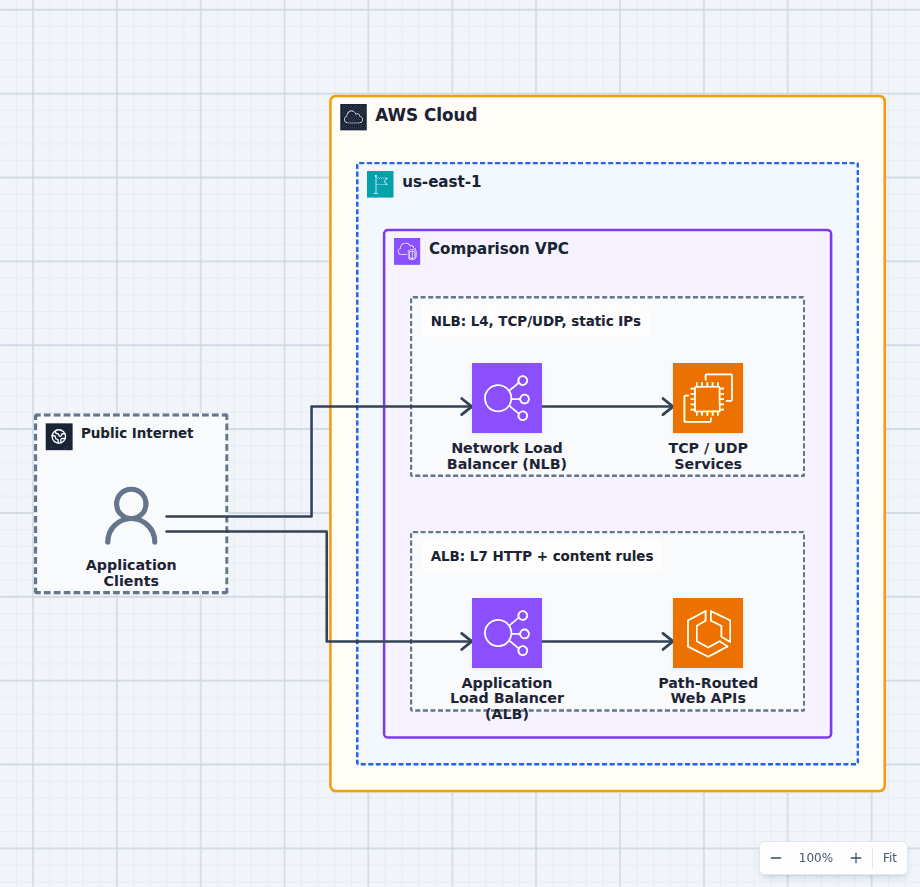
Application Load Balancer vs Network Load Balancer
Choose an ALB for HTTP applications that need content-based routing, redirects, OIDC or Cognito authentication, Lambda targets, or AWS WAF. Choose an NLB for non-HTTP protocols, static IP addresses, source-IP preservation, PrivateLink endpoint services, or extremely high connection throughput. The editable diagram keeps both paths side by side so you can preserve the one that fits your protocol and delete the other.
Explore the architecture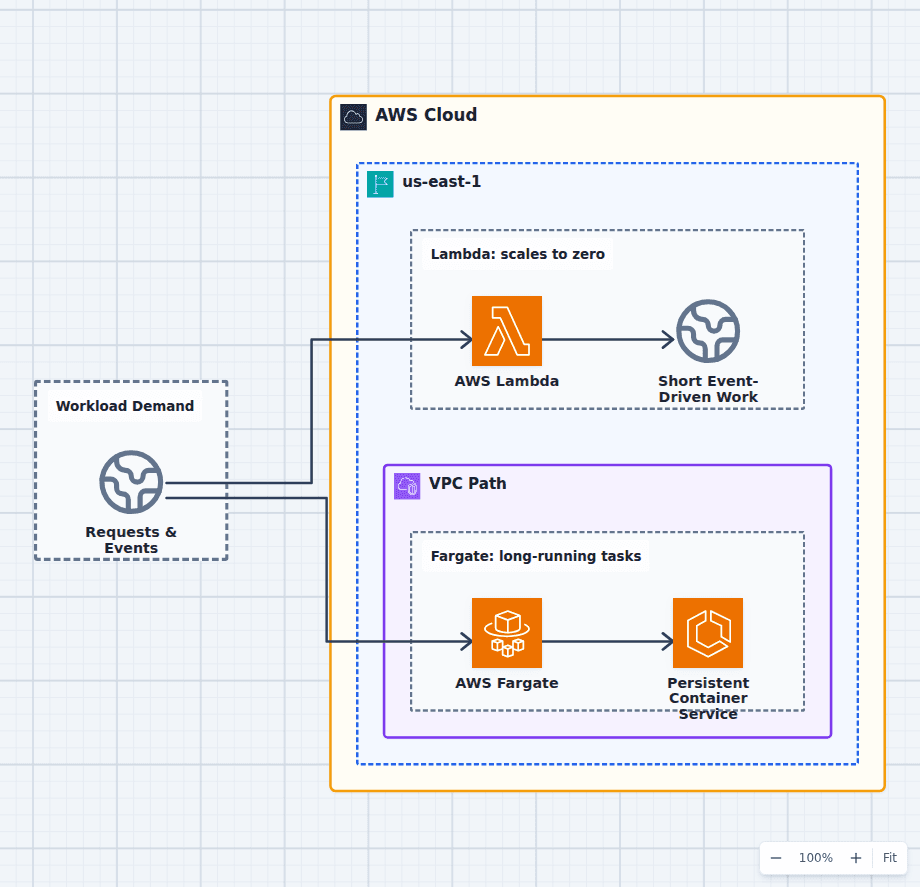
AWS Lambda vs AWS Fargate
Choose Lambda for short, stateless, event-driven work with variable traffic and a supported runtime model. Choose Fargate for long-running services, background consumers, larger dependencies, custom runtimes, persistent connections, or an existing container image. Real systems often use Fargate for the always-on API and Lambda for bursty side jobs, so the architecture need not force every workload into one compute model.
Explore the architecture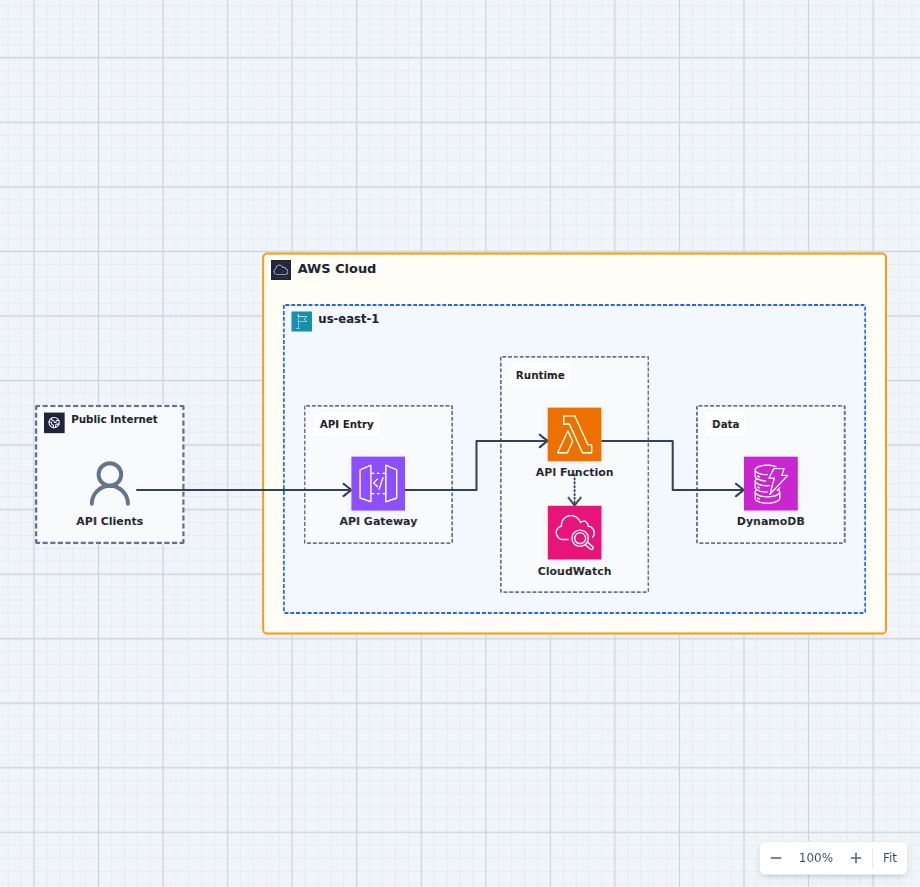
Serverless REST API Architecture on AWS
This is the serverless API baseline that most production APIs grow from rather than away from: a managed HTTPS entry point, stateless function compute, on-demand data storage, and observable execution. It is deliberately compact so the first real decisions stay legible. Adding authentication, caching, asynchronous work, and a second Region each attaches to this shape without replacing it, which is why it is worth understanding before the additions arrive.
Explore the architectureFrom reference to working draft
Adapt this architecture with your AWS AI Agent
Start from the exact diagram in this guide. Change requirements, challenge a decision, or ask what fails first, while keeping the architecture editable.