
Amazon CloudWatch vs AWS CloudTrail
Compare workload observability with AWS API audit history for metrics, logs, alarms, events, investigations, and compliance.
Open editable diagramArchitecture diagram
Edit this exact diagram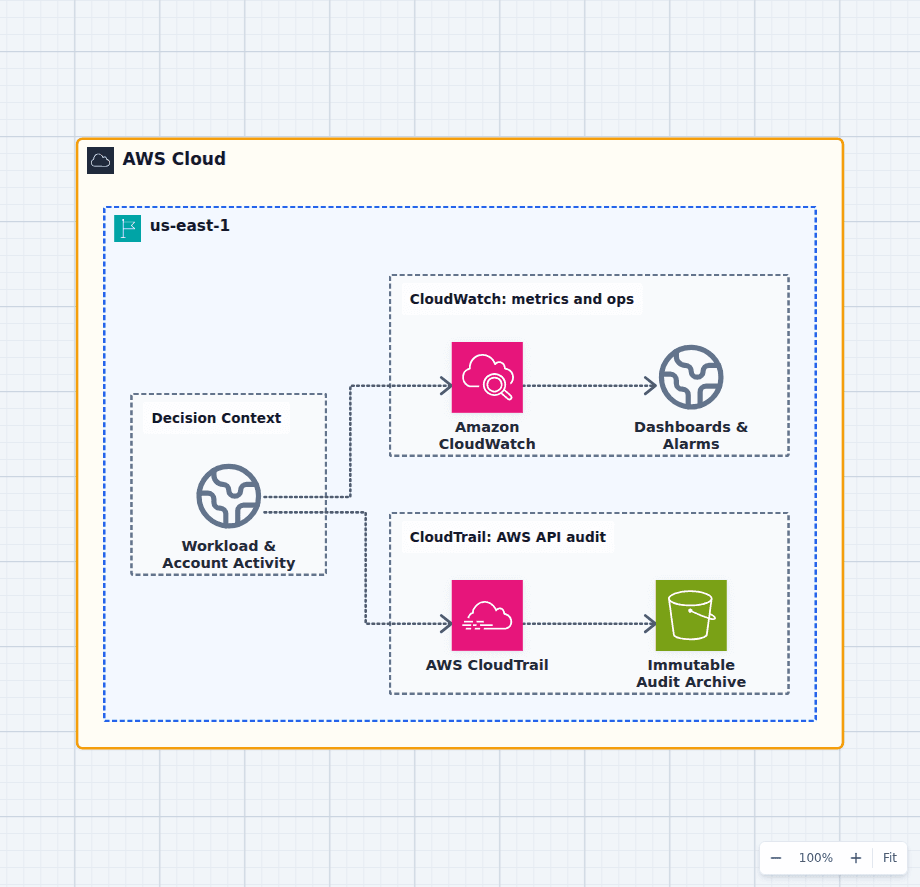 Open on the canvas
CloudWatch vs CloudTrail architecture diagram comparing workload metrics logs and alarms with an AWS API audit trail stored in Amazon S3. The image links to a fully editable BuildPlane starter.
Overview
Amazon CloudWatch collects workload telemetry such as metrics, logs, traces, alarms, dashboards, and operational events. AWS CloudTrail records AWS API activity and management events with actor, action, source, resource, and time context. CloudWatch tells operators how a system behaves; CloudTrail tells investigators who changed or called AWS control and data planes.
Components
- Shared decision context: Runtime telemetry and AWS API activity produced by applications, resources, users, and roles.
- Amazon CloudWatch: Collects metrics, logs, traces, events, dashboards, and alarms for workload operations. Operators detect performance, availability, and application failures.
- AWS CloudTrail: Records AWS API activity with actor, action, resource, source, and time context. Central retention for investigations, compliance evidence, and organization trails.
Comparison Flow
- Workload & Account Activity can enter the Amazon CloudWatch path and continue to Dashboards & Alarms.
- Workload & Account Activity can instead enter the AWS CloudTrail path and continue to Immutable Audit Archive.
- Choose the path whose operating model and constraints match the workload, then delete the unused branch in the editable diagram.
Customize First
- Define operational service-level indicators separately from security audit detections.
- Protect the CloudTrail archive with restrictive access, retention, and lifecycle policies.
- Route high-value CloudTrail events into alerting without treating every API call as an incident.
Side-by-side decision
Amazon CloudWatch vs AWS CloudTrail
Use CloudWatch for workload health and operational telemetry. Use CloudTrail for AWS API audit history and change attribution. Feed selected CloudTrail events into alerting, but retain the audit source independently.
| Decision factor | Amazon CloudWatch | AWS CloudTrail |
|---|---|---|
| Question answered | How is the workload behaving? | Who called which AWS API, where, and when? |
| Primary data | Metrics, logs, traces, alarms, events | Management, data, network, and insight events |
| Producers | Applications, agents, AWS services, custom metrics | AWS API activity by users, roles, services, and accounts |
| Real-time use | Dashboards, SLOs, alarms, automation | Audit detections and event-driven investigation |
| Retention | Per log group and telemetry system settings | Event history plus trails, event data stores, and S3 archives |
| Best fit | Operations and performance | Security, governance, compliance, forensics |
Related AWS guides
Understand the decisions behind this diagram
Use these practical explanations to compare services, failure boundaries, and operating tradeoffs before adapting the architecture.
Design rationale
Decisions that shape this architecture
Telemetry and audit evidence have different owners
Application teams define service-level indicators, dashboards, and alarms in CloudWatch. Security and platform teams define organization trails, data events, retention, immutability, and detective controls. Blending ownership can leave both sides incomplete.
CloudTrail records calls, not application intent
A PutObject event can show which principal wrote to S3, but it does not explain whether an order succeeded or a customer saw an error. Application logs and traces provide that domain context. Investigations correlate both sources.
Selective alerting avoids audit noise
CloudTrail can route important changes through EventBridge or logs into alarms, but alerting on every call creates fatigue and cost. Start with identity, policy, logging, network, and destructive changes that have clear response actions.
Before production
Operational checks
Create an organization trail across all accounts and Regions.
Protect audit destinations with encryption, validation, least privilege, retention, and lifecycle.
Define CloudWatch log retention and service-level alarms per workload.
Test one incident by correlating an API change with metrics, logs, and traces.
Scope and tradeoffs
What this diagram does not solve
Neither is a full security analytics platform alone
Security Lake, GuardDuty, Security Hub, SIEM tools, and detection pipelines may aggregate and analyze evidence. CloudWatch and CloudTrail remain foundational sources, not the complete response workflow.
Data events and telemetry can be expensive
High-volume S3 or Lambda data events, verbose logs, custom metrics, and long retention require deliberate scope and lifecycle. Enable evidence according to threat and operational value.
Common questions
Frequently asked questions
Can CloudTrail logs go to CloudWatch?
Yes. Trails and event routing can deliver selected activity for near-real-time alarms and automation, while S3 or CloudTrail Lake retains the audit record for investigation.
Does CloudWatch record AWS API calls?
CloudWatch can receive events and logs derived from API activity, but CloudTrail is the authoritative AWS API audit service that records actor and request context.
Which service should alert on a deleted security group?
CloudTrail records the delete API call. EventBridge or a CloudWatch-based detection can match that event and notify responders. The architecture uses both sources and alerting controls.
Keep exploring
Related AWS architectures
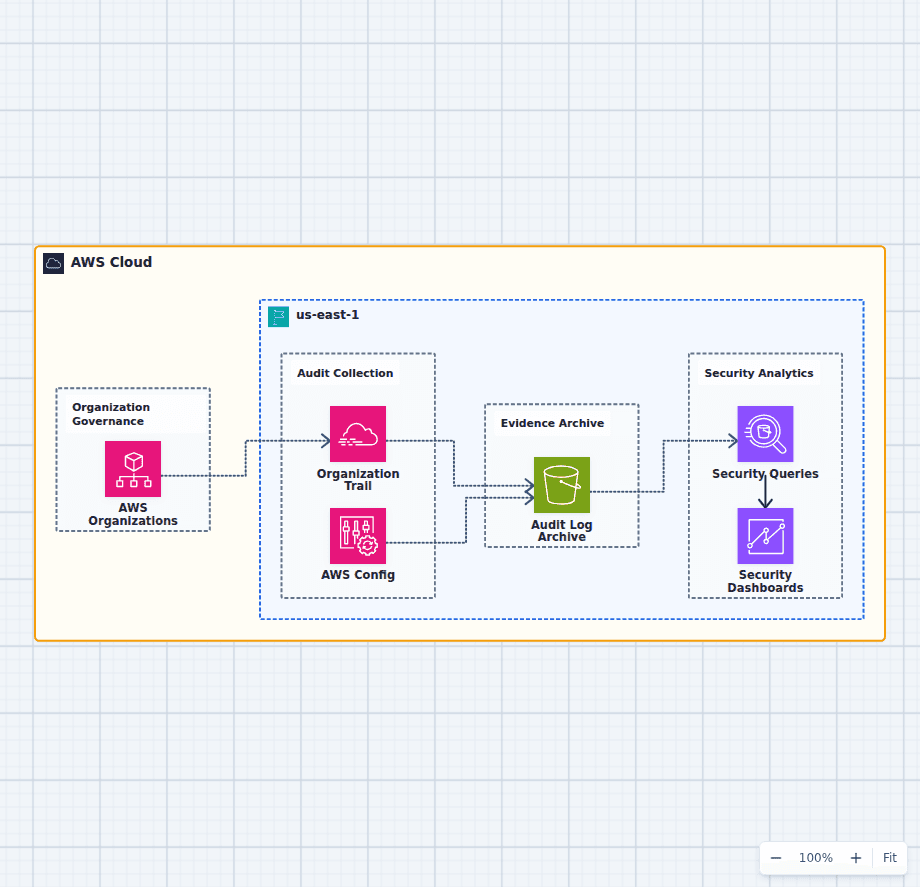
Centralized AWS Security Logging Architecture
This multi-account security architecture separates evidence collection, immutable retention, investigation, and reporting. It creates a clear baseline for deciding who owns the log archive, which administrators can change collection, how long evidence is retained, and how incidents are queried.
Explore the architecture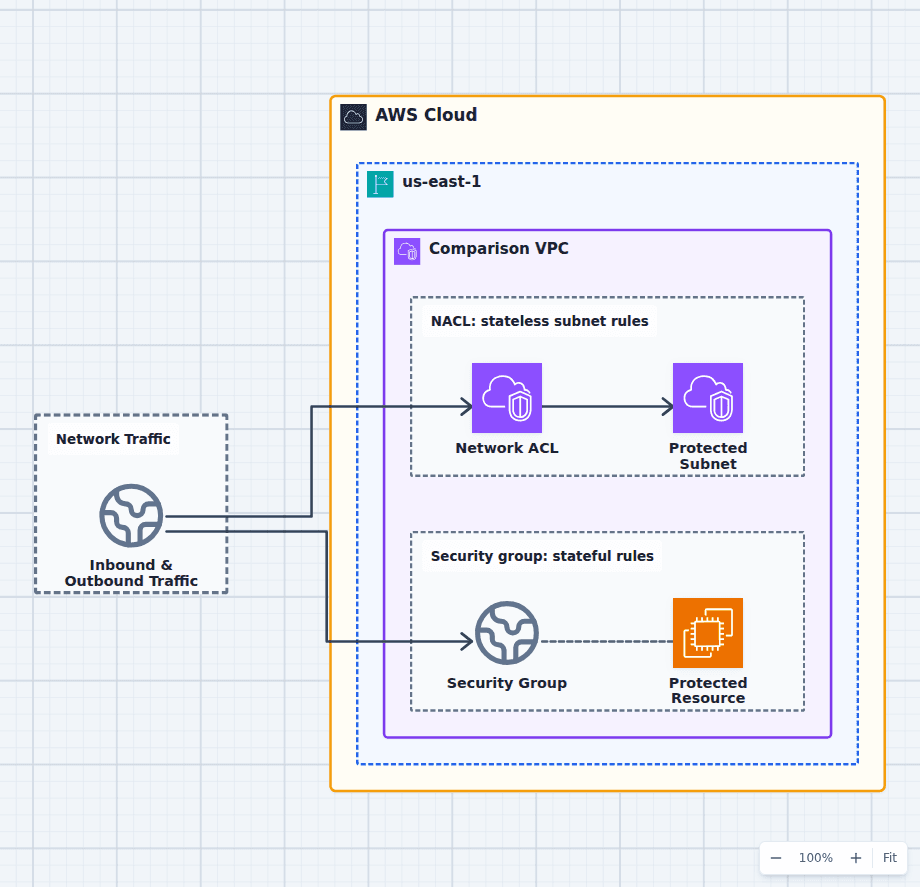
Security Groups vs Network ACLs in an AWS VPC
Use security groups to express which application tiers and resources may communicate, ideally through references to other security groups rather than broad IP ranges. Use network ACLs when a subnet needs an explicit deny, coarse IP-based boundary, or backup control against a missing resource rule. Because NACLs are stateless, inbound and outbound rules must both allow response ports, which makes aggressive policies harder to operate.
Explore the architecture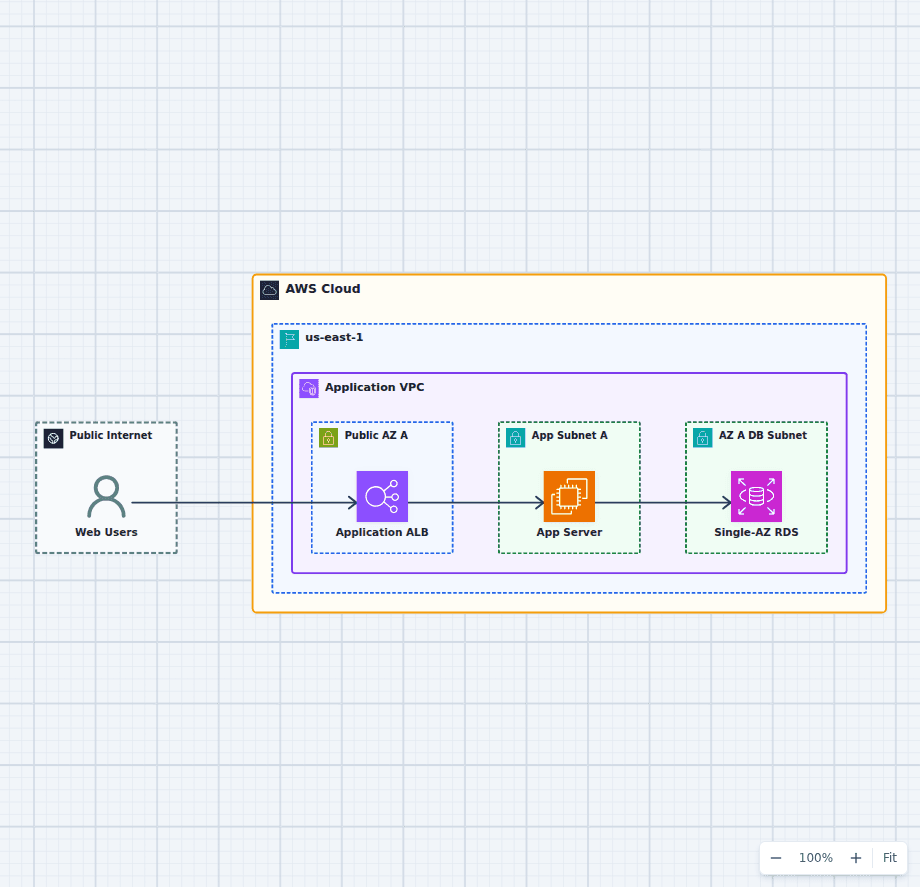
Architecture Review Practice: A Single-AZ AWS Web App
This diagram is deliberately incomplete. Its clean request path makes the risks easy to discuss: one application instance, a Single-AZ database, and no visible recovery or operational controls. Use it as a review exercise before opening the editable version and improving it.
Explore the architectureFrom reference to working draft
Adapt this architecture with your AWS AI Agent
Start from the exact diagram in this guide. Change requirements, challenge a decision, or ask what fails first, while keeping the architecture editable.