
Generative AI RAG Assistant on AWS
A grounded generative AI request path using API Gateway, Lambda, OpenSearch vector retrieval, Amazon Bedrock, and an S3 knowledge source.
Open editable diagramArchitecture diagram
Edit this exact diagram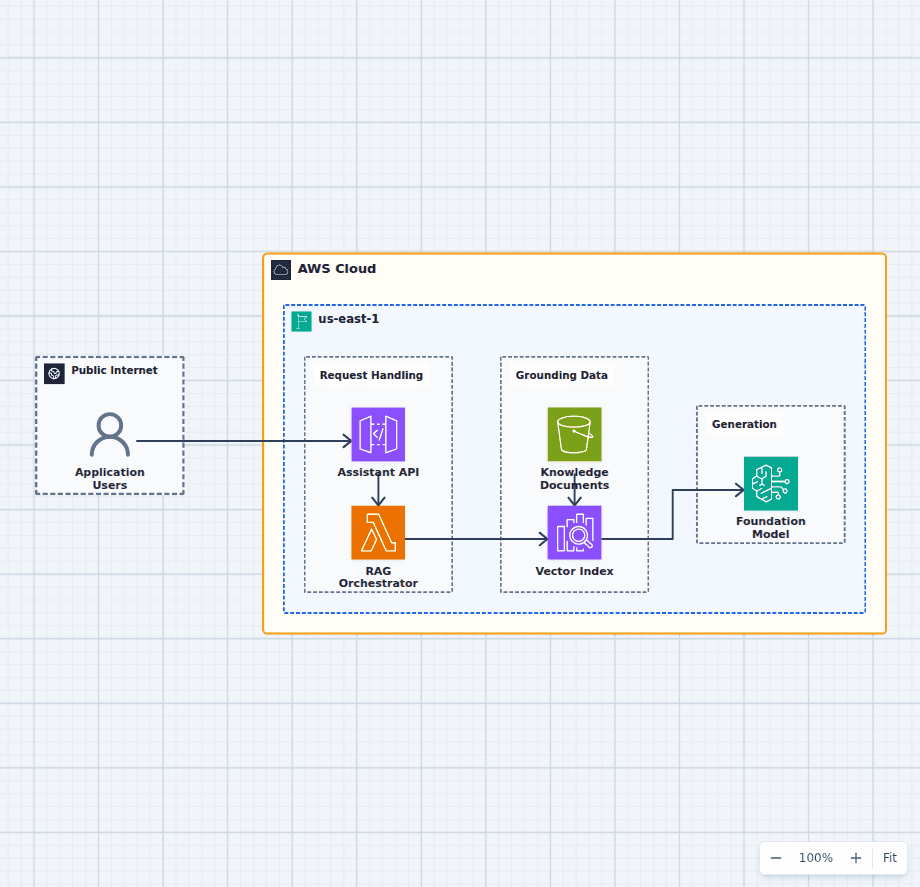 Open on the canvas
AWS retrieval-augmented generation architecture diagram with API Gateway, Lambda, S3, OpenSearch vector search, and Amazon Bedrock. The image links to a fully editable BuildPlane starter.
Overview
API Gateway receives assistant requests and invokes a Lambda orchestrator. The function retrieves relevant passages from an OpenSearch vector index populated from S3 knowledge documents, then supplies that context to an Amazon Bedrock foundation model for grounded response generation.
Components
- Assistant API and RAG Orchestrator: API Gateway receives requests while Lambda coordinates retrieval and model invocation.
- Knowledge Documents and Vector Index: S3 preserves source material and OpenSearch serves similarity searches over indexed passages.
- Amazon Bedrock: A managed foundation model produces the final response from the prompt and retrieved context.
Grounded Answer Flow
- A user sends a question to the managed assistant API.
- Lambda converts the question into a retrieval request and queries the OpenSearch vector index.
- The retrieved passages are supplied to Amazon Bedrock as grounding context for generation.
Customize First
- Choose an embedding model, chunk size, and metadata-filtering strategy for the document corpus.
- Add Cognito or an enterprise identity provider before exposing private knowledge.
- Add evaluation, prompt safety, and citation checks before production rollout.
Related AWS guides
Understand the decisions behind this diagram
Use these practical explanations to compare services, failure boundaries, and operating tradeoffs before adapting the architecture.
AI on AWS
How to Build a Generative AI RAG Architecture on AWS
A useful RAG system is a data pipeline plus a retrieval system plus a model call. Most production risk lives outside the final prompt.
Read the guideAI on AWS
AI Agent Architecture on AWS: Tools, Memory, Guardrails, and Workflows
An AI agent becomes a production system when model decisions can cause actions. Safe architecture constrains those actions and records every important step.
Read the guideDesign rationale
Decisions that shape this architecture
Keep orchestration outside the model
Lambda owns retrieval, prompt assembly, authorization context, and response handling so the foundation model remains one replaceable capability in the request path.
Preserve source documents separately from the index
S3 retains versioned knowledge artifacts while OpenSearch holds a rebuildable vector projection. The index can be recreated without becoming the only copy of source truth.
Ground each response before generation
The orchestrator retrieves the most relevant passages first and sends bounded context to Bedrock, which reduces unsupported answers and makes citations possible.
Before production
Operational checks
Measure retrieval precision and answer quality with a representative evaluation set.
Record document version, retrieved passage IDs, model ID, and prompt version per response.
Apply tenant and document authorization before vector results reach the model prompt.
Set token, latency, concurrency, and cost budgets for the synchronous request path.
Scope and tradeoffs
What this diagram does not solve
Document ingestion is intentionally outside the request path
Chunking, embedding, deletion, and re-indexing need a separate controlled workflow with lineage and failure handling.
Grounding does not eliminate model risk
The application still needs evaluation, safety controls, citation checks, privacy review, and user-visible handling for uncertain answers.
Common questions
Frequently asked questions
Why use OpenSearch in a RAG architecture?
OpenSearch can store vector embeddings and retrieve passages similar to a user query, giving the model relevant private context before it generates an answer.
Where should document embeddings be created?
Create them in a separate ingestion workflow that tracks document versions, chunking rules, embedding model versions, and index updates.
Can this diagram use another vector database?
Yes. Open the editable architecture and replace OpenSearch with the vector store that fits your scale, retrieval features, network model, and operations requirements.
Keep exploring
Related AWS architectures
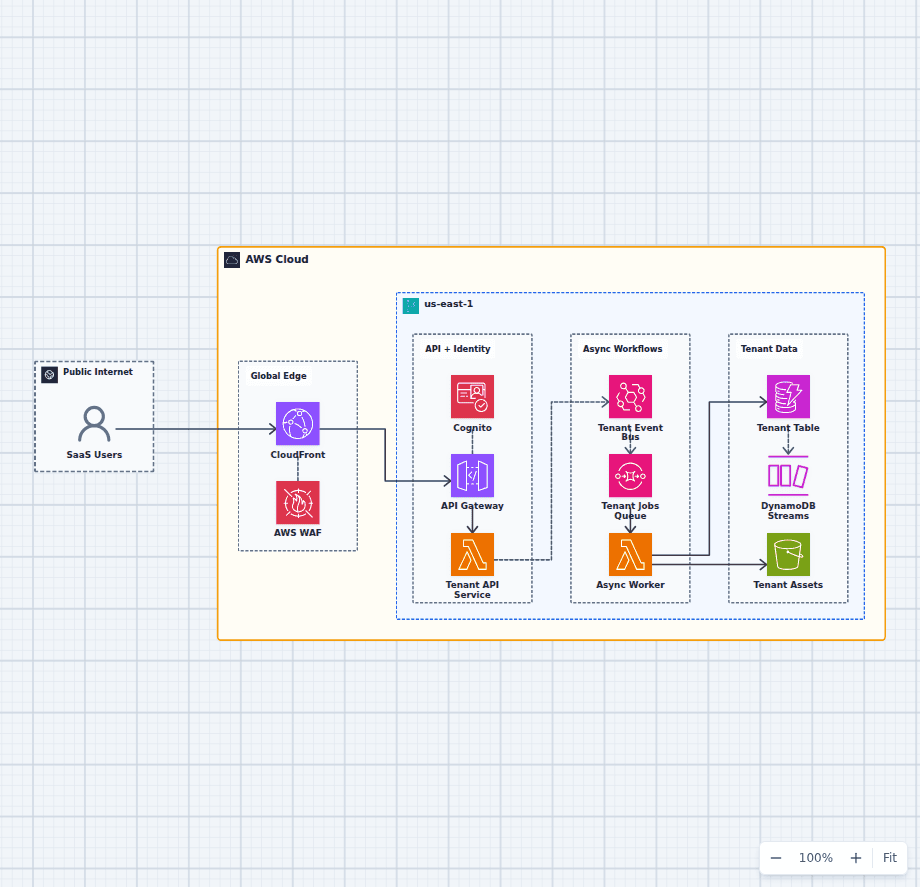
Serverless Multi-Tenant SaaS Architecture on AWS
This architecture combines a protected synchronous API with a durable asynchronous work path. Tenant identity travels from Cognito into application authorization, domain events decouple background work, and DynamoDB plus S3 provide scalable tenant state and assets.
Explore the architecture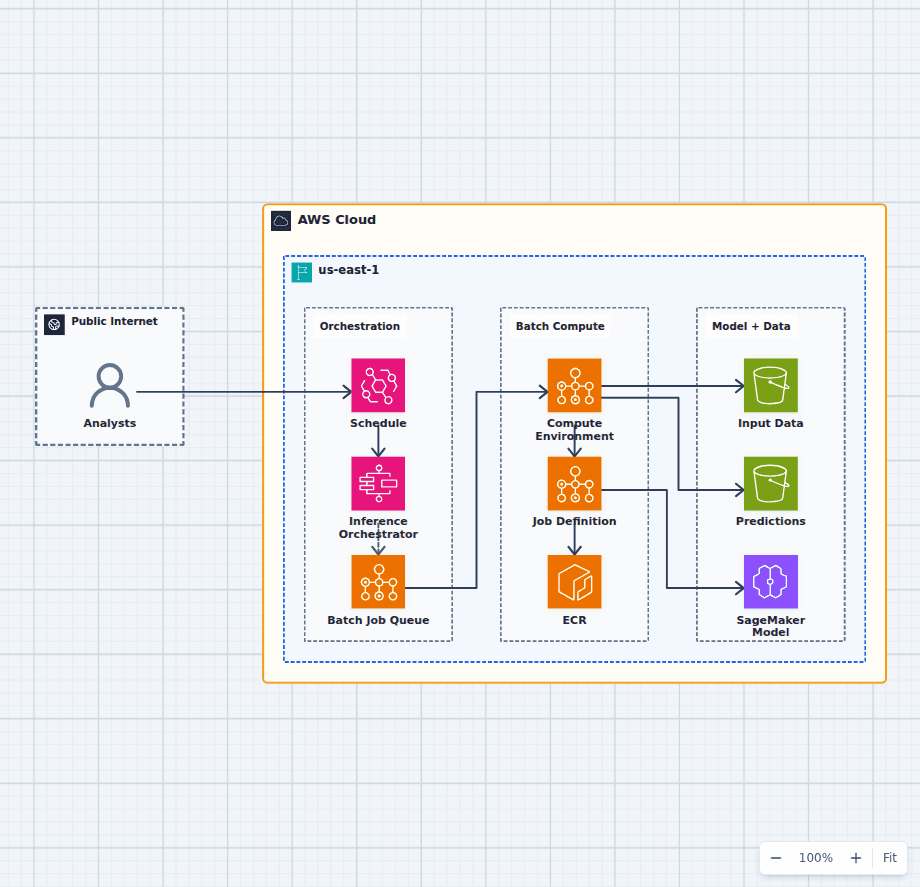
Machine Learning Batch Inference Platform on AWS
This architecture runs scheduled or on-demand scoring as a durable workflow. Step Functions coordinates jobs, AWS Batch supplies container compute, ECR pins the runtime, an approved SageMaker model supplies the artifact, and S3 preserves inputs and predictions.
Explore the architecture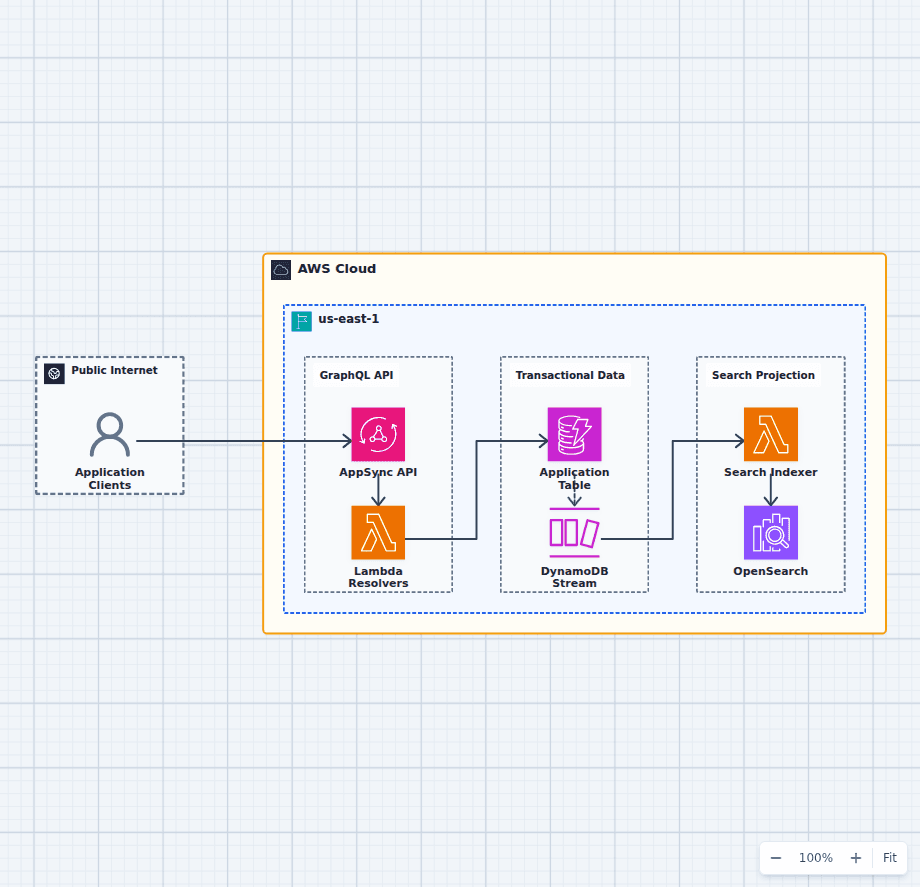
Serverless GraphQL API on AWS
This GraphQL architecture separates the client-facing schema, application logic, transactional write model, and asynchronous search model. The split keeps user mutations fast while making OpenSearch replaceable and rebuildable from durable DynamoDB records and change events.
Explore the architectureFrom reference to working draft
Adapt this architecture with your AWS AI Agent
Start from the exact diagram in this guide. Change requirements, challenge a decision, or ask what fails first, while keeping the architecture editable.